
An HR portal shaped around your organisation
We build HR portals for UK employers: holiday and absence, sickness and statutory pay, onboarding, performance, training, documents and compliance in one secure place. Try our live HR portal demo today, then we tailor it to your policies, your roles and the way your people actually work.
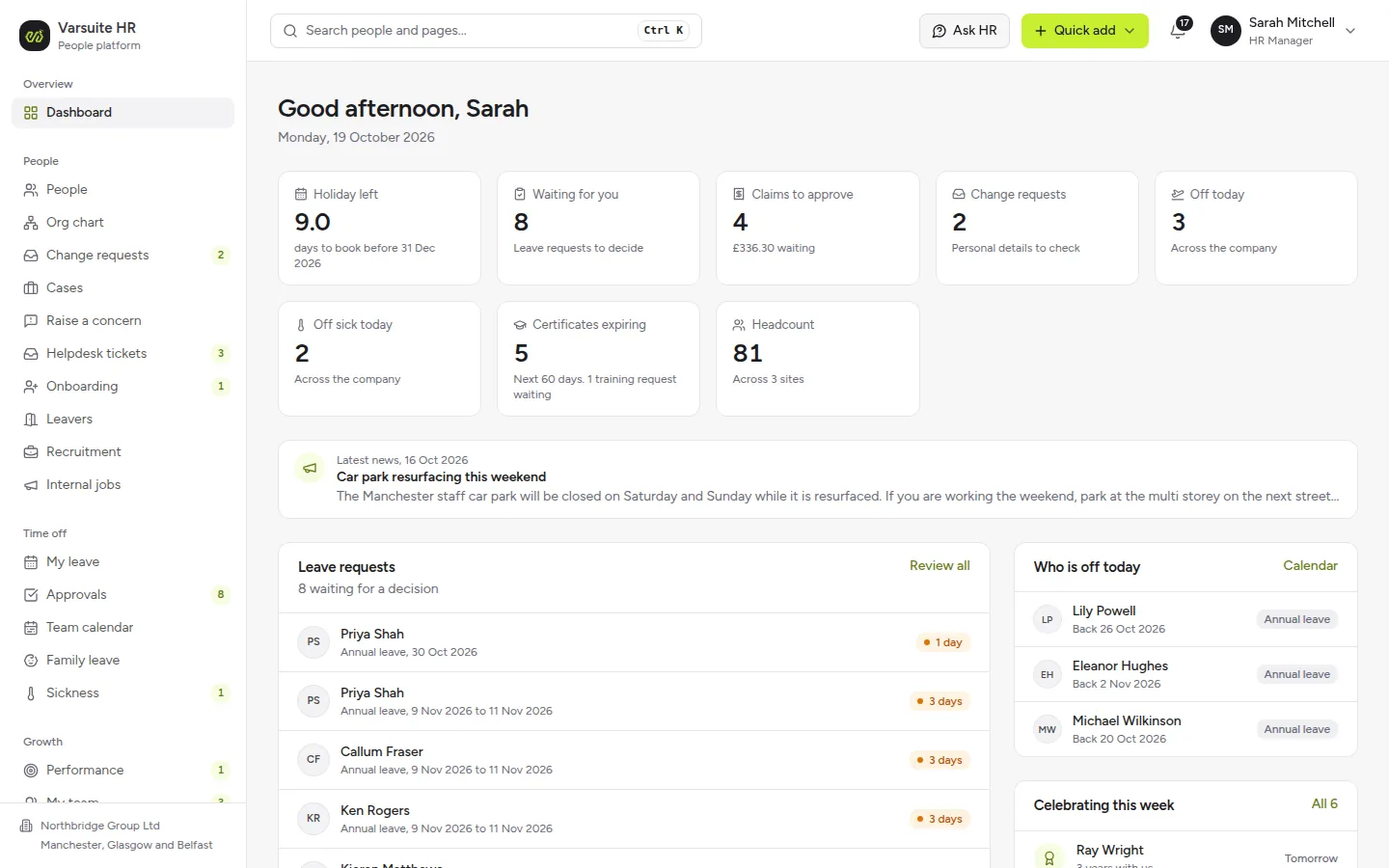
Live demo Your own private copy of the HR portal, with a sample company already in it.
Try the live demoWhat we build
- Websites
- E-commerce Stores
- Software Development
- Business Systems
- Mobile App Development
- Reward & Loyalty Apps
- Competition Websites
- Garmin App Development
- Wearable & Smartwatch Apps
- Progressive Web Apps
- AI Agents
- SaaS & MVP Development
- API Development
- Business Automation
- Booking & Scheduling Systems
- Process Replacement
- Custom CRM
- Customer & Member Portals
- Data Integrations
- Marketplace Platforms
- Subscription & Membership Sites
- Manufacturing Software
- Code Scanning
- Security Monitoring
- Testing & QA
- Accessibility Audits
- SEO & AIO Automation
- Social Media Management
- AI Content & Blogging
- AI Copywriting
- Google Ads Management
- Marketing Reporting
- Management
- Insight
- Always Improving
Real screens from the live demo
Every screen below is from the HR portal you can try right now, signed in as HR, a line manager or an employee at our sample company.
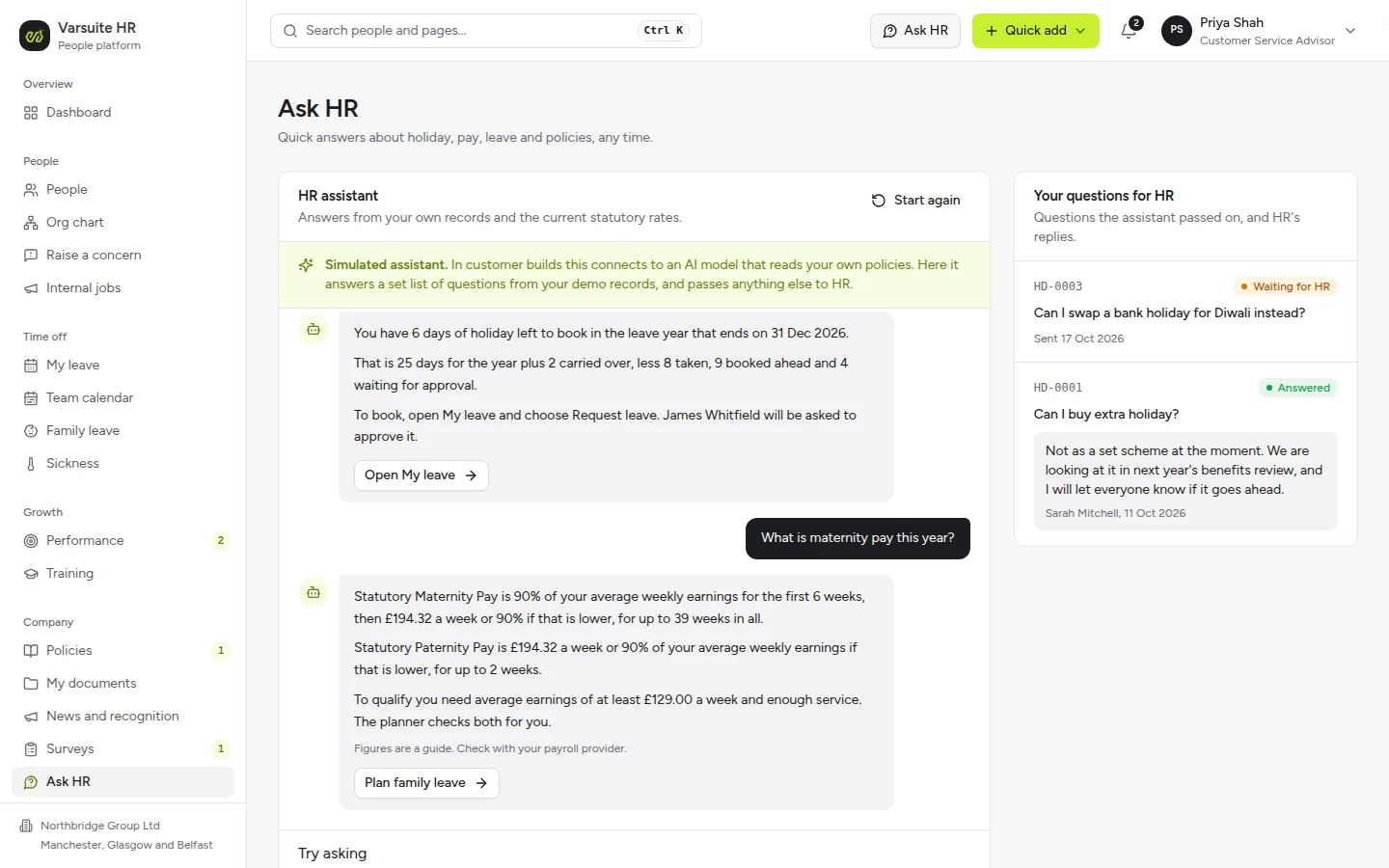
Ask HR, answered from their own records
Staff ask how much holiday they have left or what maternity pay is this year, and get an answer worked out from their own record and the current statutory rates. Anything else goes straight to your HR team.
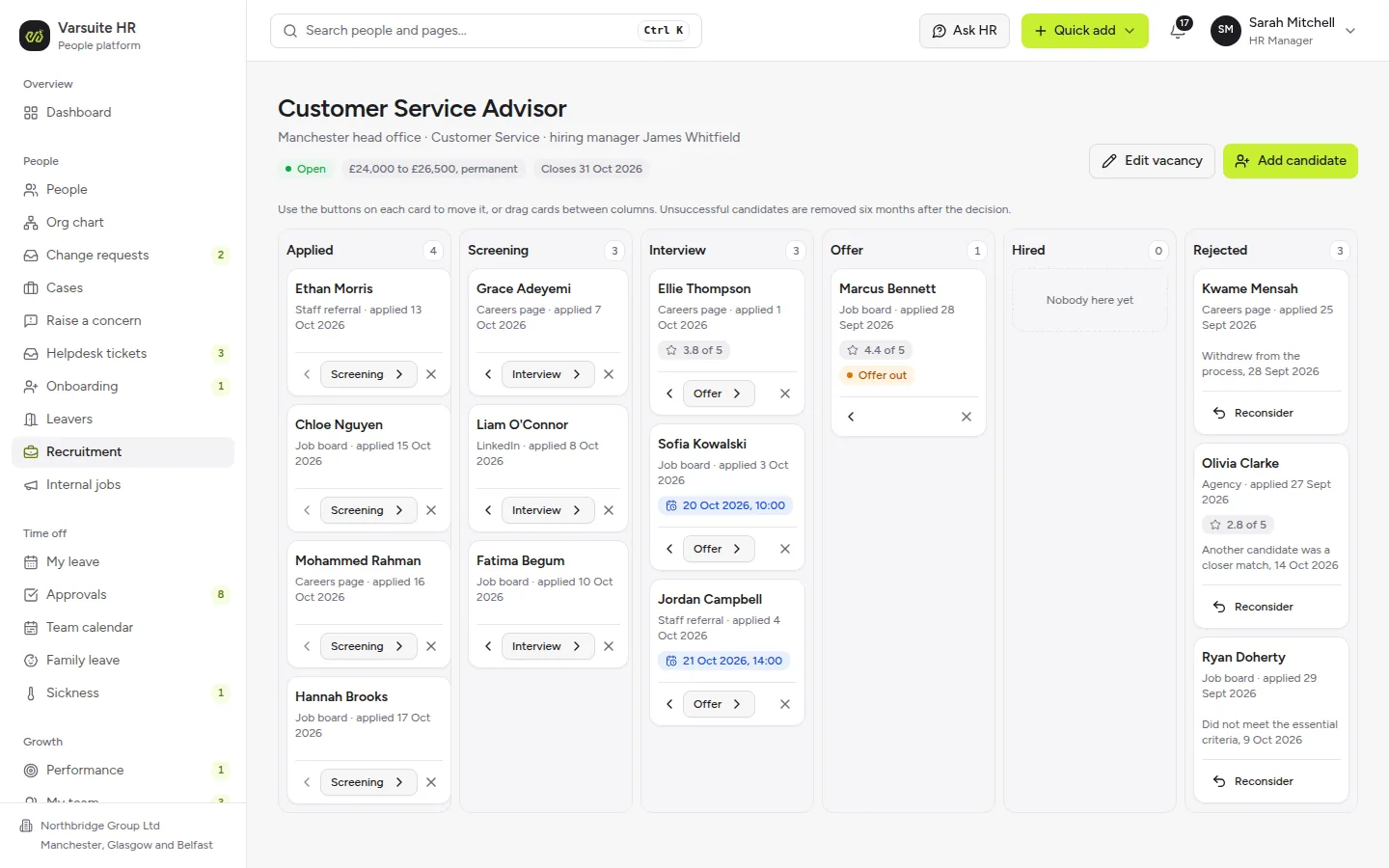
Recruitment that flows into onboarding
Move candidates from applied to hired on one board, score interviews and send offers. Hiring someone starts their onboarding checklist automatically.
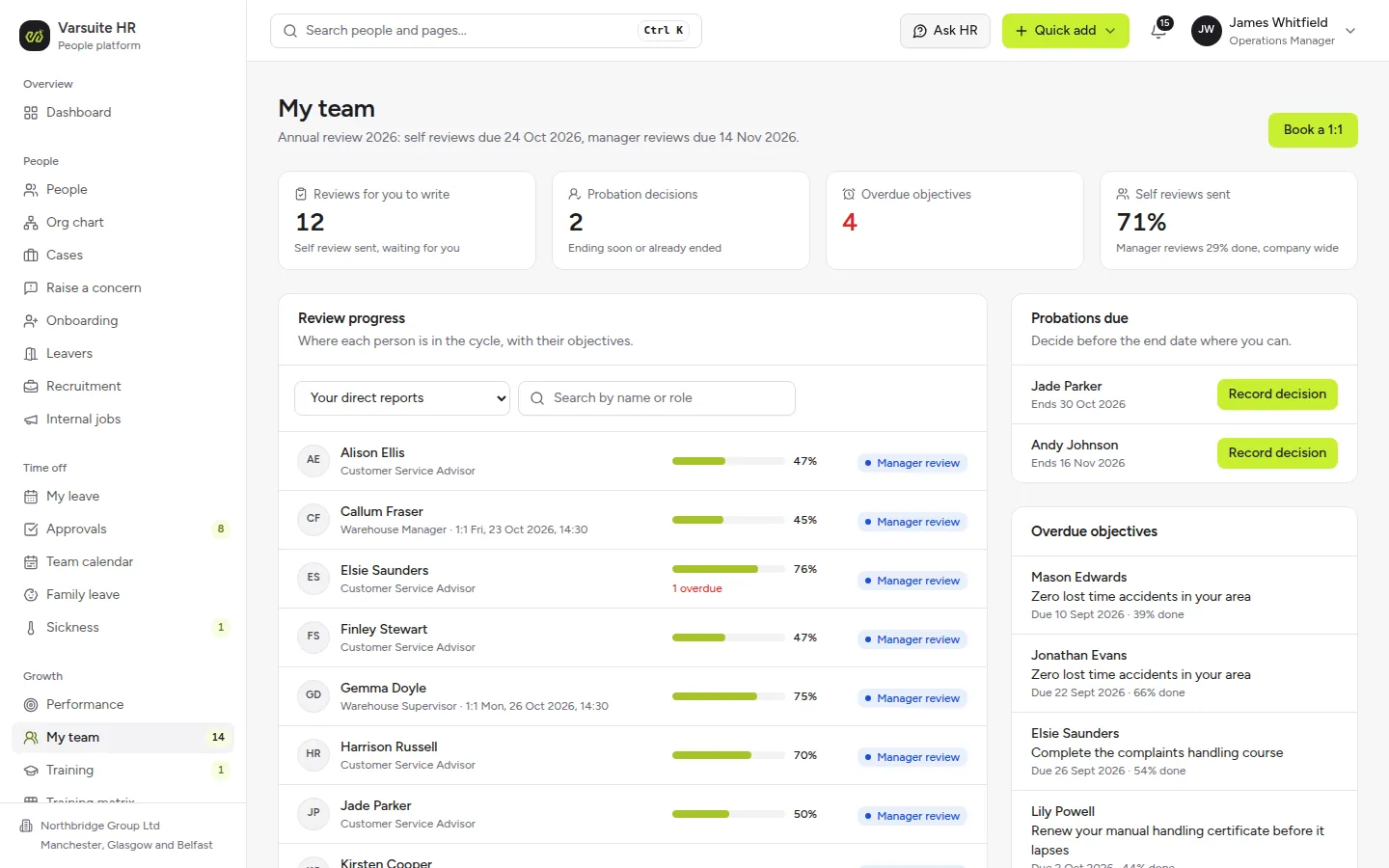
Reviews and probations for every manager
Line managers see review progress, probation decisions due and overdue objectives for their team in one place.
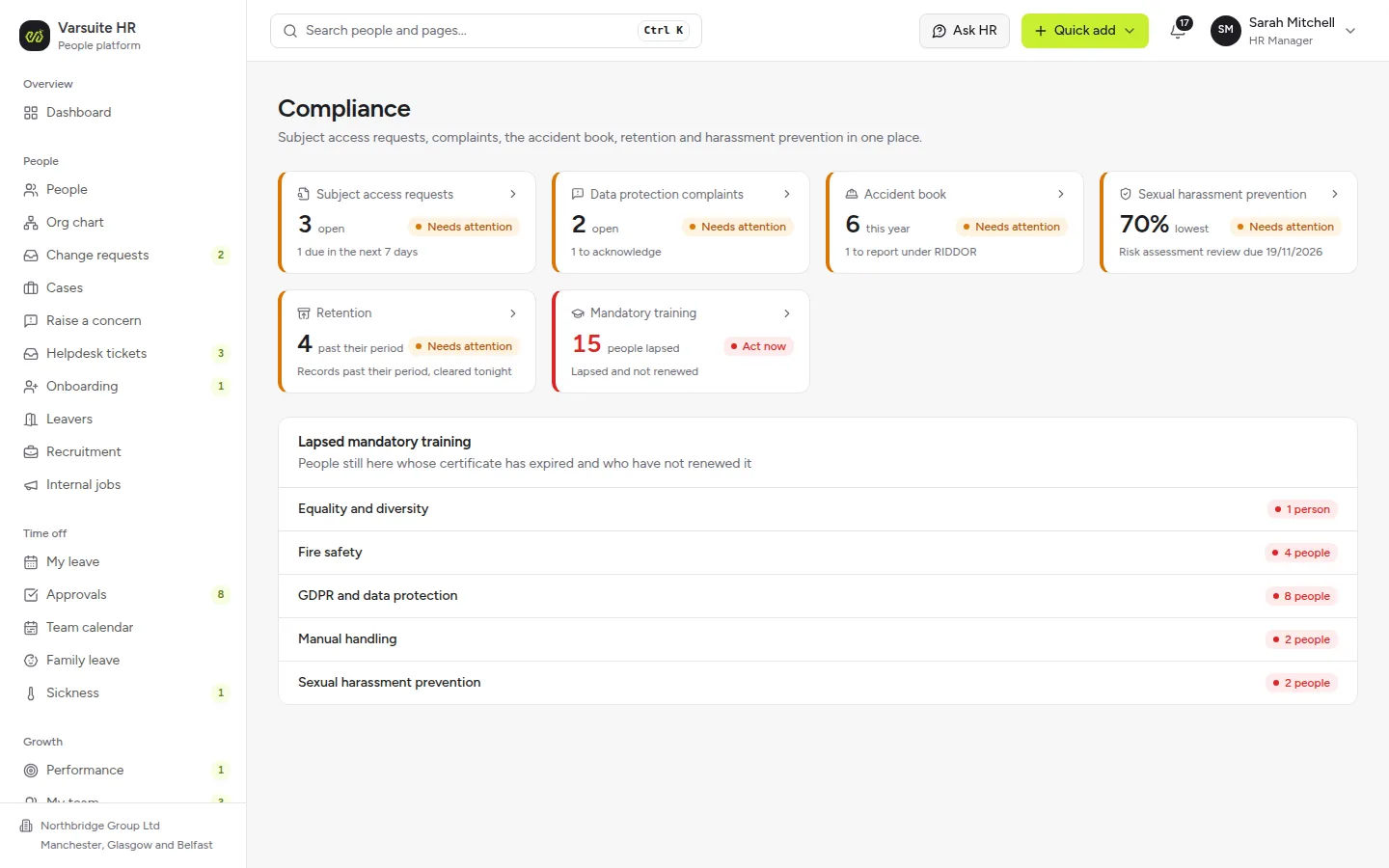
Compliance at a glance
Subject access requests, data protection complaints, the accident book, retention and sexual harassment prevention, each flagged when it needs attention.
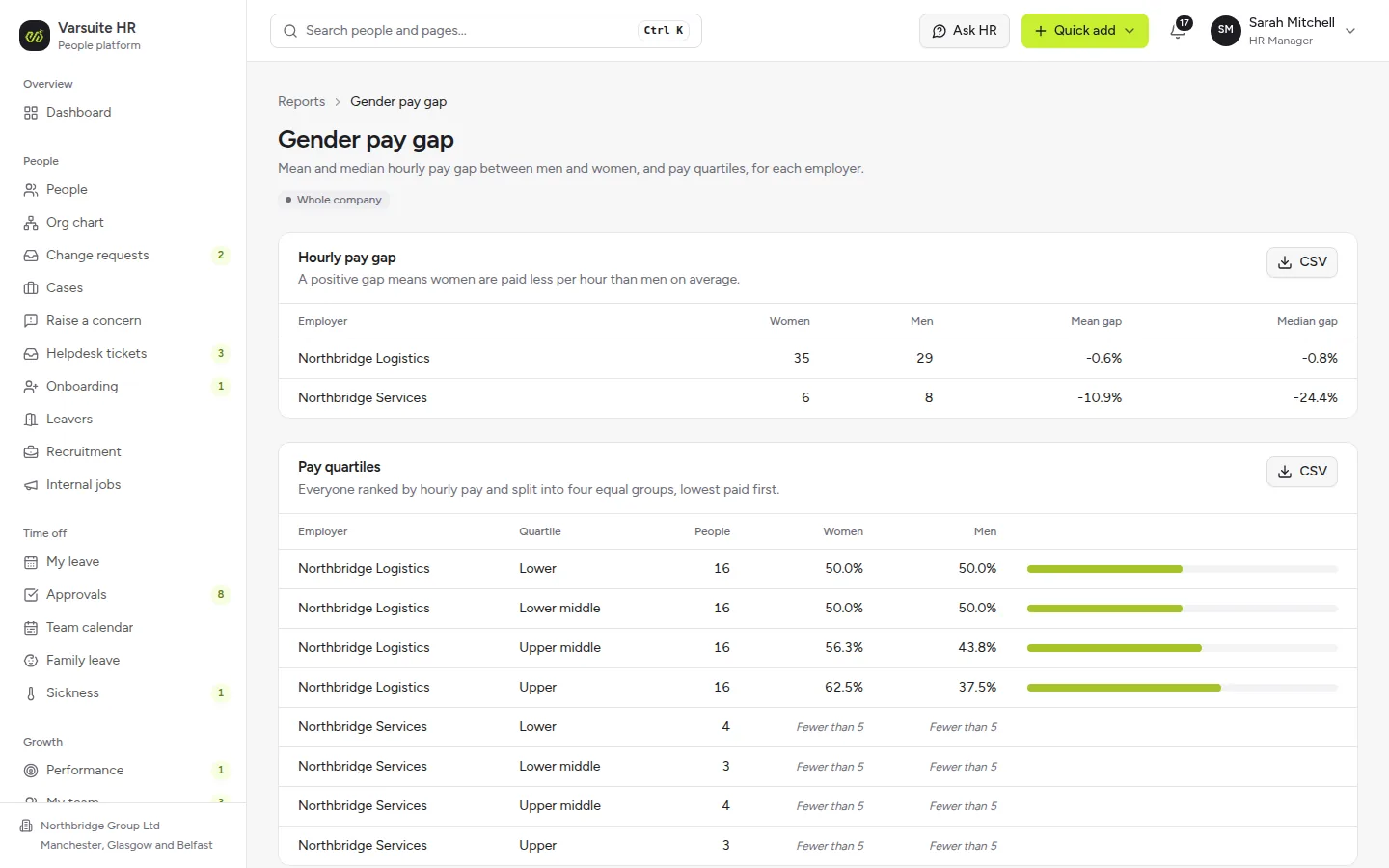
Gender pay gap, ready to report
Mean and median hourly pay gaps and pay quartiles for each employer, with small groups hidden so nobody can be identified.
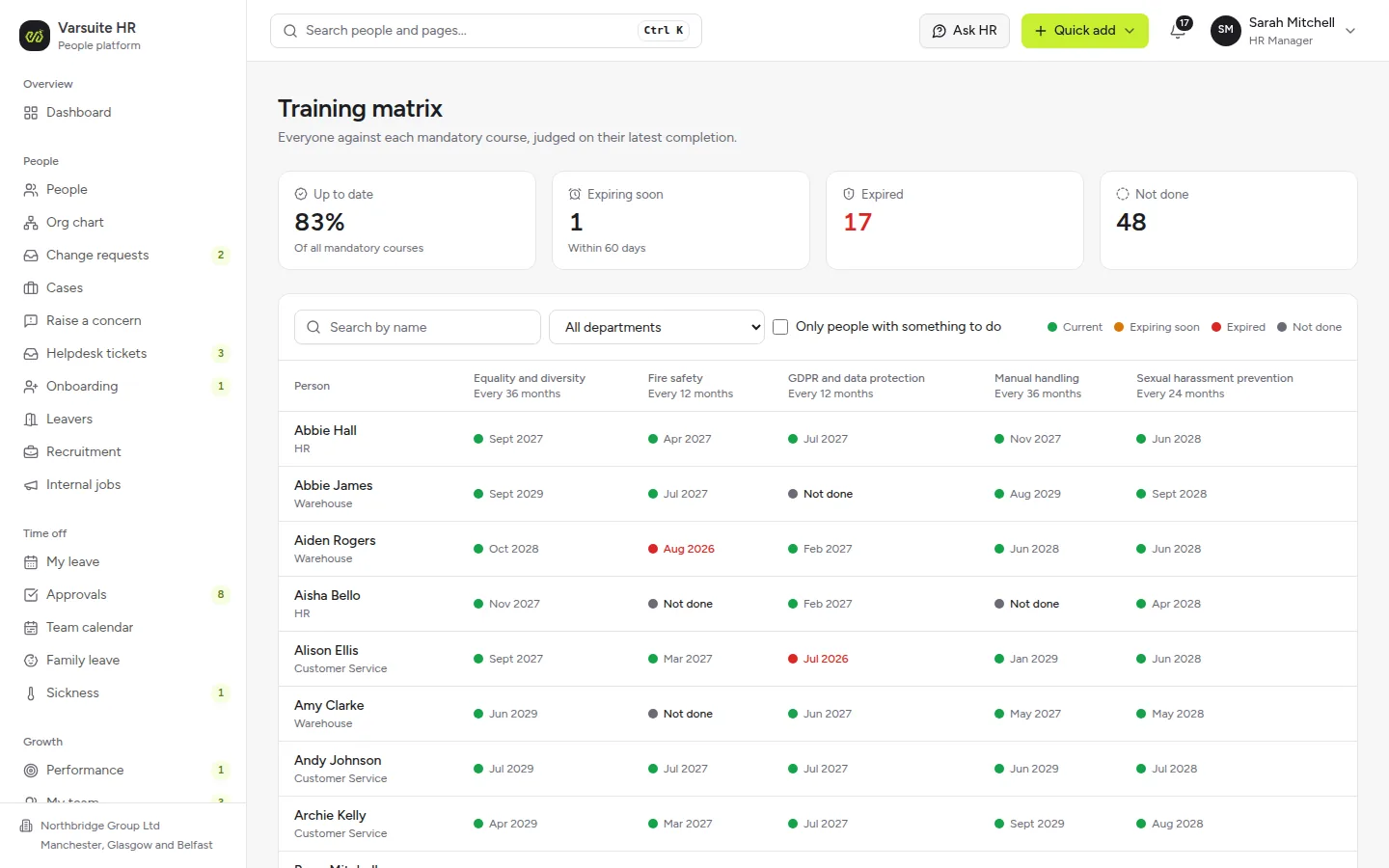
A mandatory training matrix
Everyone against every mandatory course, showing what is current, expiring within 60 days, expired or not yet done.
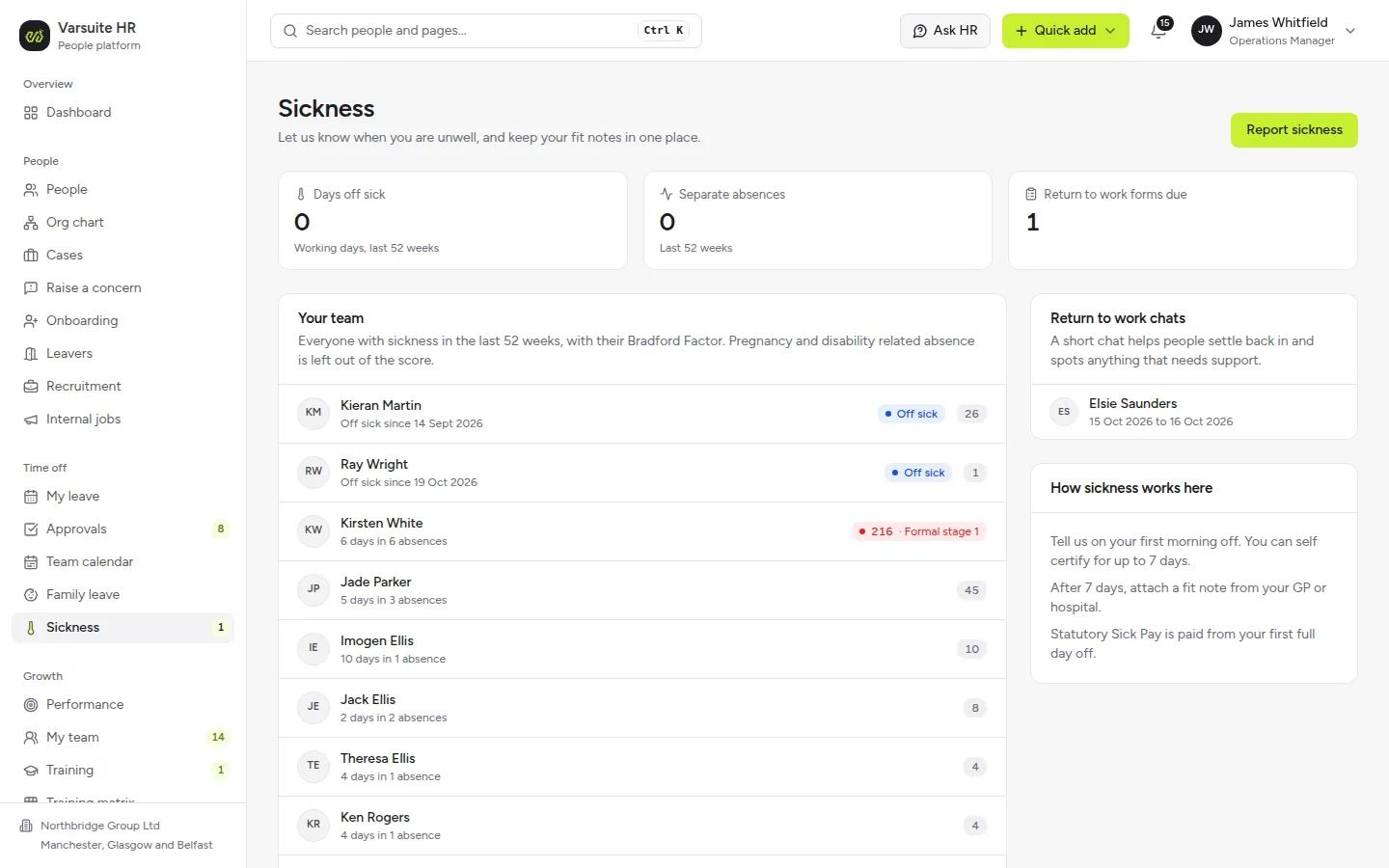
Sickness with return to work chats
Managers see who is off, Bradford Factor scores and return to work chats due, with pregnancy and disability related absence left out of the score.
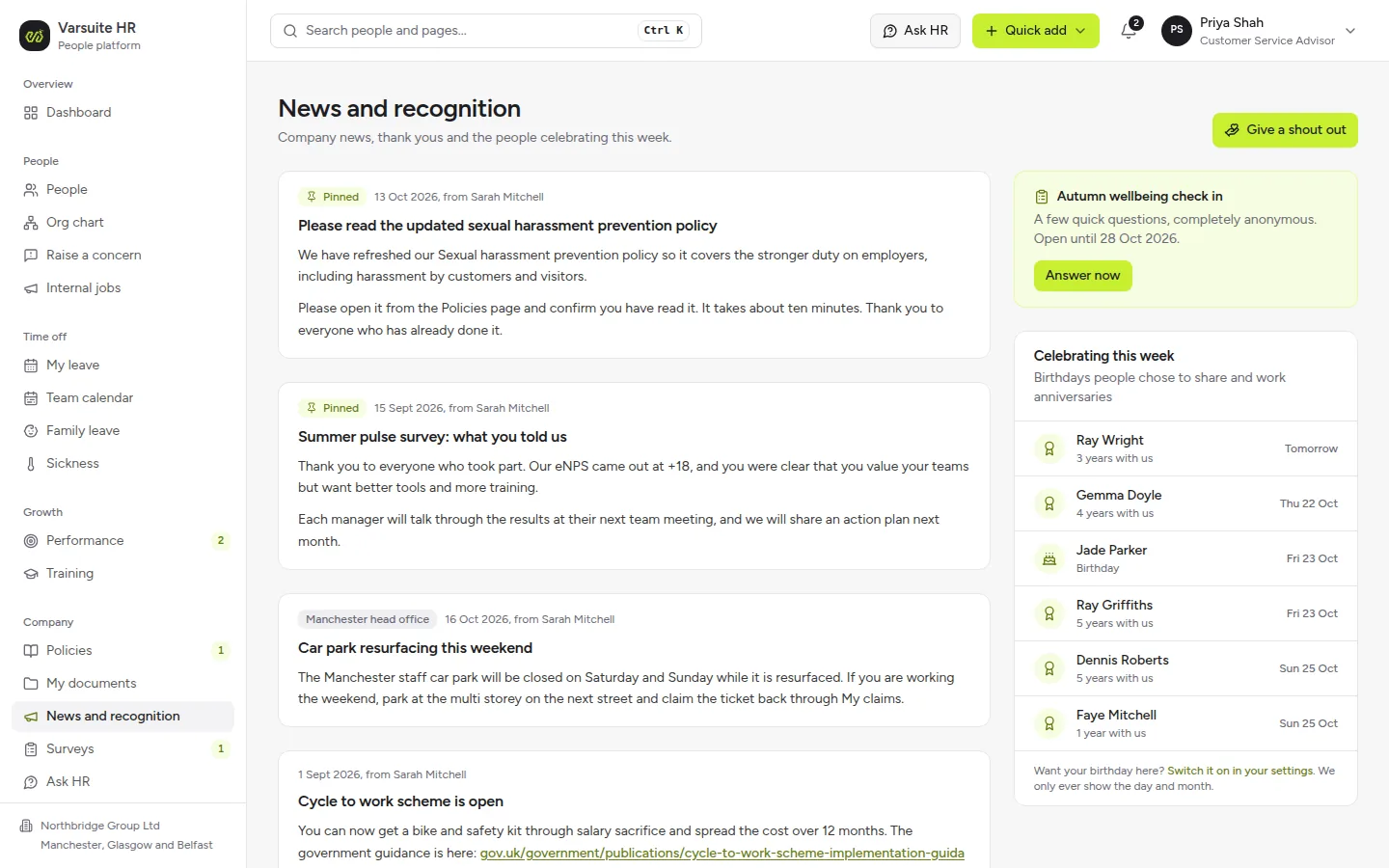
News, shout outs and celebrations
Pinned announcements, thank yous between colleagues, birthdays people chose to share and anonymous pulse surveys.
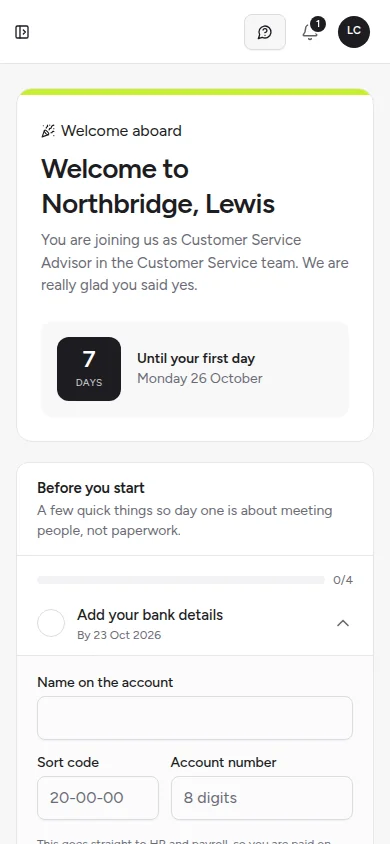
New starters get a welcome portal before day one
Before their first day, new starters see a friendly countdown, where to go and who to ask for, and a few tasks such as bank details and their right to work document, all on their phone. They can ask HR questions too. The rest of the portal opens on their start date.
What is an HR portal?
An HR portal is a secure, logged in system where employees, managers and HR handle everyday people tasks themselves: booking holiday, reporting sickness, claiming expenses, finding a policy or updating their details, instead of sending emails and spreadsheets back and forth.
A good HR portal gives each person the view their role needs:
- Employees see their own holiday balance, payslip questions, documents, training and objectives
- Line managers approve requests, see who is off, hold return to work chats and run reviews for their team
- HR gets the whole picture: records, cases, onboarding, compliance and reports
- Payroll and directors see the figures they need, and nothing they should not
It is the staff facing cousin of a customer portal: the same secure logins and permissions, pointed at your own people.
Try our live HR portal demo
The quickest way to judge HR software is to use it, so we built one you can try now at hr-demo.varsuite.co.uk.
The demo is a complete HR portal for Northbridge Group, a sample UK company with 81 people across Manchester, Glasgow and Belfast and a year of realistic history. You can sign in as:
- an HR manager, with leave to approve, cases to run, compliance to check and reports to read
- a line manager, with a team calendar, reviews to write and a sickness return to work due
- an employee, booking holiday, asking HR a question and planning family leave
- payroll and a director, each with their own figures and permissions
- a new starter who joins next Monday and sees only their welcome portal until then
Every visitor gets their own private copy, so nothing you change affects anyone else, and you can reset it whenever you like. Each role has a short guided tour, and two factor sign in is switched on, with the demo code shown on screen.
What does the HR portal include?
The portal is built from modules, so each organisation switches on what it needs:
- People records: employee profiles, org chart, effective dated job and pay changes, and an audit trail of changes and of who opened sensitive details
- Holiday and absence: requests, approvals with clash warnings, a team calendar, bank holidays for each UK nation and a calendar feed
- Sickness: self reporting, fit notes, return to work chats, Bradford Factor scores and Statutory Sick Pay
- Family leave: maternity, paternity, adoption, shared parental, neonatal care and bereavement leave, with key dates and statutory pay worked out
- Expenses, mileage and overtime: claims with receipts, approvals and a payroll export
- Cases: grievance and disciplinary stages that follow the ACAS Code, flexible working requests and anonymous reporting
- Onboarding and leavers: checklists, a welcome portal for new starters, right to work checks and leaver holiday pay
- Performance: objectives, one to ones, review cycles, 360 feedback and probation decisions
- Training: a course catalogue, certificates, requests and a mandatory training matrix with expiry alerts
- Documents: policies with acknowledgement tracking, personal documents and letters generated from templates
- Compliance: subject access requests, the accident book, retention schedules and sexual harassment prevention evidence
- Engagement: announcements, shout outs, celebrations and anonymous pulse surveys
- Recruitment: vacancies, a candidate pipeline, interview scorecards and offers that turn into onboarding
- Reports: headcount, turnover, absence, holiday liability, gender pay gap and training compliance, with small groups hidden so nobody can be identified
- Ask HR: an assistant that answers questions from each person's own records and passes anything else to your HR team
Built for UK employment rules
Most HR software is designed for many countries at once. This portal is designed around how UK employment actually works:
- holiday entitlement of at least 5.6 weeks, pro rata for part time staff and accrued at 12.07% for irregular hours workers
- separate bank holidays for England and Wales, Scotland and Northern Ireland
- Statutory Sick Pay worked out under the rules in force on the day, including the changes from April 2026
- statutory family leave and pay with qualifying weeks, notice deadlines and keeping in touch days
- flexible working as a day one right, with the statutory business reasons for refusal
- grievance and disciplinary stages, letters and the right to be accompanied, in line with the ACAS Code of Practice
- right to work checks with follow up dates before permission runs out
- subject access requests tracked against the one month deadline
- gender pay gap figures with pay quartiles
Figures are shown as a guide. Your payroll provider and your advisers keep the final say, and the portal says so wherever money is involved.
Off-the-shelf HR software or a bespoke HR portal?
Off-the-shelf HR software is a sensible choice for a small team with standard processes, and a bespoke HR portal makes more sense when your organisation does not fit the template.
A tailored portal tends to pay off when:
- you have more than one employer, site or set of terms and conditions
- your approval chains, sick pay scheme or leave rules are not the standard ones
- per user pricing grows every time you hire
- HR data needs to flow into payroll, rotas, finance or a business system you already run
- you want the portal in your own brand, under your own control
Because we start from a working HR portal rather than a blank page, you get the fit of bespoke software without starting from nothing. Where data needs to move between systems, our data integrations work connects them.
How we tailor it to your organisation
Everything in the demo can be fine tuned for you. We start by walking through the demo with your HR team and noting what you would change, then shape the portal around your answers:
- your leave year, entitlements, carry over rules and approval chains
- your sick pay scheme, absence triggers and return to work process
- your policies, letter templates, onboarding checklists and review cycles
- your roles and permissions, down to who can see pay or health information
- your branding, and single sign on with the work accounts your staff already use
- exports and connections to your payroll, rota and finance software
In the demo, Ask HR answers a set list of questions from the sample records. In your portal it can be connected to an AI agent that reads your own policies and handbook, with anything it cannot answer passed to a person.
Security is built in from the start: two factor sign in, bank details, National Insurance numbers and sickness details encrypted, changes and access to sensitive details logged, and each person limited to what their role allows.
HR Portal Software, answered.
Yes. Open hr-demo.varsuite.co.uk, fill in a short form and you get your own private copy of a complete HR portal with a sample company already in it. You can sign in as an HR manager, a line manager, an employee, payroll, a director or a new starter, and reset it whenever you like.
Yes, tailoring is the point. We change leave rules, approval chains, sick pay, letters, checklists, permissions, branding and integrations to match how your organisation works, and switch off any module you do not need.
Yes, if your processes do not fit standard HR software or you want to own the system rather than pay per user. For a very small team with simple needs, an off-the-shelf HR product may be the better fit, and we will tell you so.
It works them out using the current UK statutory rules and rates, including the Statutory Sick Pay changes from April 2026 and accrual for irregular hours workers. Figures are shown as a guide, and your payroll provider keeps the final say.
Yes. The demo already exports approved expenses and claims for payroll, and we build direct connections to payroll, rota and finance software where they offer an API, or export files in the format your provider asks for.
Each person sees only what their role allows, bank details, National Insurance numbers and sickness details are encrypted, two factor sign in is on, and changes to records and access to sensitive details are logged. Subject access requests and retention schedules are built in to help with UK GDPR.
Yes. Ask HR answers everyday questions such as how much holiday someone has left, using their own records and the current statutory rates. In the demo it answers a set list of questions, and in your portal it can read your own policies, passing anything it cannot answer to your HR team.
Explore related services
Customer & Member Portals
We build secure customer and member portals where people log in to see their documents, orders, invoices and s...
Learn moreBusiness Systems
We build CRMs, automations and back-office workflows that connect the software you already use, so your team s...
Learn moreData Integrations
Varsuite data integrations connect the tools you already use so your data stays in sync automatically, with no...
Learn moreAI Agents
We build a custom AI agent that understands your whole organisation, your data and your processes, then works...
Learn moreSee it working, then make it yours
Try the live HR portal demo, then book a call and we will walk through what we would tailor for your organisation.