
See your business working, live
Live Workplace is a photorealistic picture of your business at work. Staff walk, sit and carry work between stations, the things you handle move through the building, and you can see in seconds where work is piling up and which machine has stopped. It runs on the data your systems already record. Try our live demo of a busy testing lab, then we build the same thing for your building, wired to your own systems.
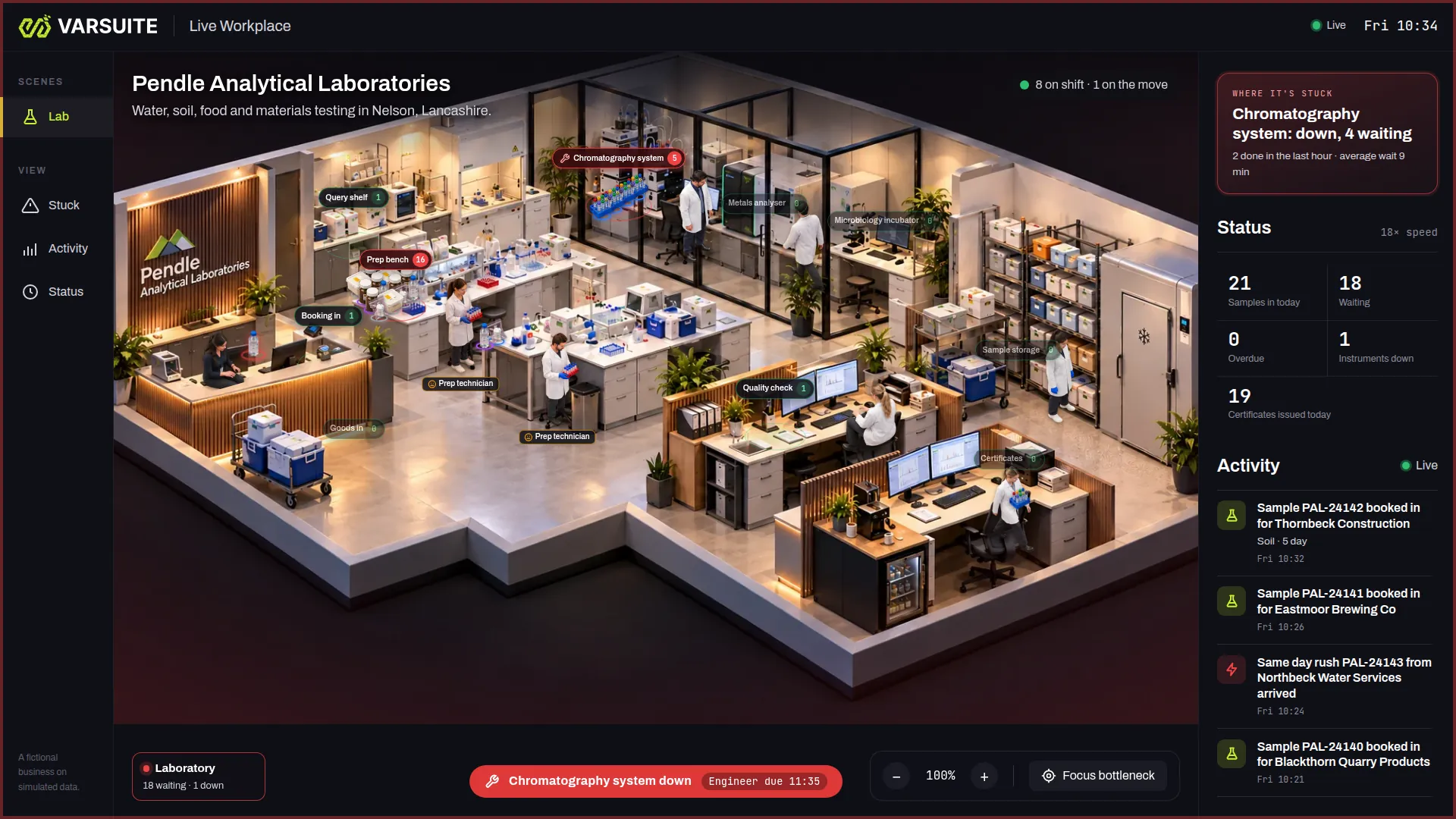
Live demo Your own private copy of a busy testing lab, running live. Break an instrument and watch the work back up.
Try the live demoWhat we build
- Websites
- E-commerce Stores
- Software Development
- Business Systems
- Mobile App Development
- Reward & Loyalty Apps
- Competition Websites
- Garmin App Development
- Wearable & Smartwatch Apps
- Progressive Web Apps
- AI Agents
- SaaS & MVP Development
- API Development
- Business Automation
- Booking & Scheduling Systems
- Process Replacement
- Custom CRM
- Customer & Member Portals
- Data Integrations
- Marketplace Platforms
- Subscription & Membership Sites
- HR Portal Software
- Manufacturing Software
- Letting Agent Software
- Training Provider Software
- Code Scanning
- Security Monitoring
- Testing & QA
- Accessibility Audits
- SEO & AIO Automation
- Social Media Management
- AI Content & Blogging
- AI Copywriting
- Google Ads Management
- Marketing Reporting
- Management
- Insight
- Always Improving
The picture first, the numbers one click away
Pendle Analytical Laboratories is a fictional water, soil, food and materials testing lab in Nelson, Lancashire, running on simulated data. Click anything in the picture to see what sits behind it.
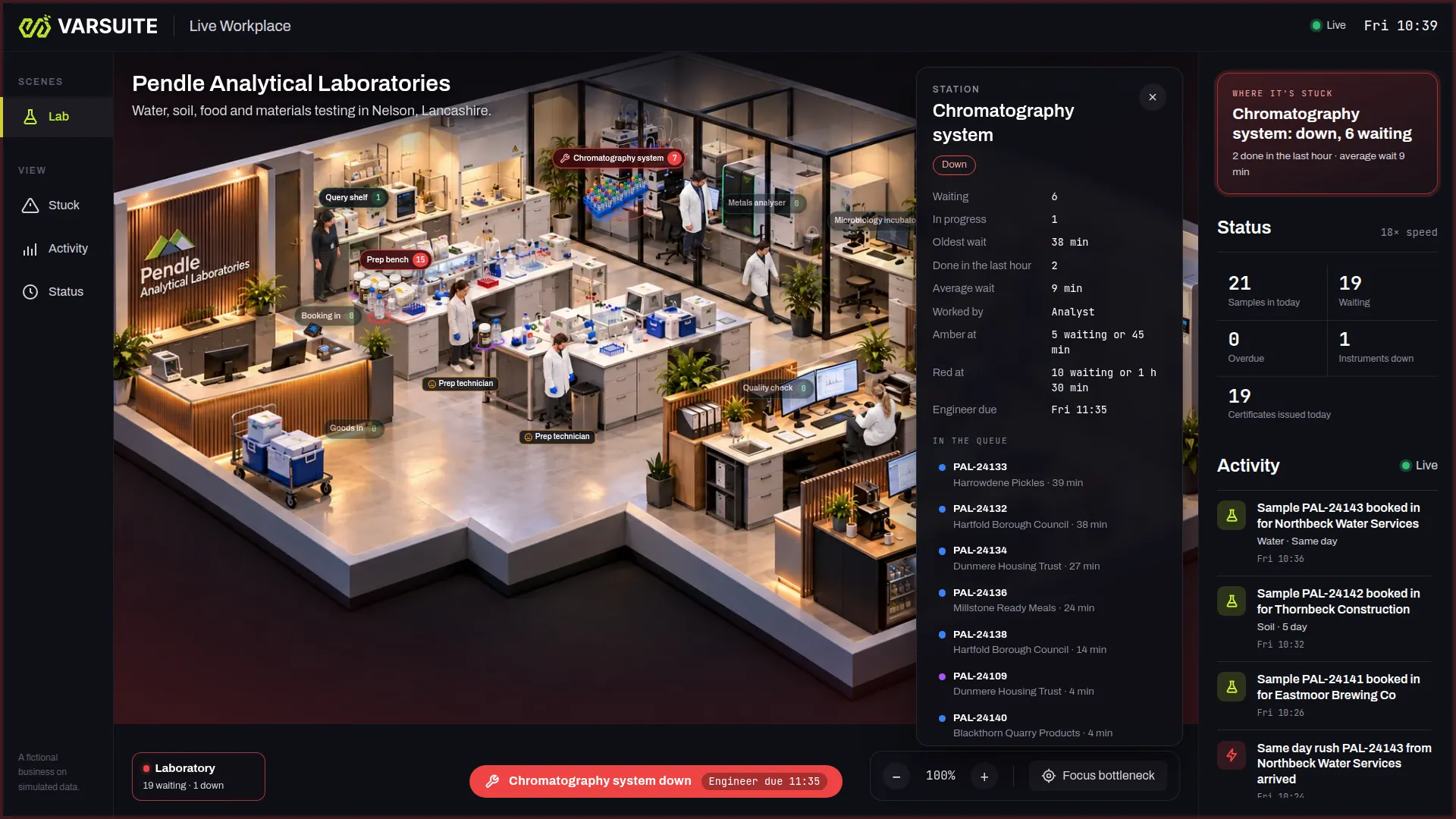
Click a station to see why it is stuck
The chromatography system is down. Its panel shows what is waiting and in progress, the oldest wait, the average wait, the limits that turn it amber and red, when the engineer is due and every sample in the queue.
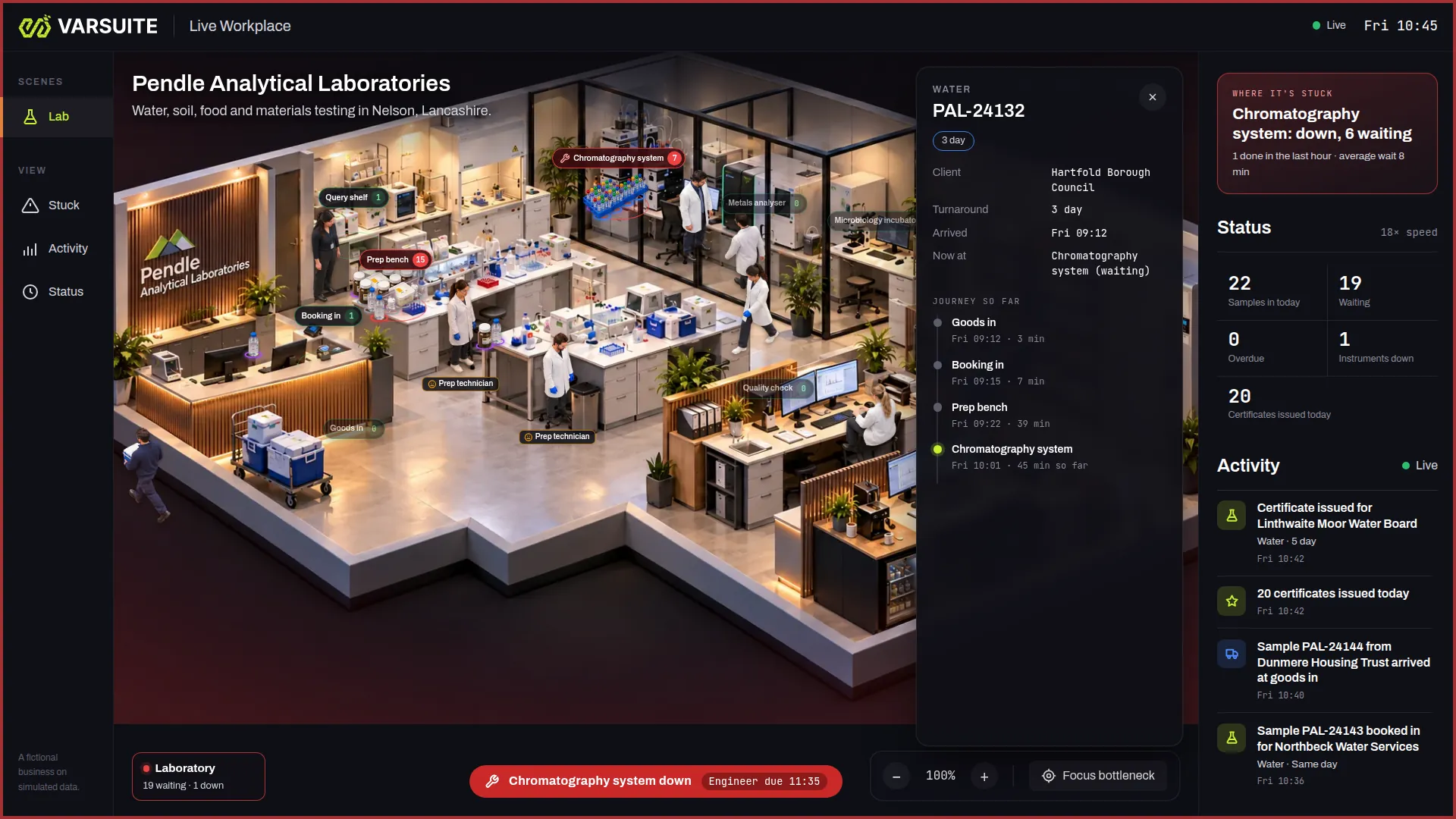
Follow any item through the building
Click a sample to see its client, turnaround, where it is now and its journey so far, with the time it spent at each station.
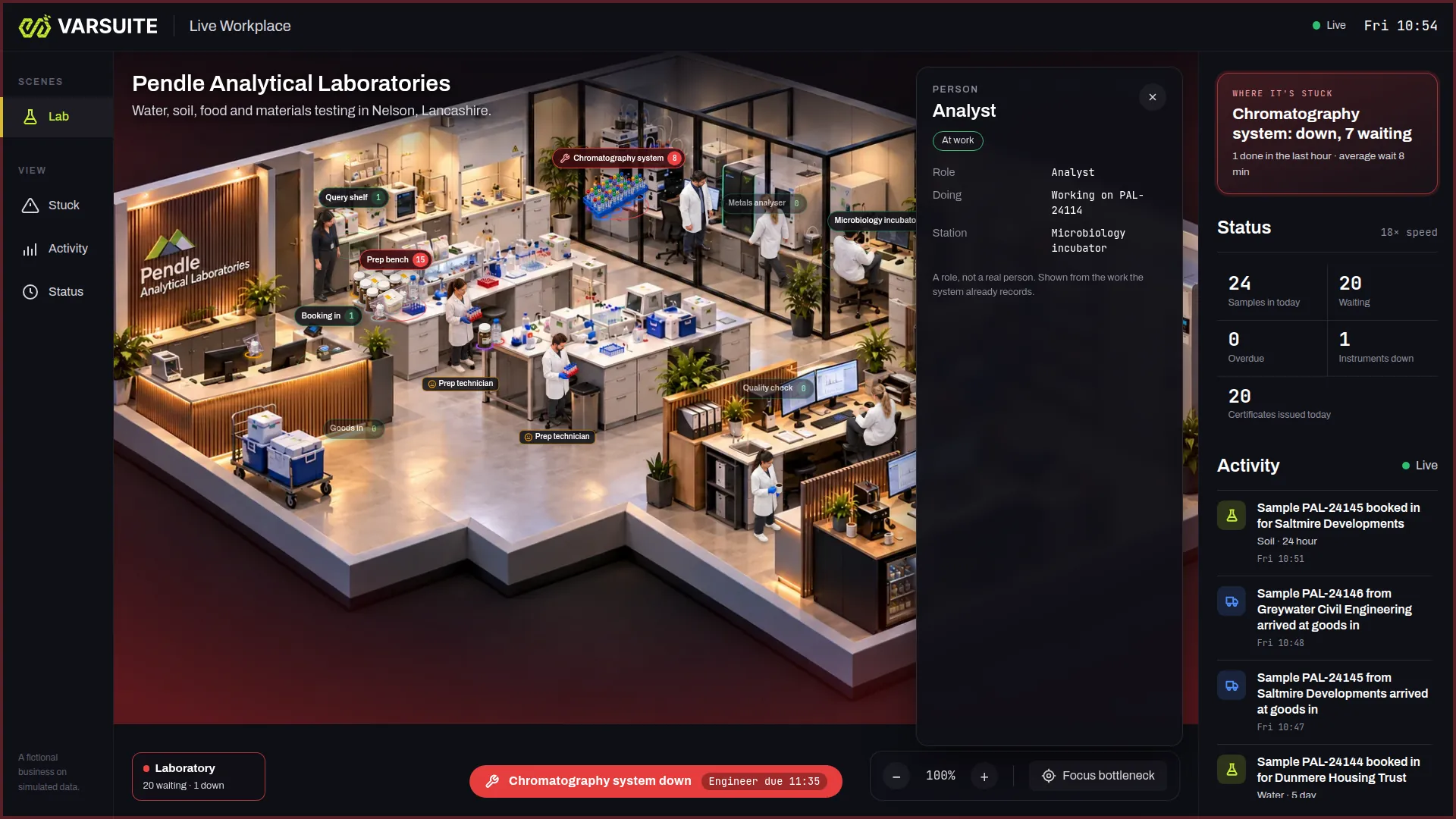
People as roles, from the work they record
Click a person to see their role, what they are working on and where. In the demo they are roles, not real people, shown from the work the system already records.
The lab is the demo. Your business is the build.
The lab is the scene you can try today. For a factory, a warehouse, a garage, a food production line or a takeaway, we build your own scene from your building, stations and roles, and wire it to the systems you already run.
What is Live Workplace?
Live Workplace is a moving picture of your business. It looks like your building, drawn from above at an angle, with people at their stations and the work itself travelling between them: samples in a lab, orders in a kitchen, pallets in a warehouse, cars in a garage.
It is not a video and it is not a mock up. Every person, item and number on screen comes from what your business system records as it happens. When a job arrives, it appears at goods in. When someone starts it, they pick it up and carry it to the next station. When a machine goes down, its station turns red and the work queues up behind it.
Most leadership teams already have the data to know where work is stuck. The trouble is that it sits in reports and dashboards that take time to read. Live Workplace turns the same data into something you understand in a glance, the way you would if you could walk the floor.
Bottlenecks and backlogs at a glance
Each station has its own limits, set by you: how long a queue can get, or how long the oldest job can wait, before the station turns amber and then red. Piles of work build up where it is actually waiting, so the bottleneck is the place on screen with the most in front of it.
A panel beside the picture names the station where work is most stuck, with how many jobs are waiting, how many were finished in the last hour and the average wait. A Focus bottleneck button moves the view to it. Counts along the side show the numbers your business cares about, such as work in today, waiting, overdue, machines down and work finished today, with a live activity feed below.
If you want the reasoning behind this, our answer on how to see bottlenecks in your business in real time explains why a bottleneck is easier to spot as a queue than as a row in a report.
Click anything to see the numbers behind it
The picture is the overview. The detail is one click away:
- A station shows what is waiting and in progress, the oldest wait, how many were done in the last hour, the average wait, who works it, the limits that turn it amber and red, and the queue in order. A broken station also shows when the engineer is due
- An item shows the customer, its turnaround, when it arrived, where it is now and its journey so far, with the time it spent at each station
- A person shows their role, what they are doing and where
Rush jobs are marked and jump the queue, and each turnaround has its own colour, so you can see at a glance whether the work stuck at a station is urgent.
A TV on the shop floor or in reception
Live Workplace runs in a web browser, so it works on any screen that can open a web page. Put it on a TV on the shop floor and the team sees the same picture as leadership: where the queue is, what is overdue and which machine is down. Put it in reception and visitors see a business that knows exactly what it is doing.
It also works on a laptop or a phone for the director who is out of the building, and the scene follows the working day, so it is busy in the morning and quiet once everyone has gone home.
Remote teams in one picture
Not everyone works in the building. In a build for your business, a remote team member, such as a reviewer working from home, appears in the picture when your system shows them working on something. The people on site and the people at home are in one view of the work, without anyone installing monitoring software.
The lab demo shows the people on site. Remote staff are part of what we build for you around your own systems, rather than something the demo shows today.
No extra tracking and no productivity scores
Live Workplace only shows what your systems already record: a job booked in, a job started, a job finished, a machine marked as down. It adds no cameras, no screen recording, no keystroke logging and no location tracking, and it gives nobody a productivity score.
In the demo, the people on screen are roles, such as an analyst or a prep technician, rather than named individuals. A build for you can work the same way. It is still information about your staff, so tell your team what the screen shows and why before it goes live. Our answer on seeing what a remote team is working on without monitoring software covers what the ICO says about monitoring workers.
Try the live lab demo
The demo is Pendle Analytical Laboratories, a fictional water, soil, food and materials testing lab in Nelson, Lancashire. You can try it at workplace-demo.varsuite.co.uk: fill in a short form and you are straight in.
Samples arrive at goods in, are booked in, prepared, run on the chromatography system, the metals analyser or the microbiology incubator, checked, certified and stored. A booking clerk, prep technicians, analysts, a quality reviewer, a storage technician and a lab manager do the work, and a courier brings samples in. Samples with a question for the client wait on a query shelf.
The demo has its own controls, so you do not have to wait for something to go wrong:
- Break an instrument and watch the work back up behind it, then Fix it
- Add rush job and watch it jump the queue
- Flood intake to see a backlog build
- change the speed to see a whole working day in a few minutes
Every visitor gets their own private copy, so nothing you do affects anyone else. Every business, person and client in the demo is fictional, and its data is simulated.
Which businesses is it for?
Any business where work moves through stations and can get stuck on the way. That includes:
- laboratories: samples from goods in to certificate
- manufacturing: jobs between machines, assembly and inspection
- warehousing: pallets from goods in to put away, pick, pack and dispatch
- garages: cars from check in to the ramp, parts, the valet and handover
- food production and takeaways: orders from the till to prep, the grill or the fryer, packing and the driver
The lab is the demo you can try today. For any other kind of business we build your scene for you, from your own building, stations and roles, so it looks like your place rather than a generic one.
Built around your own systems and data
Live Workplace is a layer on top of the systems you already run. It listens for the events that matter: a job arrived, moved, started or finished, a machine went down or came back, someone picked up a task. Those can come from your own job management, ERP, lab, warehouse or order system, or from a business system we build for you.
Where a system can send events or be read through an API, we connect to it directly. Where it cannot, we work out the next best source with you, such as an export or a database it already writes to. In the demo, a simulator plays the part of your system.
We build each scene for one business: your building, your stations, your roles, the limits that turn a station amber or red, the counts you care about and the words your team uses. It is a tailored build, so we quote once we know your business and what it needs to connect to.
Live Workplace, answered.
A live, photorealistic picture of your business at work. People and the things your business handles move between stations as your systems record the work, so leadership can see where work is piling up, which station is the bottleneck and which machine has broken, without reading dashboards.
Yes. Open workplace-demo.varsuite.co.uk, fill in a short form and you are straight into your own private copy of Pendle Analytical Laboratories, a fictional testing lab. You can break an instrument, add a rush job or flood the intake and watch what happens.
No. Pendle Analytical Laboratories, its staff and its clients are fictional, and a simulator generates the work. In a build for your business, the picture runs on events from your own systems instead.
The lab is the only demo you can try today. For any other kind of business we build your scene for you, from your own building, stations and roles.
It only shows what your systems already record, such as a job started or finished. It adds no cameras, screen recording, keystroke logging or location tracking, and it gives nobody a productivity score. It is still information about your staff, so tell your team what it shows before it goes live.
In a build for your business, a remote team member appears in the picture when your system shows them working on something, so everyone is in one view of the work. The lab demo shows the people on site only.
Yes. It runs in a web browser, so it works on a TV on the shop floor or in reception, as well as on a laptop or a phone.
Anything that records the work as it happens, such as a job management, ERP, lab, warehouse or order system. We connect through an API or events where the system offers them, and otherwise find the next best source with you.
No. Live Workplace sits on top of the systems you already use. If you do not have a system that records the work, we can build one for you as well.
It is a tailored build, so the price depends on your building, how many stations and roles it shows and what it needs to connect to. Talk to us and we will quote once we understand your business.
Explore related services
Business Systems
We build CRMs, automations and back-office workflows that connect the software you already use, so your team s...
Learn moreData Integrations
Varsuite data integrations connect the tools you already use so your data stays in sync automatically, with no...
Learn moreManufacturing Software
We build manufacturing software for UK made to order manufacturers: quotes, sales orders, MRP, production sche...
Learn moreInsight
Insight is live reporting from Varsuite that shows what was built, what changed and what is running right now,...
Learn moreSee your business working, live
Try the live lab demo, then talk to us about what your own building would look like and the systems it would run on.