
Letting agent software with the Renters' Rights Act built in
We build letting agent software for UK letting agents and portfolio landlords: the lettings pipeline, periodic tenancies, rent and arrears, landlord statements, repairs, compliance and tenant and landlord portals in one system that runs every tenancy by the rules in force in England since 1 May 2026. It handles HMOs and their licences, supported living and student lets too. Try our live demo today, then we tailor it to your branches, your fees, your letters and the way your agency works.
Live demo Your own private copy of a working letting agency, with landlords, tenants and repairs already in it.
Try the live demoWhat we build
- Websites
- E-commerce Stores
- Software Development
- Business Systems
- Mobile App Development
- Reward & Loyalty Apps
- Competition Websites
- Garmin App Development
- Wearable & Smartwatch Apps
- Progressive Web Apps
- AI Agents
- SaaS & MVP Development
- API Development
- Business Automation
- Booking & Scheduling Systems
- Process Replacement
- Custom CRM
- Customer & Member Portals
- Data Integrations
- Marketplace Platforms
- Subscription & Membership Sites
- HR Portal Software
- Manufacturing Software
- Training Provider Software
- Code Scanning
- Live Workplace
- Security Monitoring
- Testing & QA
- Accessibility Audits
- SEO & AIO Automation
- Social Media Management
- AI Content & Blogging
- AI Copywriting
- Google Ads Management
- Marketing Reporting
- Management
- Insight
- Always Improving
Real screens from the live demo
Every screen below is from the lettings portal you can try right now, signed in as the director, a negotiator, accounts, a landlord, a tenant, a support worker, a guardian or a student at our sample agency in Clitheroe.
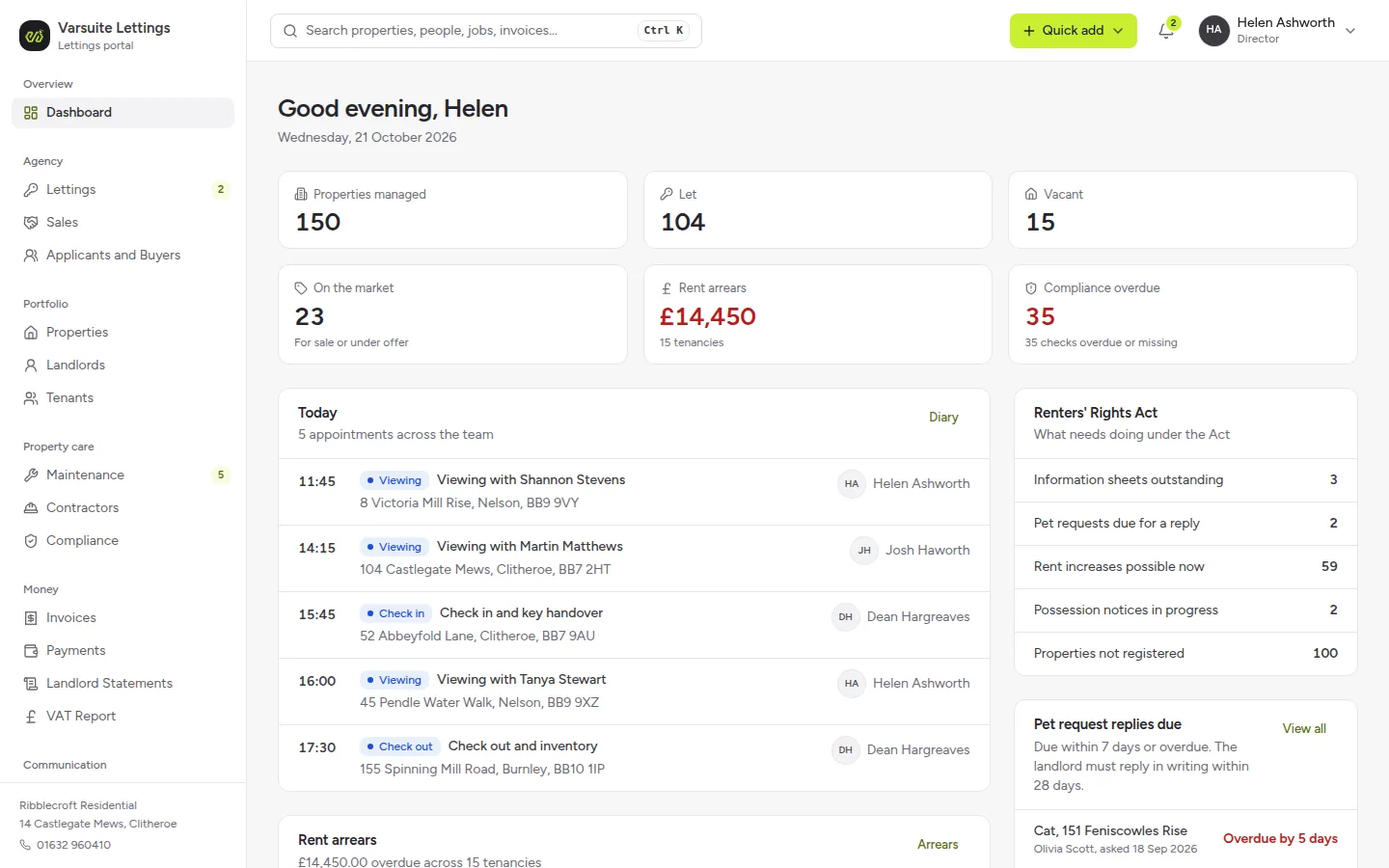
The Renters' Rights Act on the dashboard
The director sees what the Act needs doing now: information sheets outstanding, pet requests due a reply, rent increases that could be served, possession notices in progress and properties not yet registered.
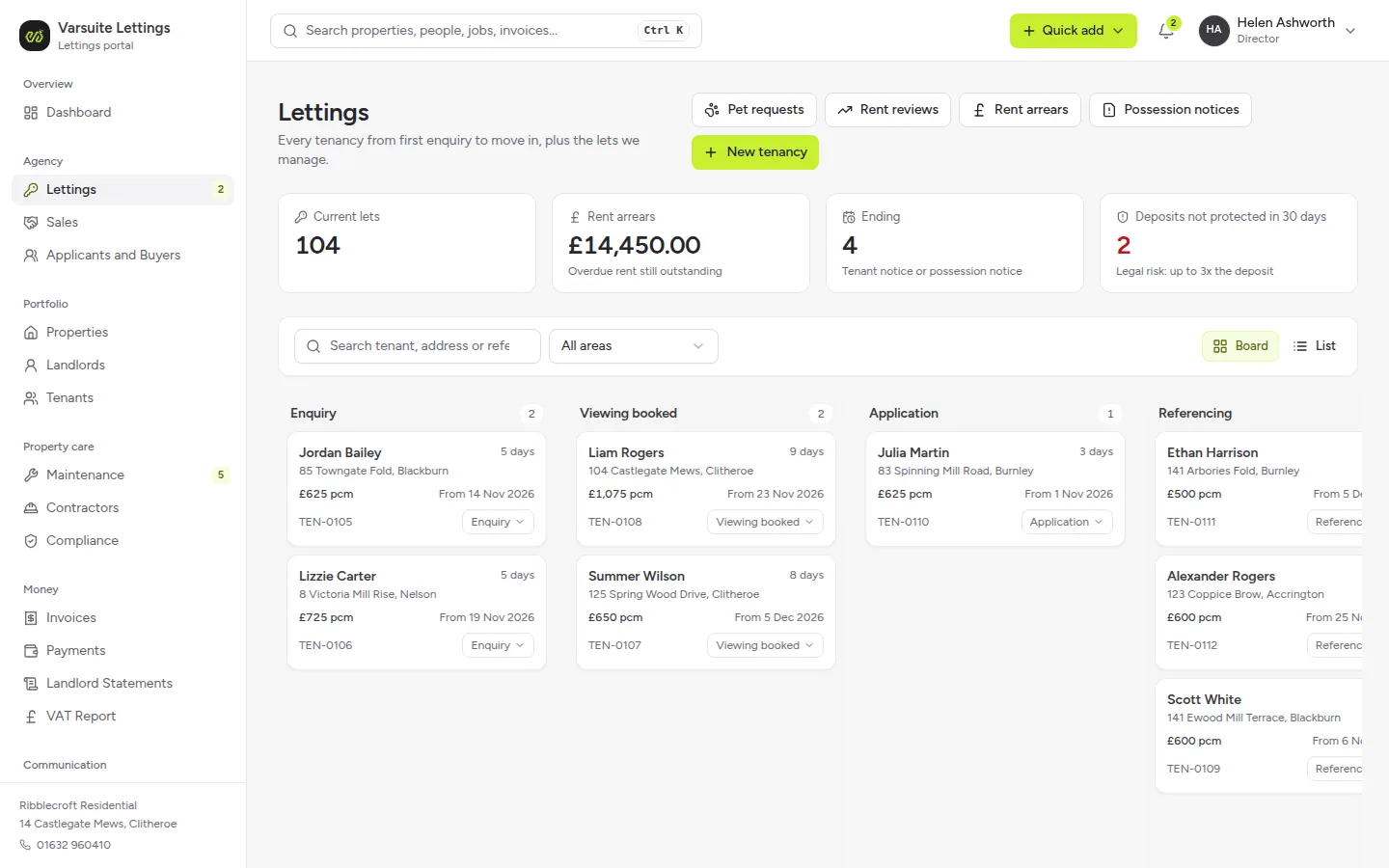
Every let from enquiry to move in
One board for the lettings team, from the first enquiry through viewings, application and referencing to the agreement signed online, with the rent and move in date on every card.
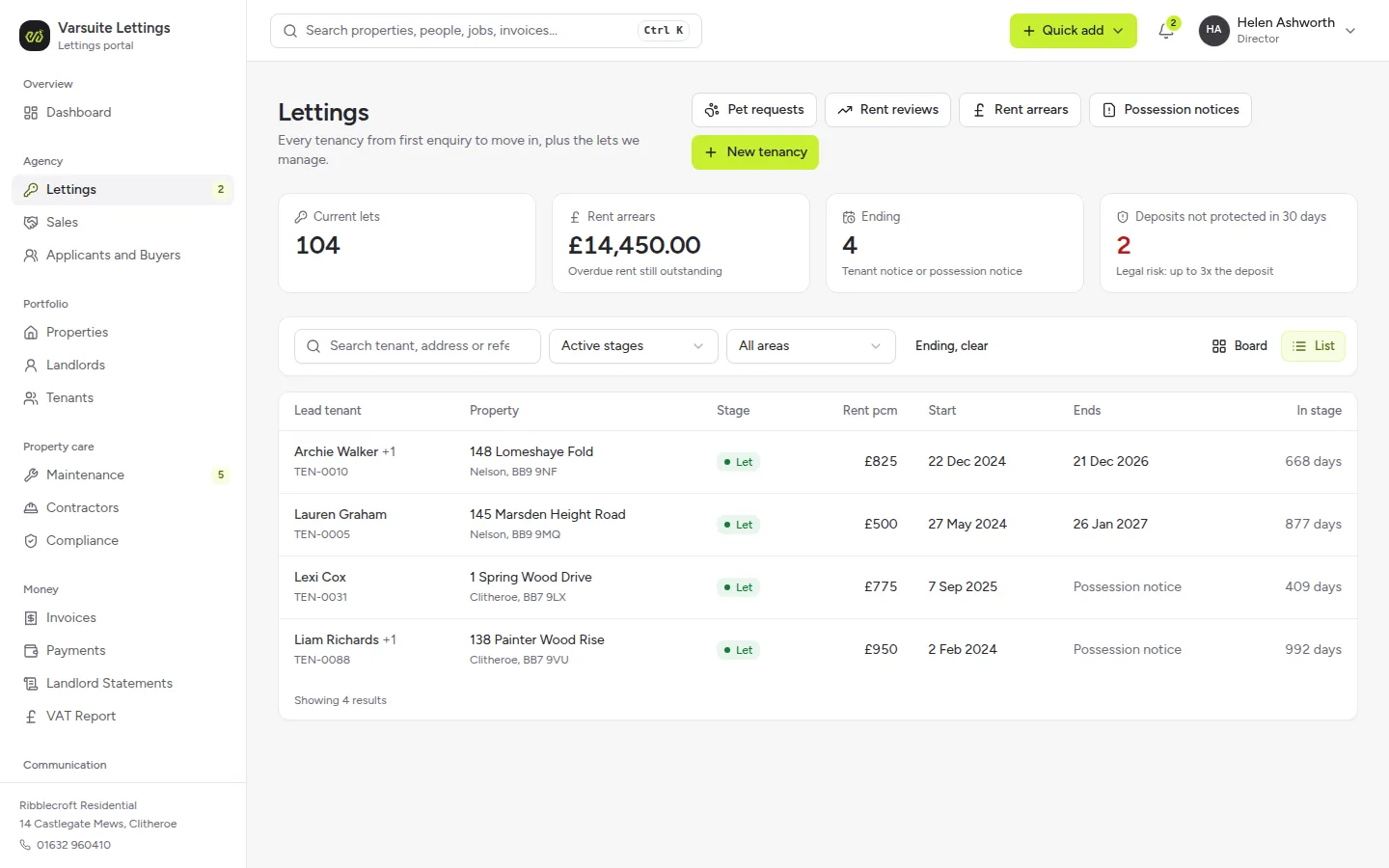
Periodic tenancies and the Ending list
Every tenancy runs as periodic. A tenant's notice is recorded with the date it ends, and the Ending list shows every let with a tenant's notice or a possession notice.
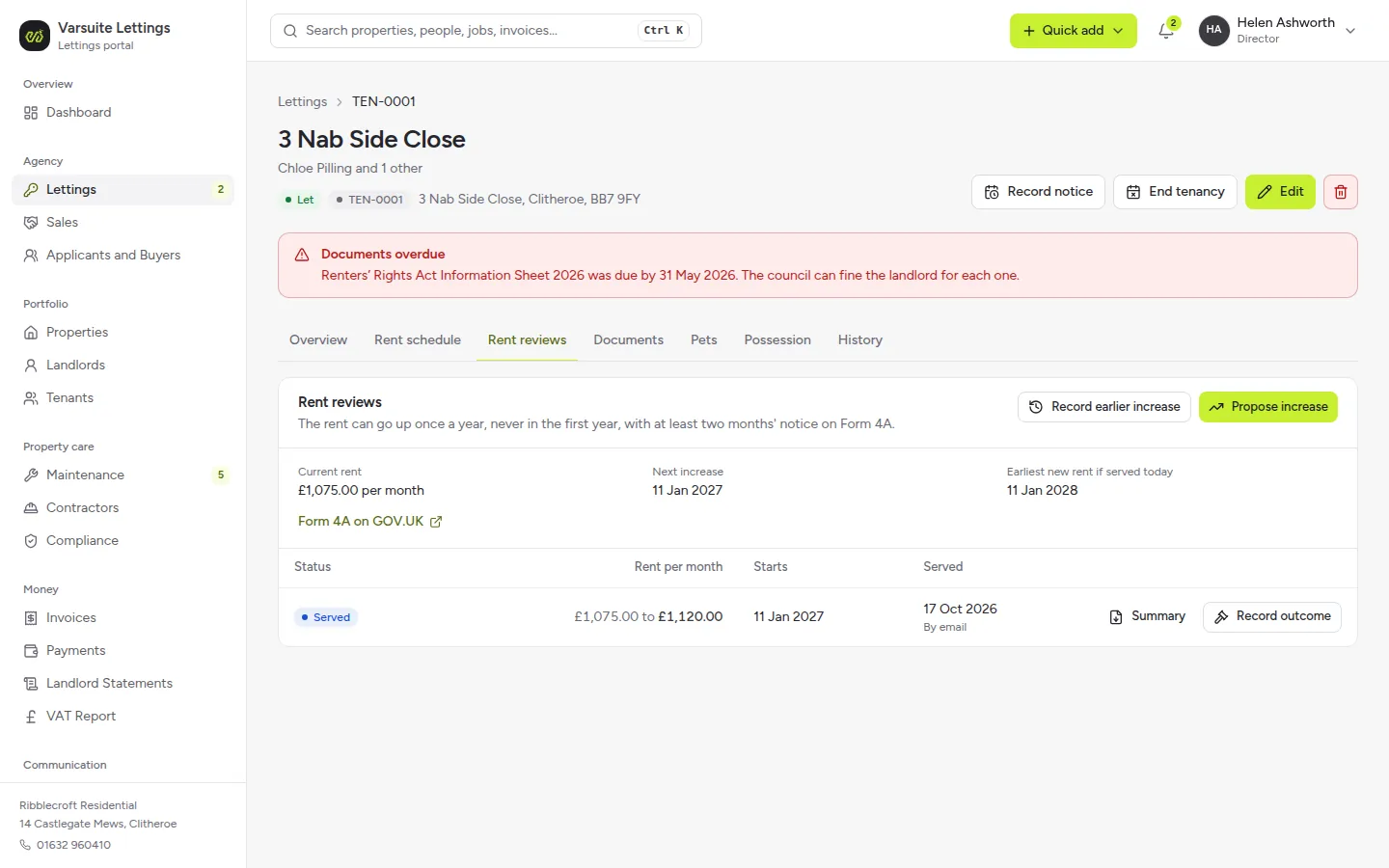
Section 13 rent reviews with the dates worked out
Each tenancy shows the next date an increase can take effect and the earliest new rent date if a notice was served today. Served increases are tracked through to the outcome.
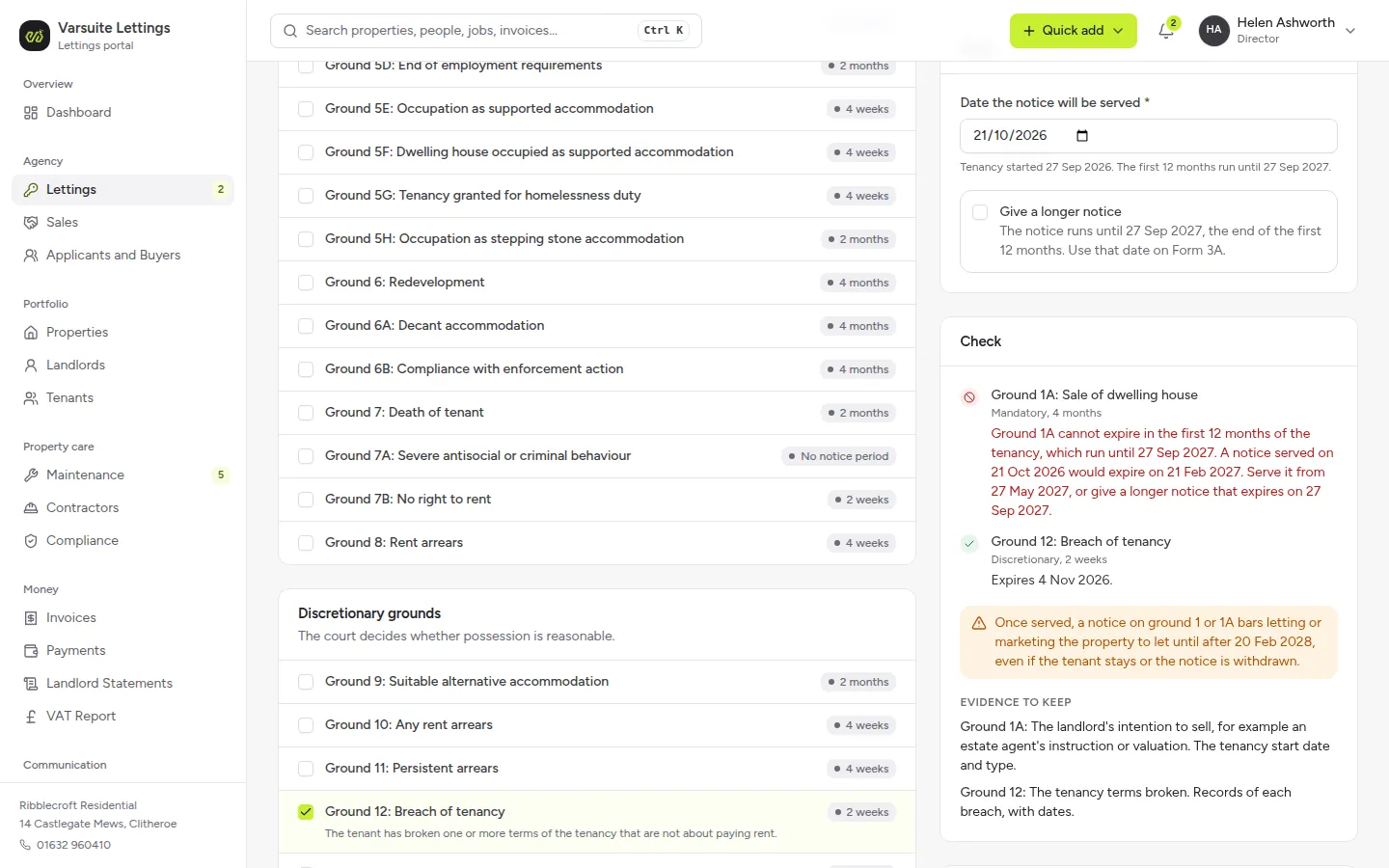
Possession grounds checked before a notice is started
Every section 8 ground is listed with its notice period. A ground that cannot be used yet is refused with the reason and the earliest date it could be, and the re-letting bar after ground 1A is spelt out.
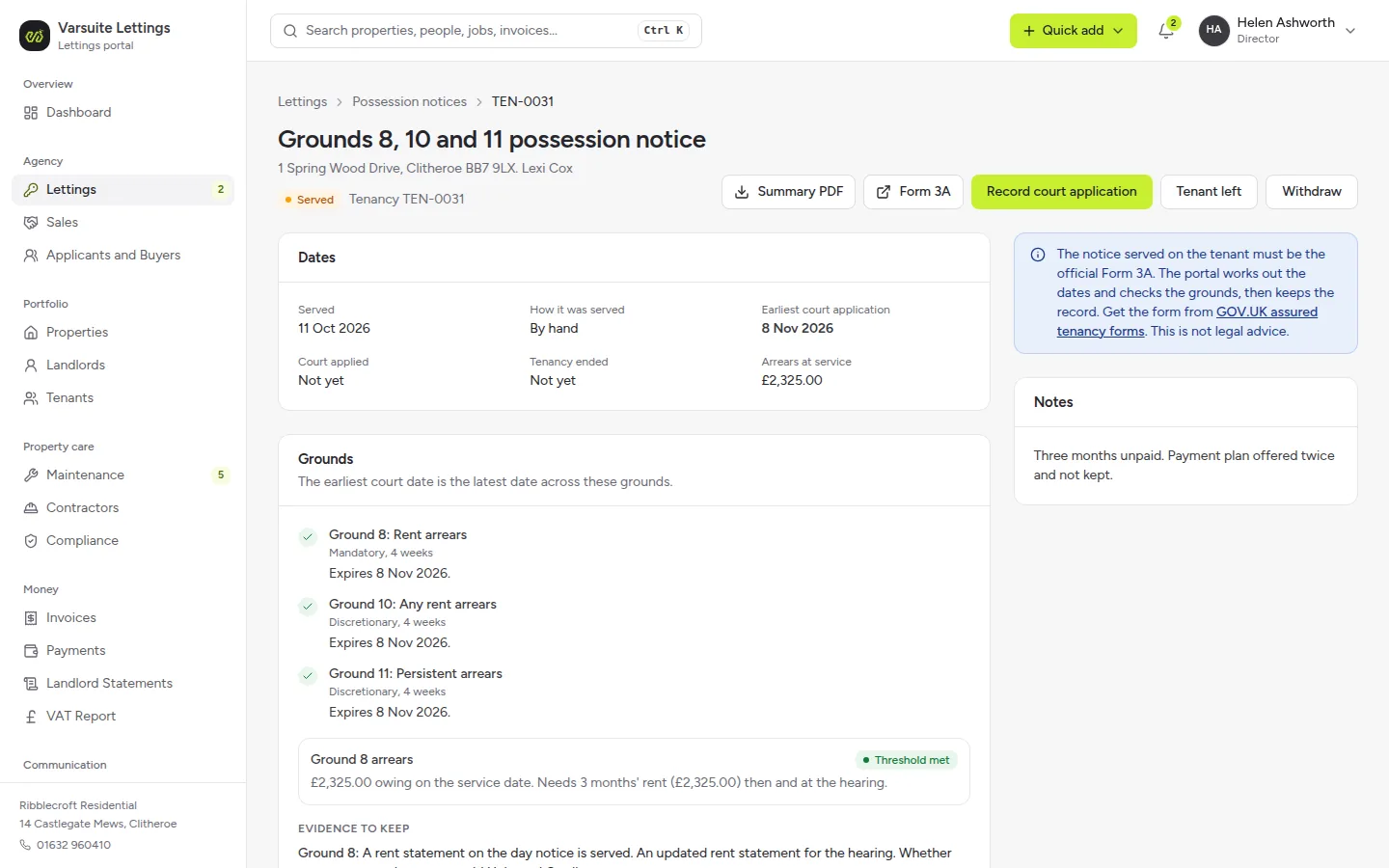
The earliest court date, and ground 8 checked against the ledger
A served notice shows the earliest date to apply to court and checks the ground 8 arrears threshold against the rent ledger, with the evidence to keep. Form 3A from GOV.UK is always the notice served.
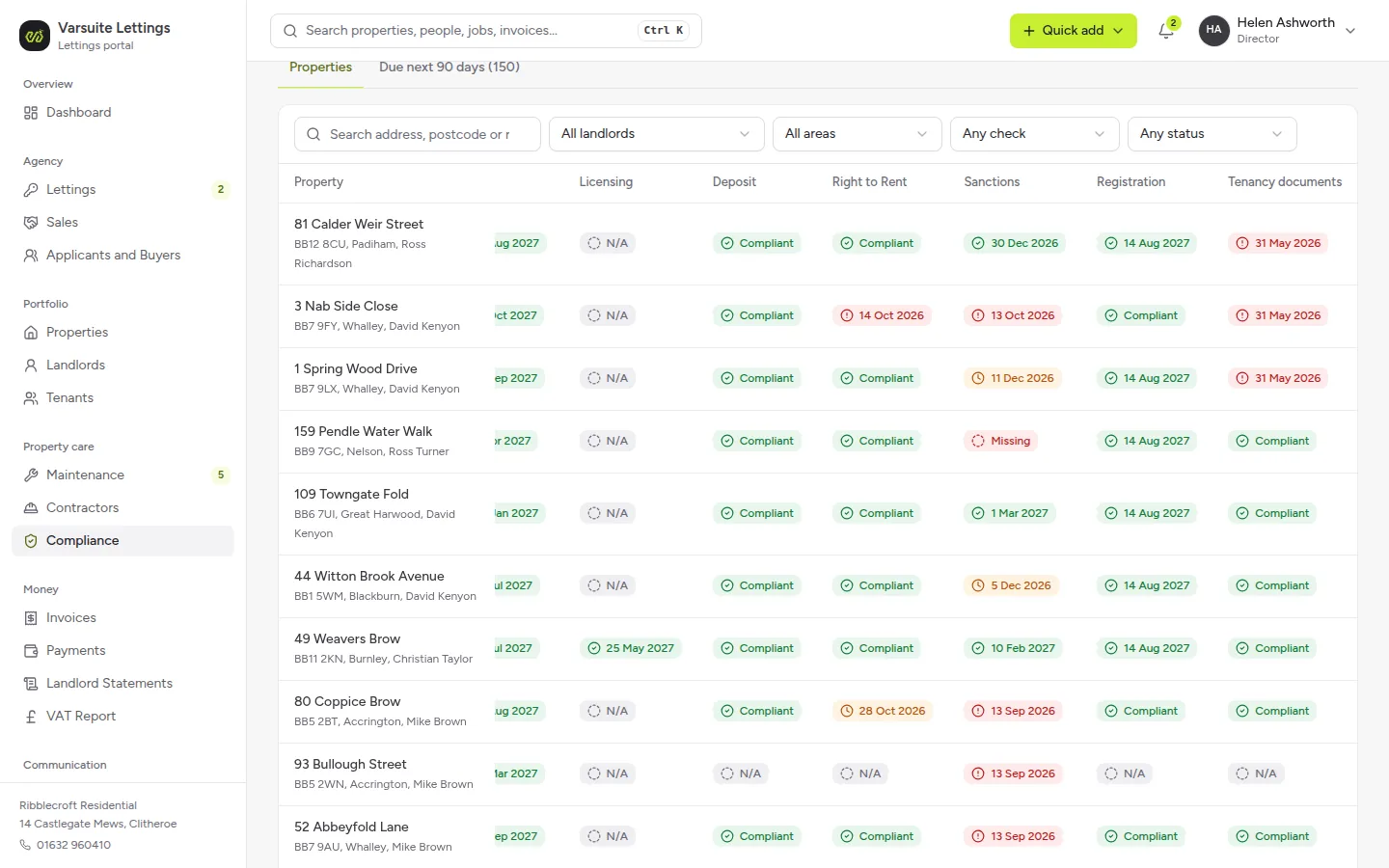
Compliance, registration and tenancy documents on one board
Gas, electrical, EPC, alarms, licensing, deposits, right to rent, property registration and the documents each tenant must be given, with reminders at 60, 30 and 7 days.
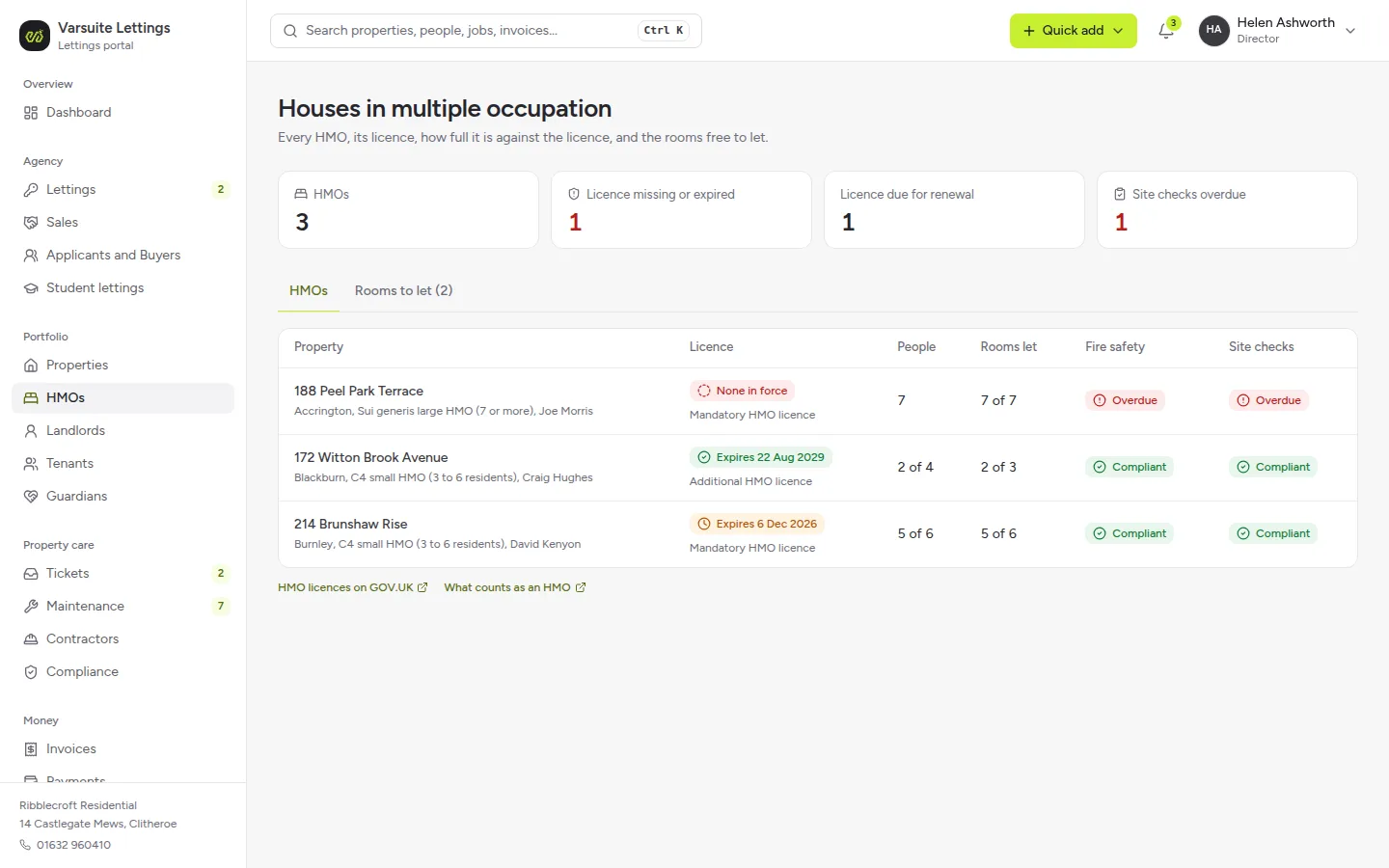
Every HMO, its licence and how full it is
The HMOs page lists each house in multiple occupation with its licence, the people and rooms let against it, and the state of its fire safety and site checks.
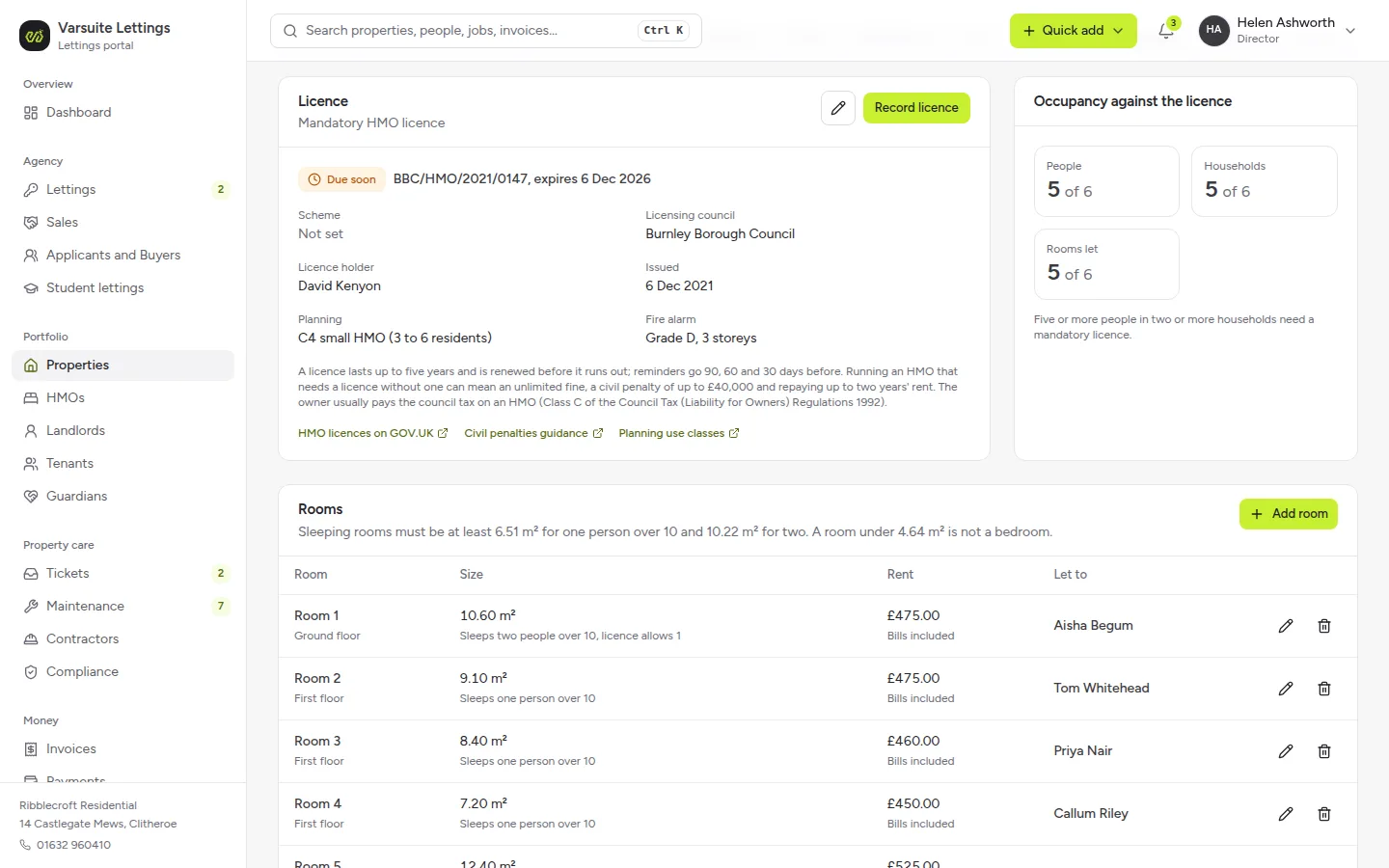
HMO licence, rooms and occupancy on the property
The HMO tab holds the licence and its limits, the planning use class and the fire alarm, with occupancy against the licence and every room with its floor area and how many people it may sleep.
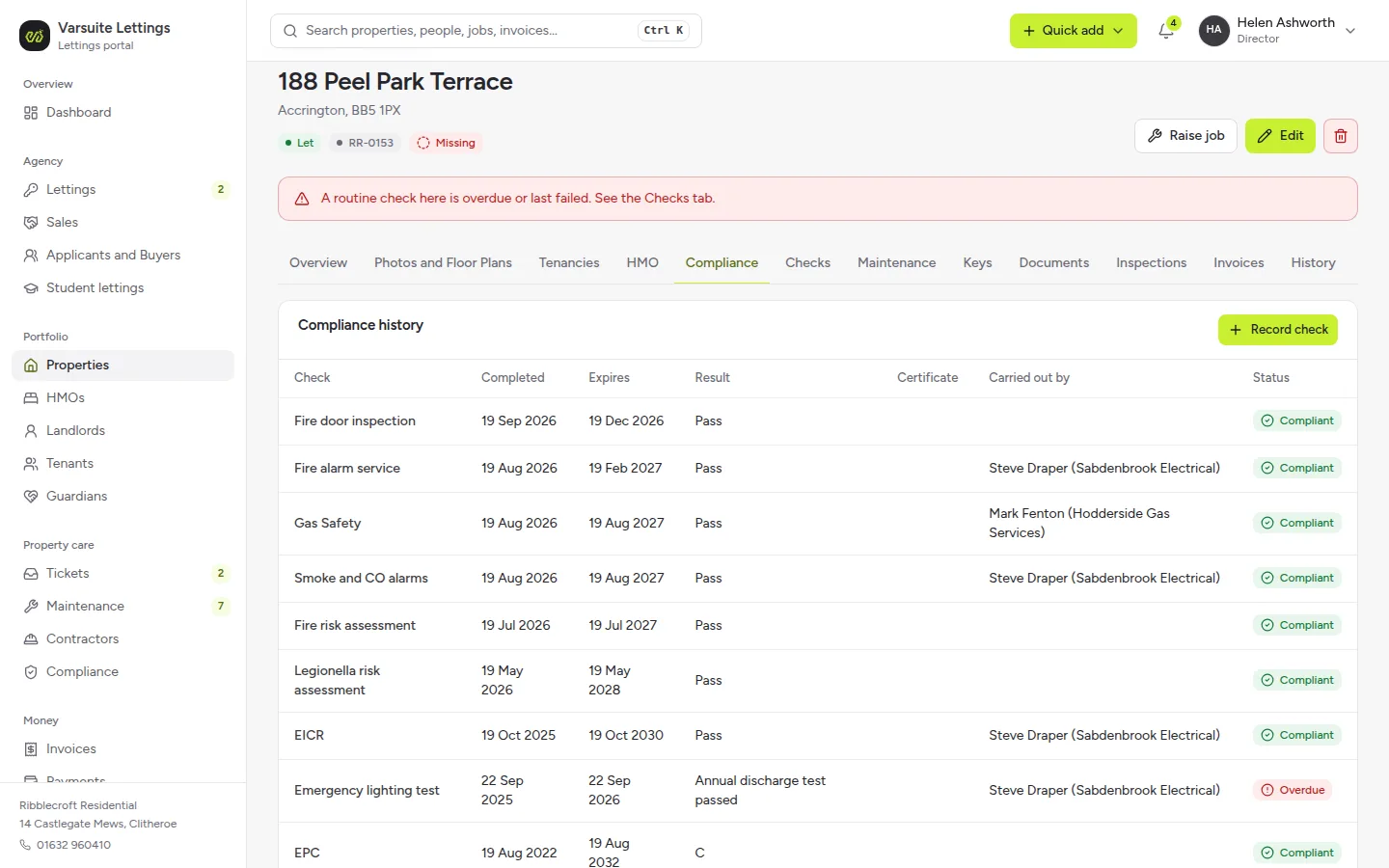
HMO fire safety on the compliance record
Fire door inspections, the fire alarm service, the fire risk assessment and the emergency lighting test sit with the gas and electrical certificates, and the property warns when a routine check is overdue.
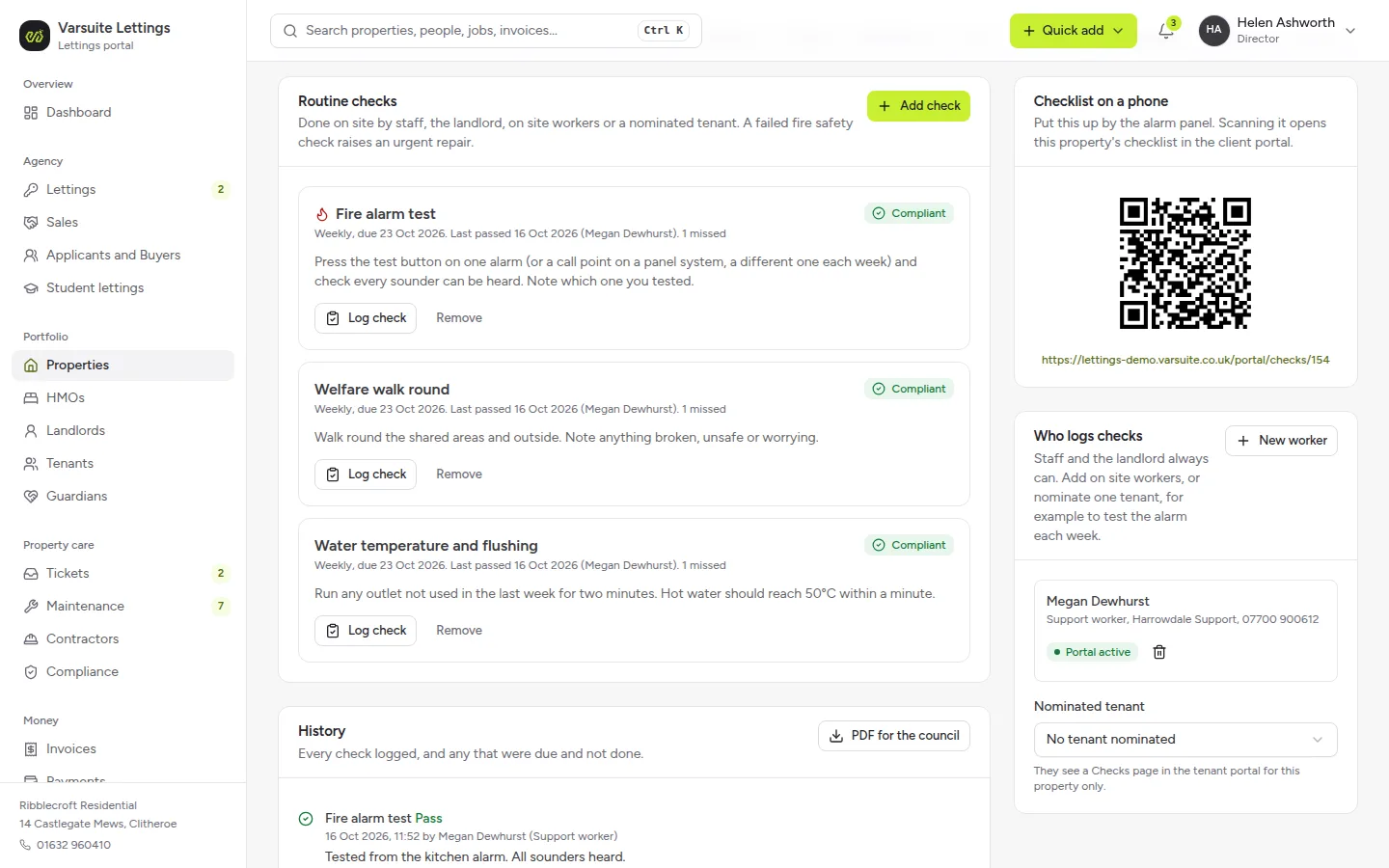
Routine checks with a QR code for the phone
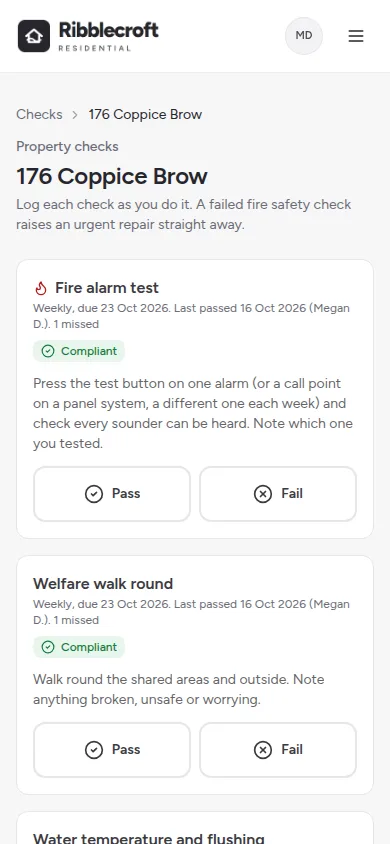
Each property has its own checks, such as the weekly fire alarm test and a welfare walk round, with a QR code that opens the checklist on a phone and a list of who may log them.
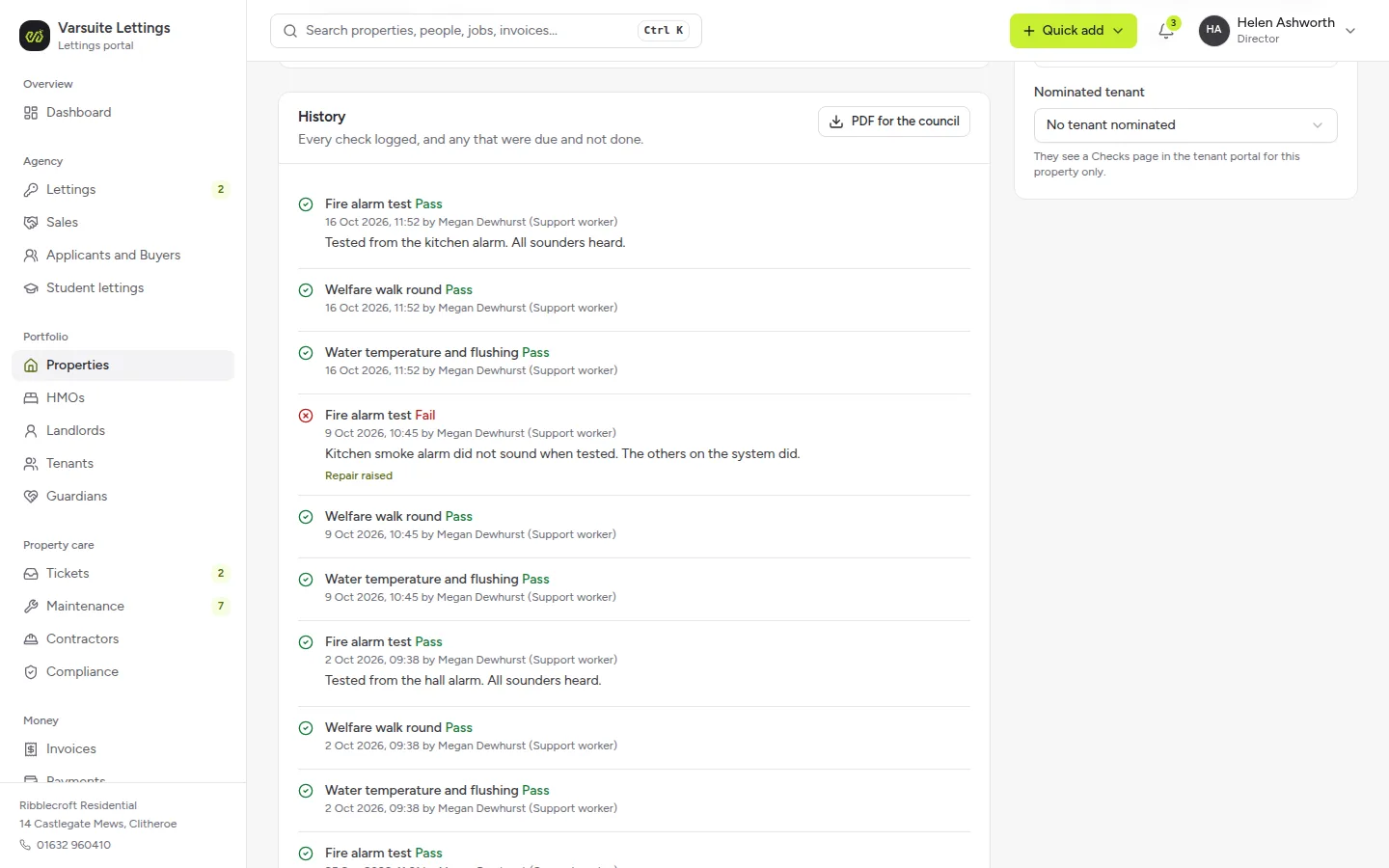
A check history ready for the council
Every check logged, and any that were due and not done, with who did it and when. A failed fire alarm test raises a repair, and the history downloads as a PDF for the council.
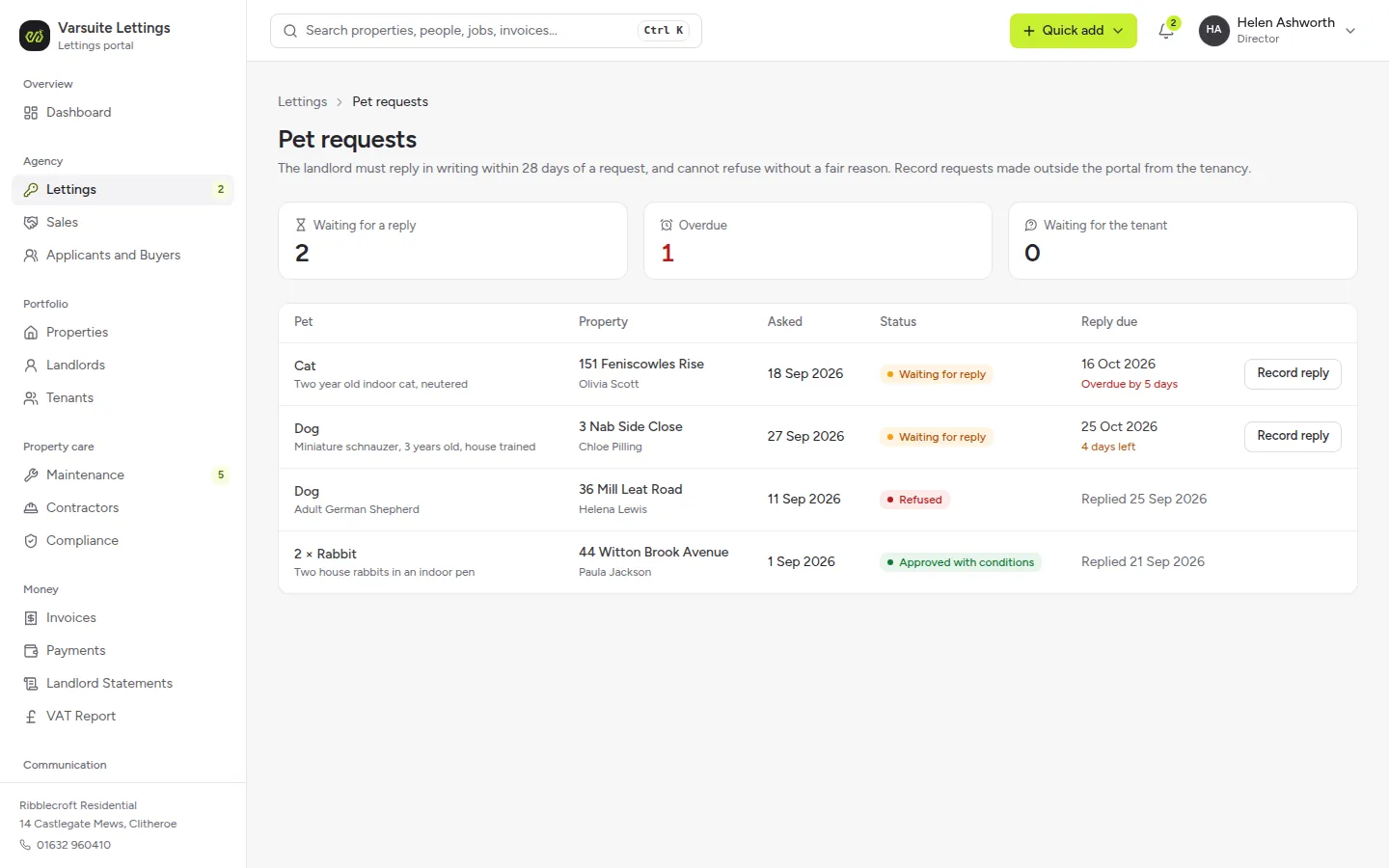
Pet requests against the 28 day clock
Every request shows when it was asked, the reply deadline and how many days are left, so nothing runs past the 28 days the Act allows.
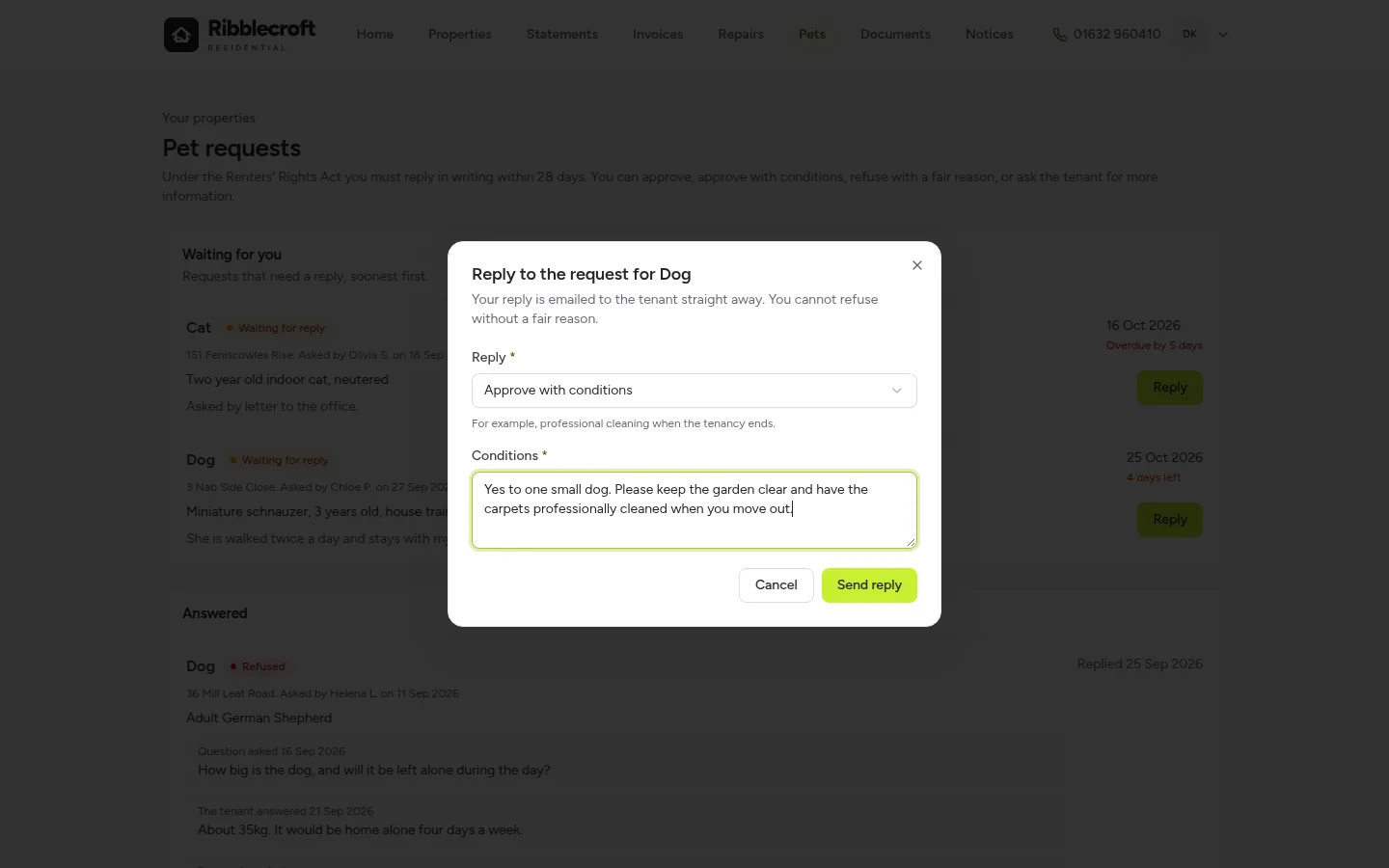
Landlords answer pet requests from their portal
The landlord approves, approves with conditions, refuses with a reason or asks for more information, and the reply is emailed to the tenant straight away.
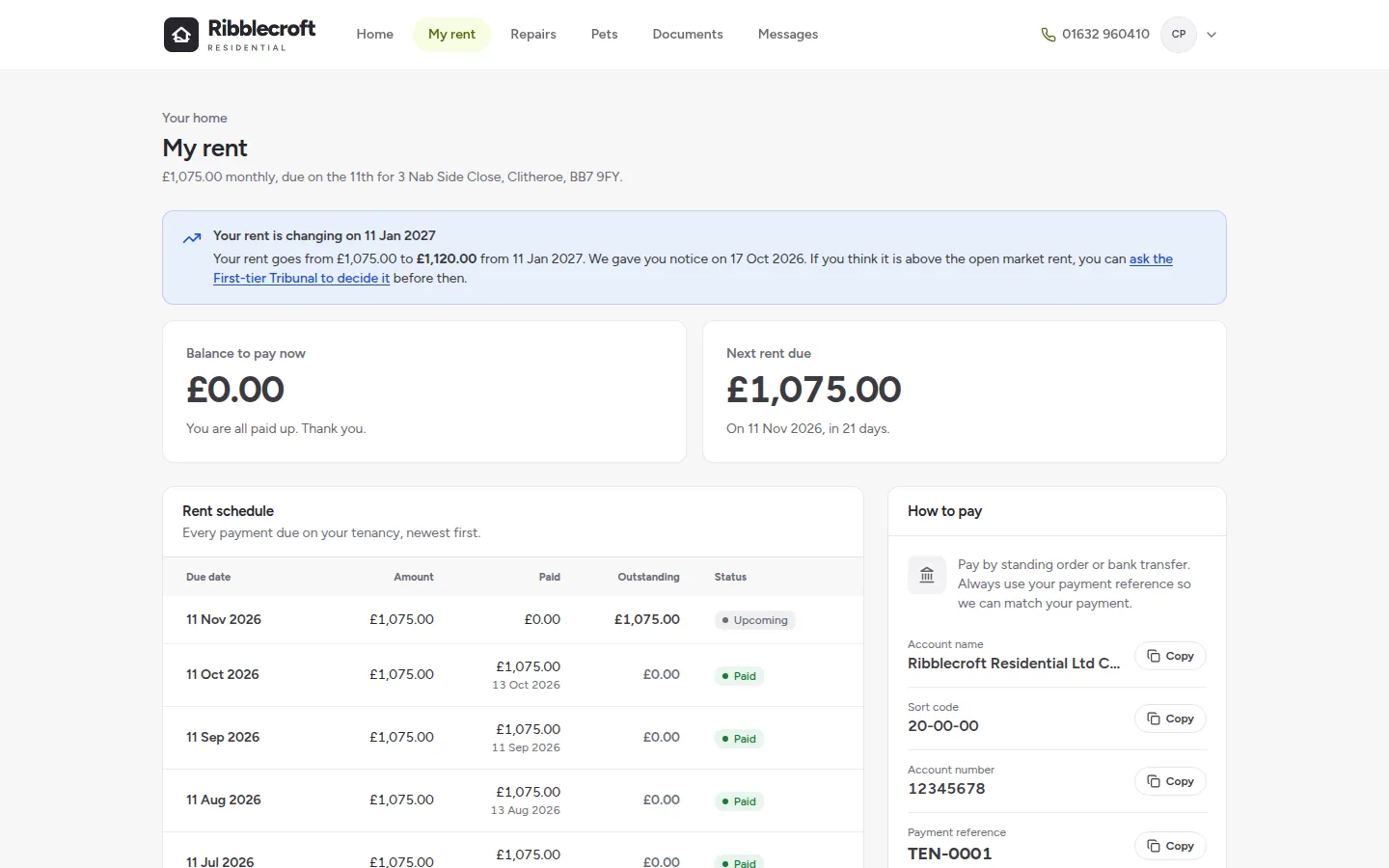
Tenants see their rent and any increase
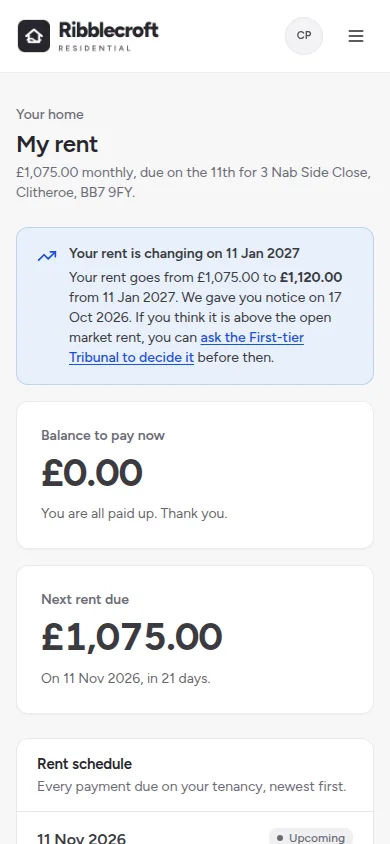
The tenant portal shows the balance, the next payment, the full rent schedule and a served rent increase with the date it starts and a link to challenge it at the First-tier Tribunal.
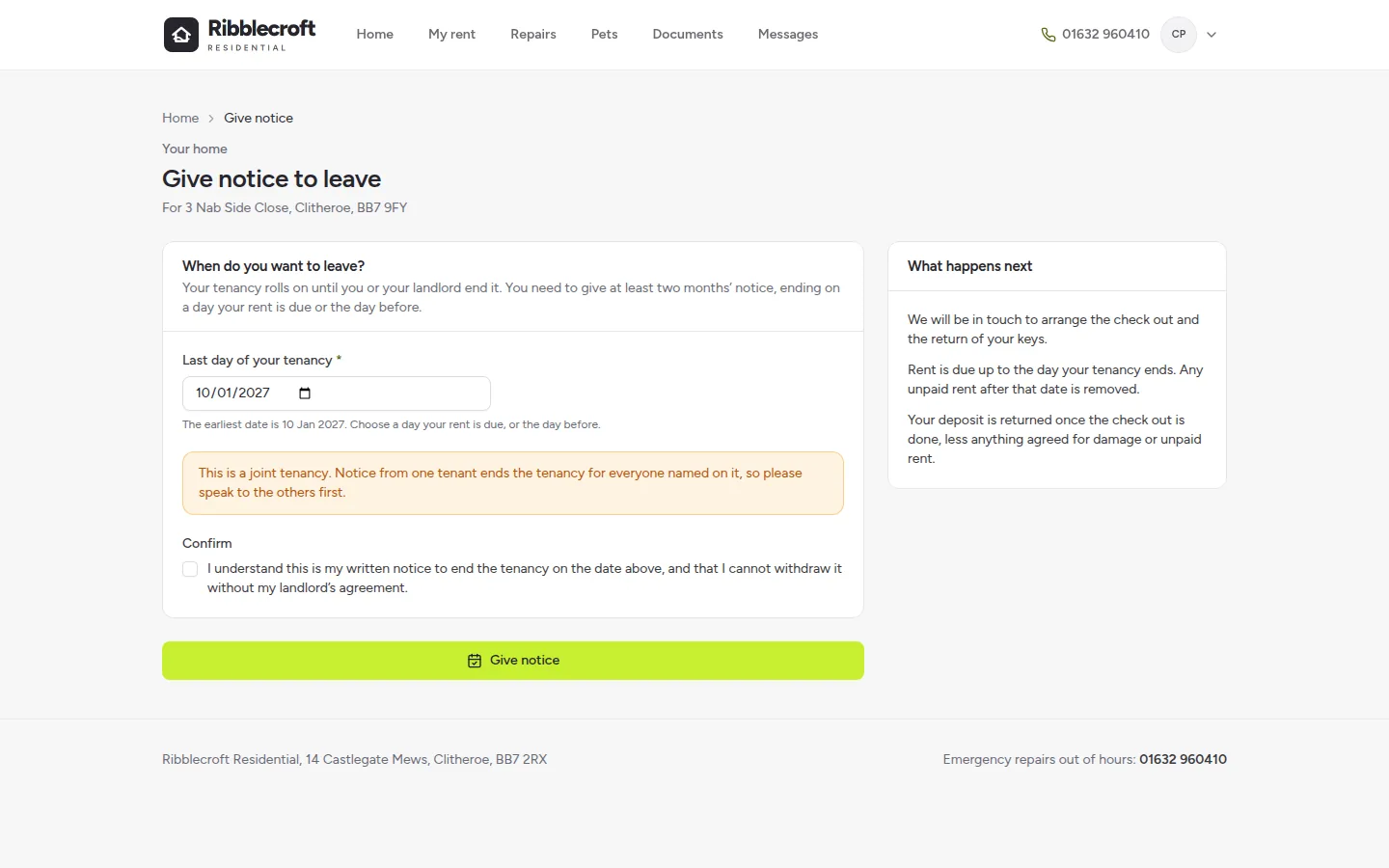
Tenants give notice online
The portal only offers dates that give at least two months' notice and end on a rent day or the day before, and warns joint tenants that notice ends the tenancy for everyone.
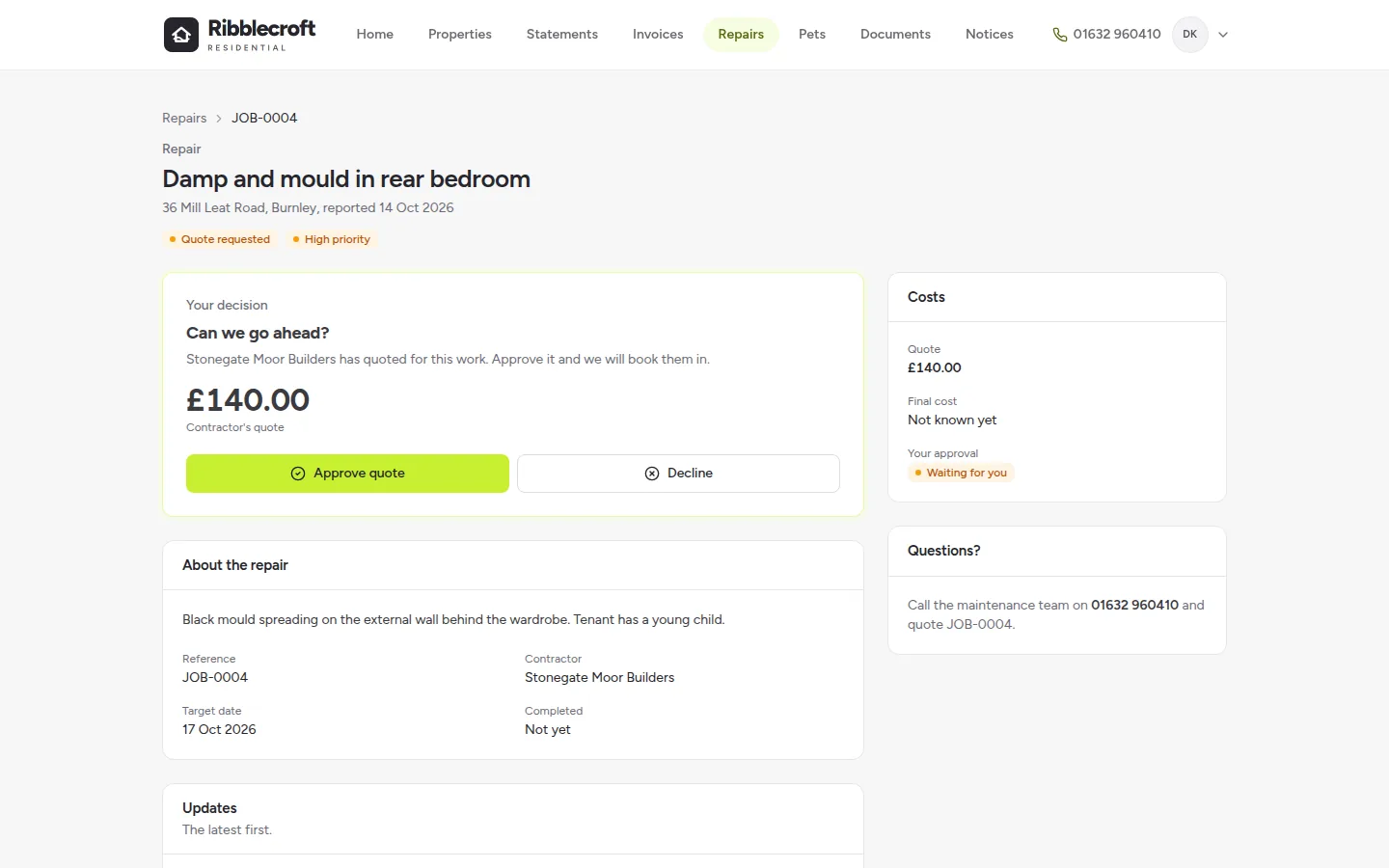
Landlords approve repair quotes
A contractor's quote waits for the landlord in their portal. One tap approves it and the agency books the work, so nobody chases by phone.
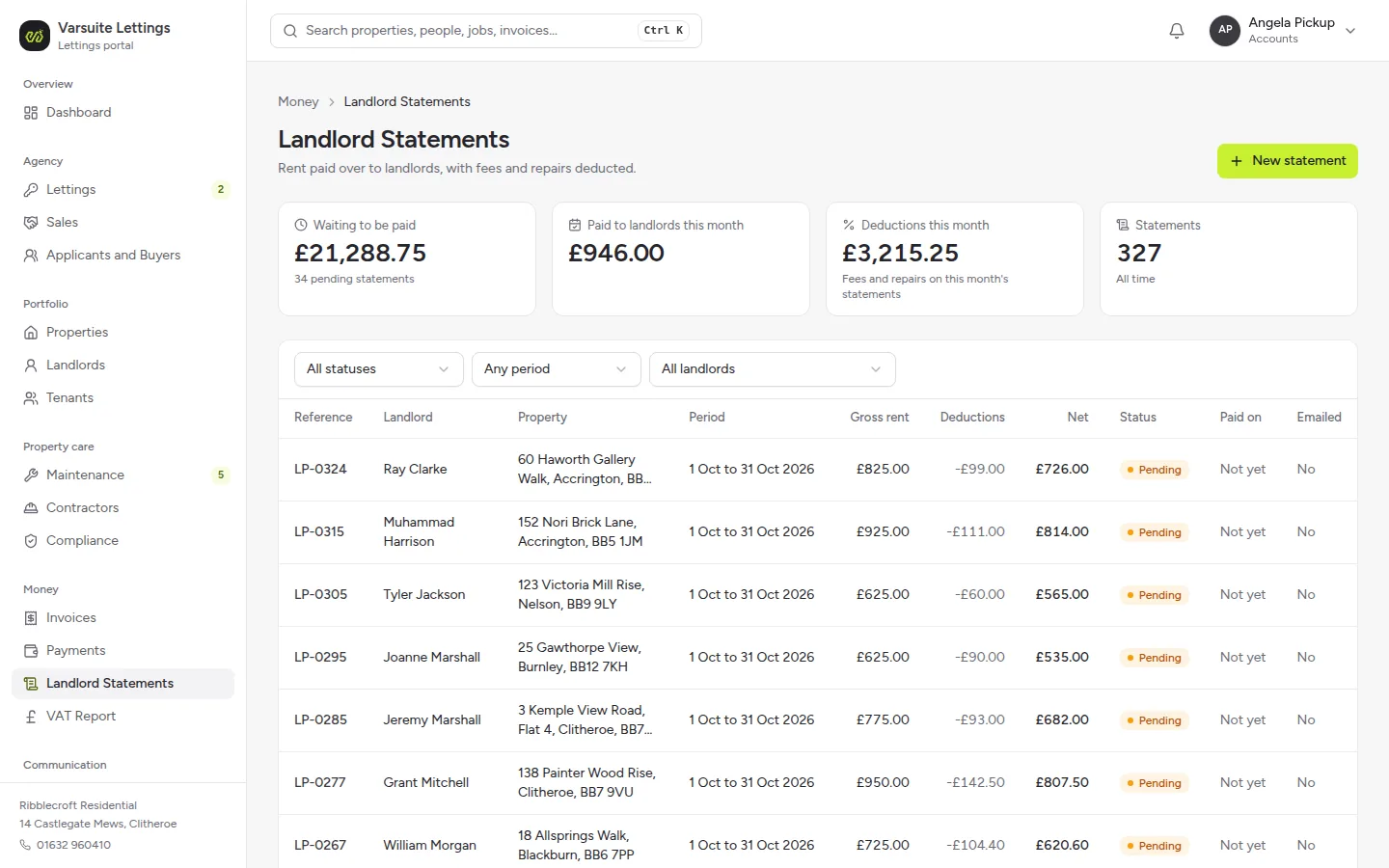
Landlord statements with fees and repairs deducted
Rent received, fees and repairs come together on each statement, ready to pay and email to the landlord, with totals for what is waiting to be paid.
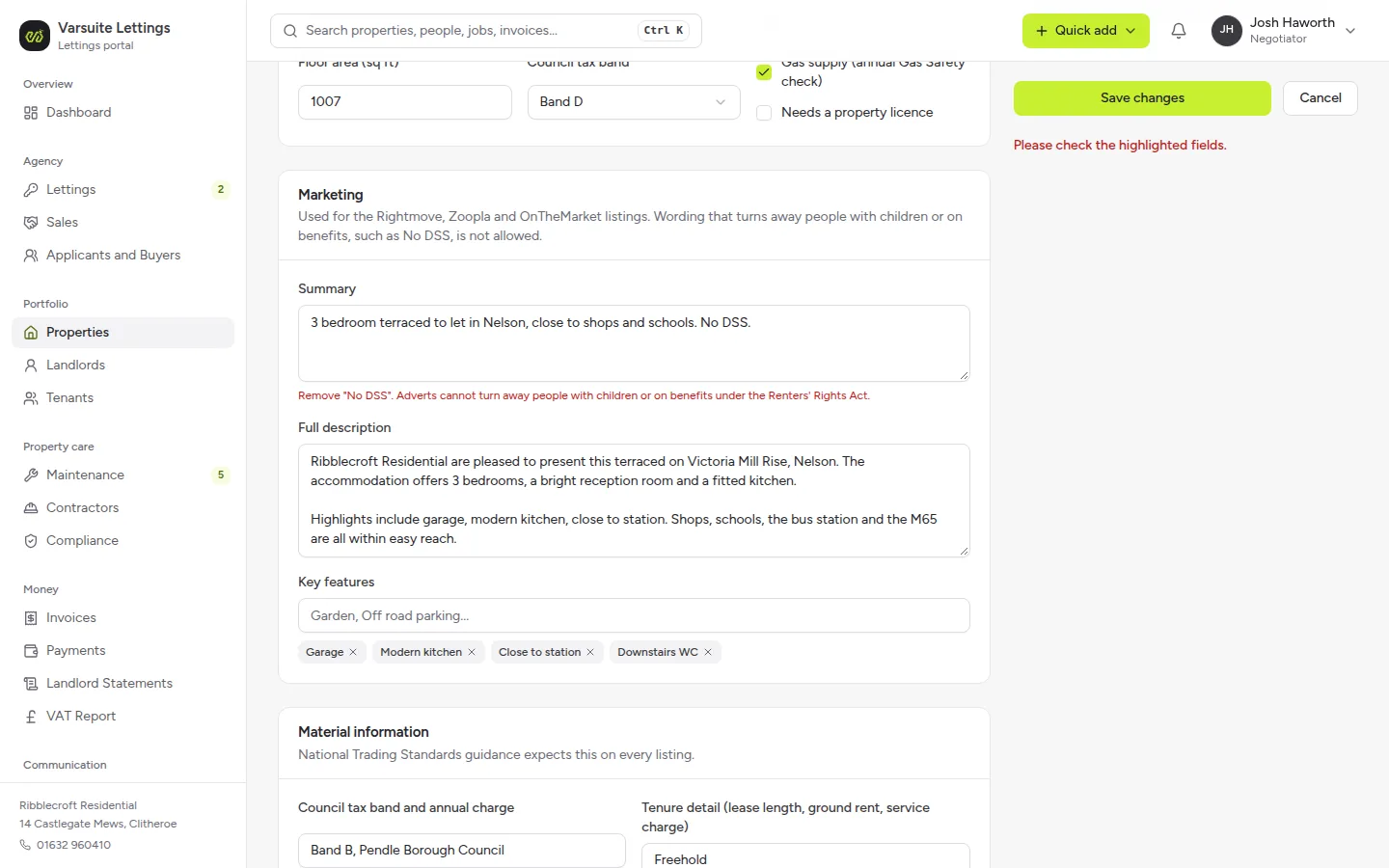
No DSS refused before an advert goes out
Advert wording that turns away families or people on benefits is refused when the property is saved, before anything is sent to Rightmove, Zoopla or OnTheMarket.
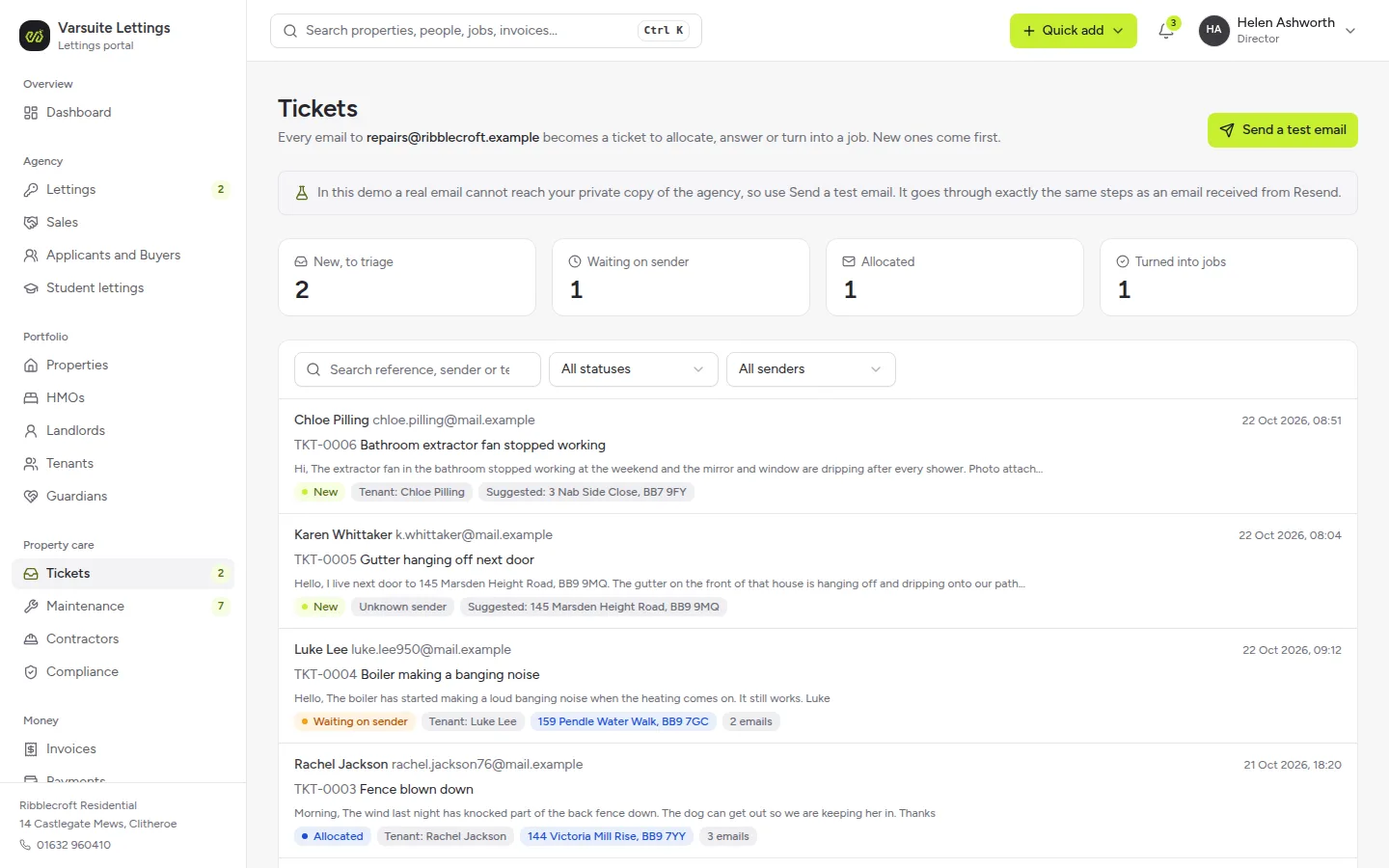
Repair emails become tickets
Emails to the repairs address land in one inbox, new first, matched to a tenant, landlord or contractor when the sender is verified, with a property suggested.
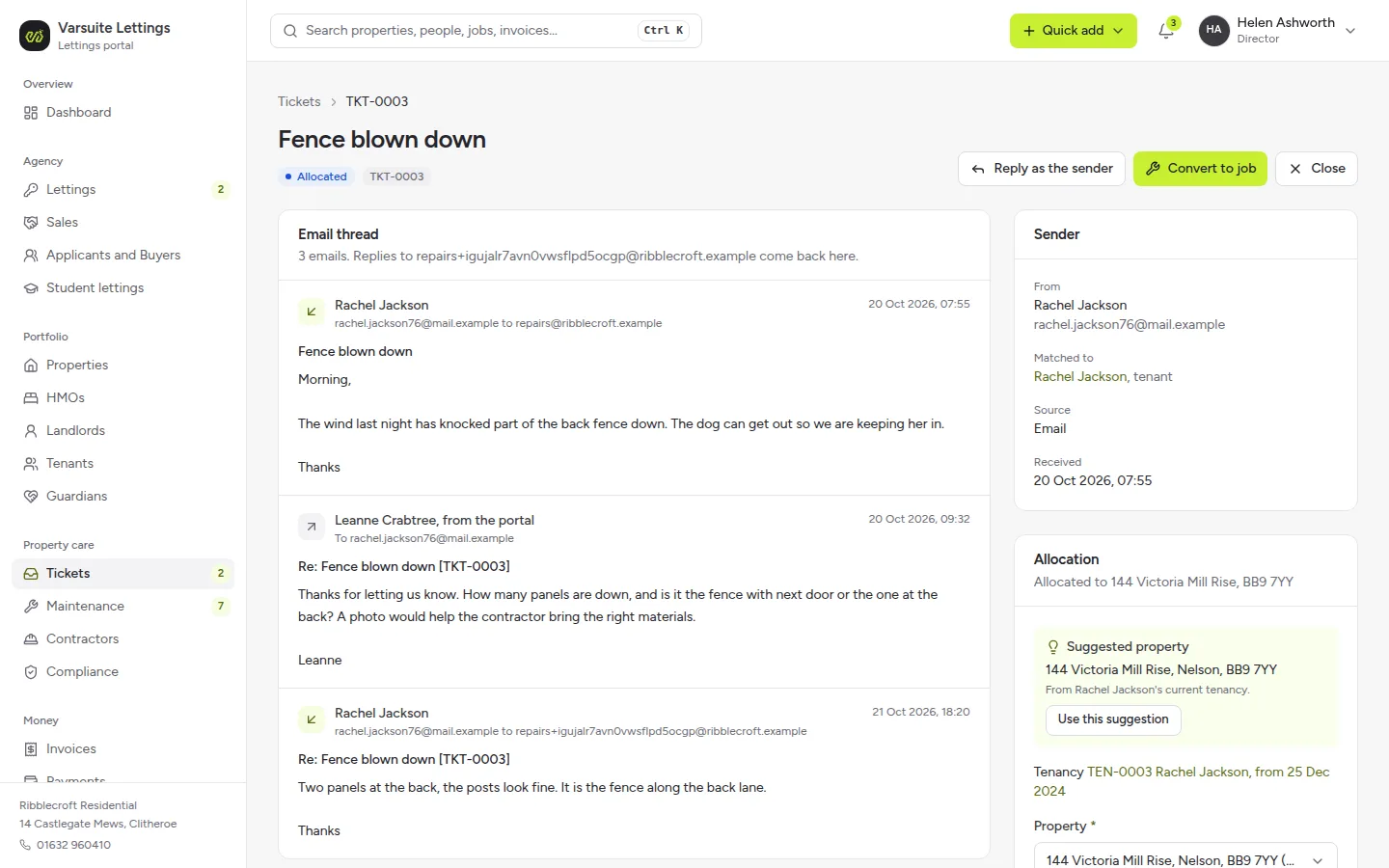
A ticket with its email thread
Staff reply or ask for more information by email and the answers thread back onto the ticket, with every message timestamped and one step to turn it into a maintenance job.
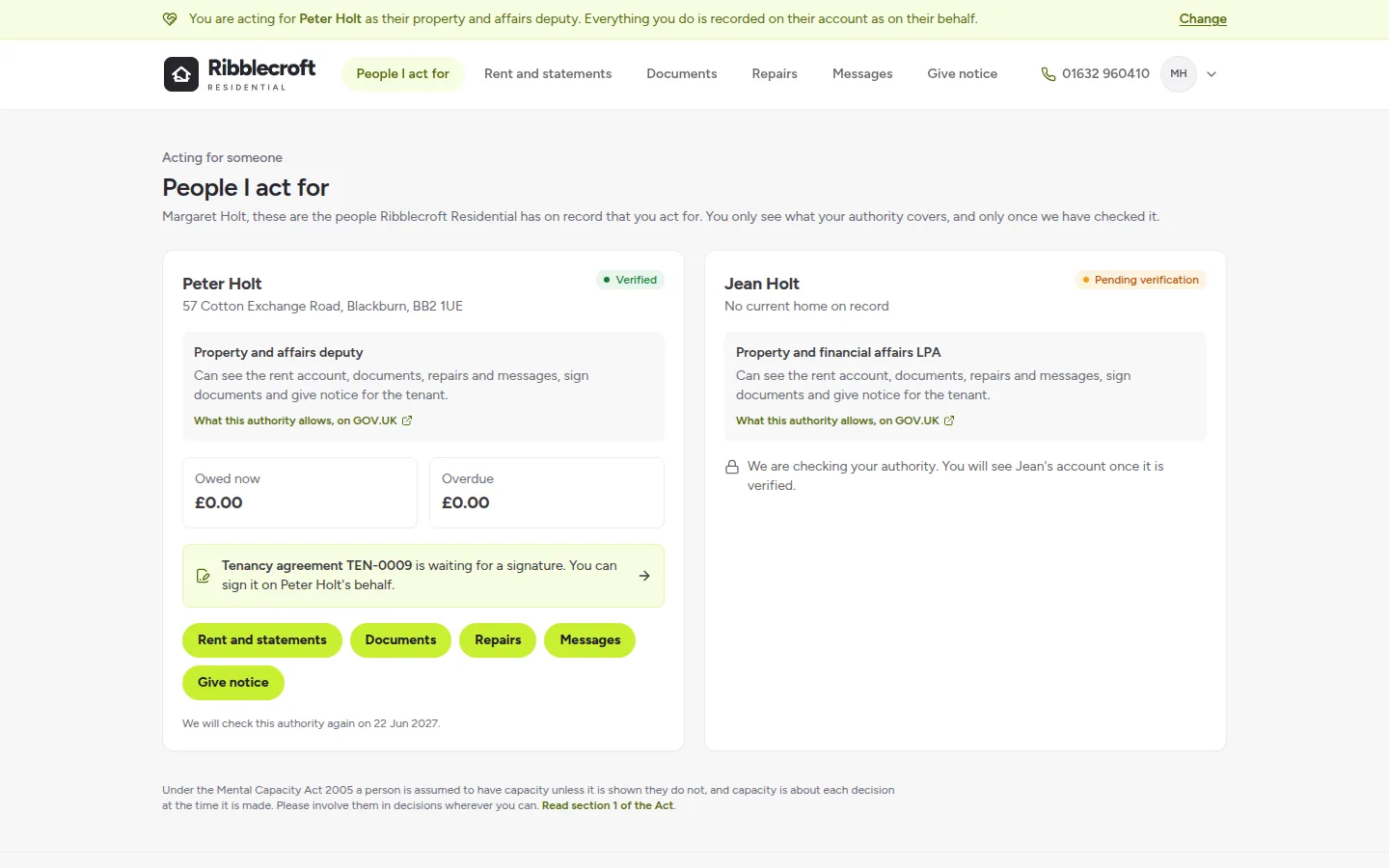
Guardians see who they act for
A guardian signs in to People I act for, with each person, the authority they hold and what it lets them do. Nothing shows until staff have verified the authority.
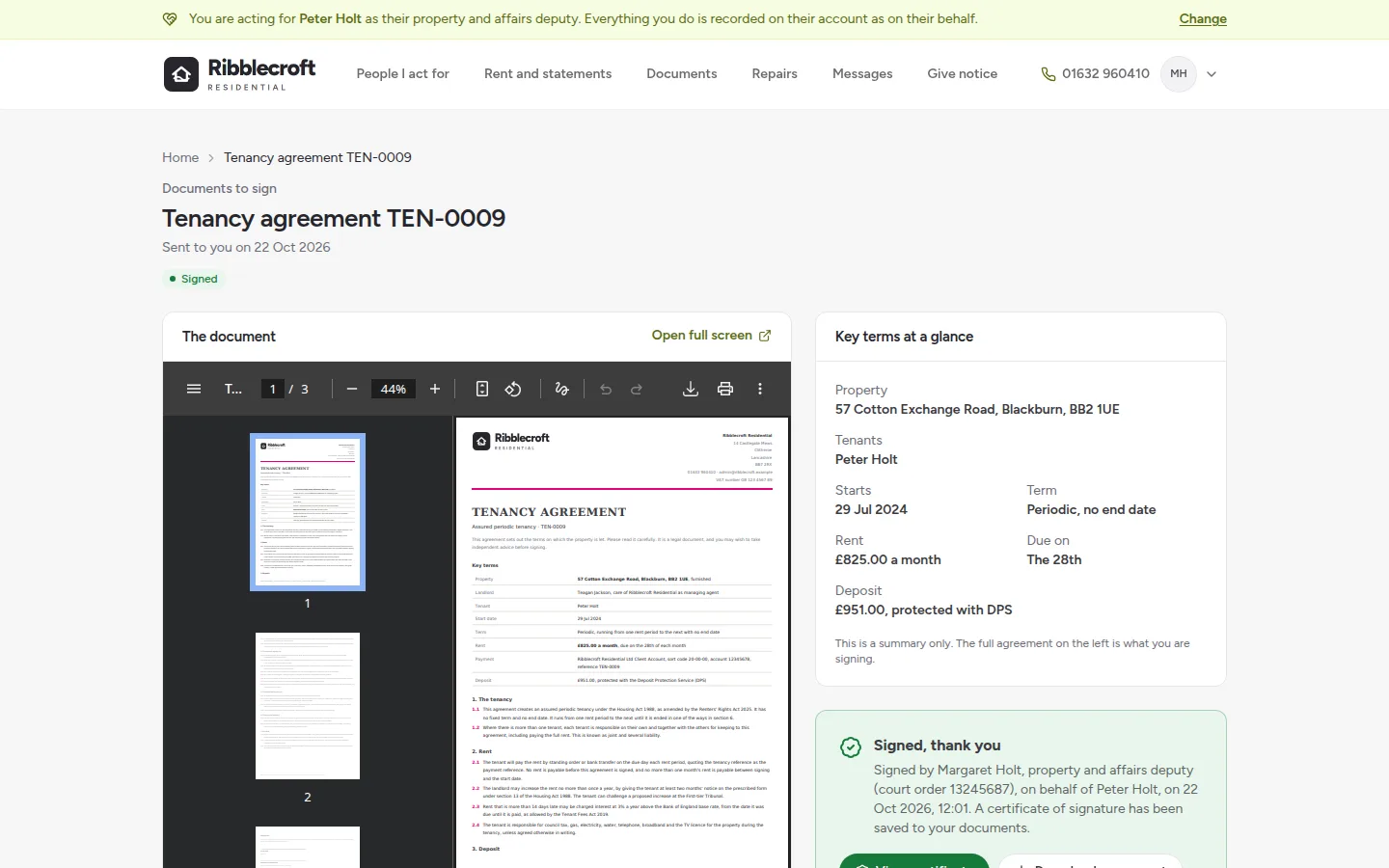
Signed on behalf, with the authority recorded
When a deputy or attorney signs, the record says who signed, under which authority and for whom, and the action is written to the tenant's audit trail.
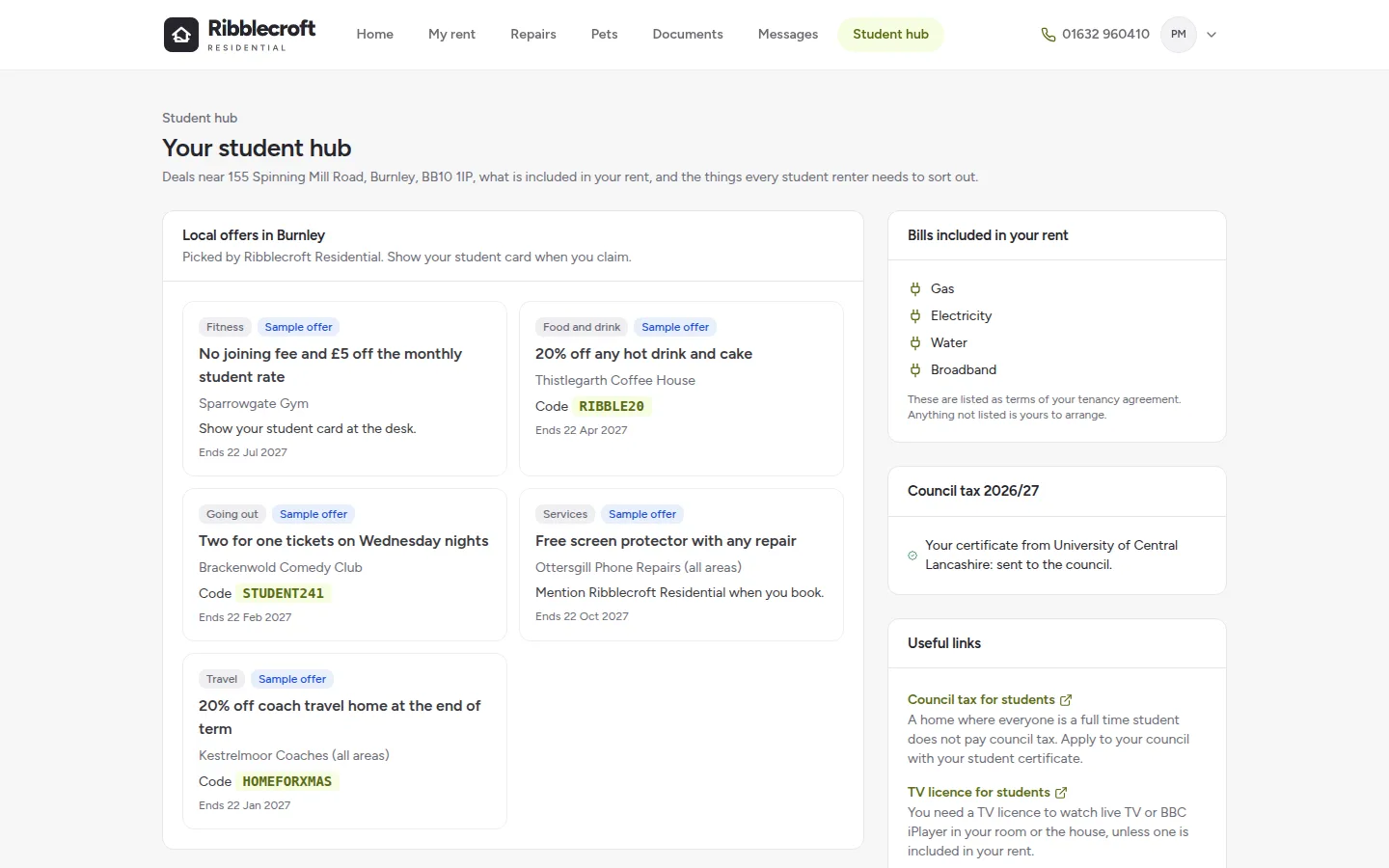
A student hub in the tenant portal
Students see local offers the agency manages, the bills included in their rent, their council tax certificate and useful links.
Rent, repairs and fire alarm checks from a phone
Tenants check their rent and any increase, report a repair with photos, sign their agreement and give notice from their phone. Support workers, wardens and nominated tenants scan the QR code at the property to log the weekly fire alarm test. Everything lands on the same records your team works from.
Questions letting agents ask
- What software do letting agents need for the Renters' Rights Act?
- How do letting agents track section 13 rent increases and section 8 notices?
- Is there a Reapit or Alto alternative built around my agency?
- What software do HMO landlords and letting agents need for licensing?
- How should a letting agent manage a tenant who lacks mental capacity?
- How can a letting agent log weekly fire alarm tests in an HMO or supported living property?
What is letting agent software?
Letting agent software is one system that runs a tenancy from the first enquiry to the day the tenant leaves: the applicant, the viewing, referencing, the agreement, the rent, the repairs, the certificates and the landlord's statement. It replaces the spreadsheets, shared inboxes, diaries and separate systems that make a busy agency key the same tenancy in again and again.
That re-keying is common. A survey of letting agents by Propoly, reported by Property118 in September 2026, found that only 17% use one main system and 61% re-key information between systems during a single tenancy, while 73% said their workload has risen since the Renters' Rights Act. About 4.7 million households rent privately in England, 19% of all households according to the English Housing Survey, and every one of their tenancies now runs by the new rules.
Our lettings portal puts the agency, its tenants and its landlords in the same system, so a repair reported by a tenant, approved by a landlord and invoiced by a contractor ends up on the right statement without anyone typing it twice. It is the kind of business system we build around how a company really works.
What does the Renters' Rights Act change for letting agents?
The Renters' Rights Act applied in England from 1 May 2026. Fixed terms and section 21 notices have gone, and the rules for rent, notice, pets and advertising have changed. Local councils can fine up to £7,000 for a minor breach and up to £40,000 for a serious or repeated one, so the safest place for the rules is inside the system your team uses every day.
The portal checks each rule before your team acts and tracks every deadline the Act creates:
- Periodic tenancies: every tenancy is an assured periodic tenancy, with no fixed term or renewal. A tenant's notice is recorded with the date it ends, at least two months and ending on a rent day, and the Ending list shows every let with notice
- Documents tenants must be given: the Renters' Rights Act Information Sheet for tenancies that started before 1 May 2026, or the written statement of terms for later ones, tracked on each tenancy until it is given
- Section 13 rent increases: the earliest date an increase can start, worked out from the start of the tenancy, the last increase and two months' notice, with any date that breaks a rule refused with the reason and the nearest date that works
- Section 8 possession notices: every ground with its notice period and restrictions, grounds that cannot be used yet refused with the earliest date they could be, ground 8 arrears checked against the rent ledger, and the earliest date to apply to court
- Pet requests: the 28 day clock on every request, and a reason required before a landlord can refuse
- Rental bidding: every letting has an asking rent, and an offer above it cannot be accepted
- Advert wording: wording that turns away families or people on benefits, such as No DSS, is refused before a listing goes to the portals
- Register your rental property: each landlord's registration number and each letting's registration ID, with the deadline for the property's region tracked on the compliance board. Registration rolls out region by region from 15 December 2026, starting with the West Midlands
A Renters' Rights Act panel on the dashboard counts what needs doing now: information sheets outstanding, pet requests due a reply, rent increases that could be served, possession notices in progress and properties not yet registered. The portal prints summaries for your file and links to the official GOV.UK forms, such as Form 4A and Form 3A, which are what you serve. It supports your team's judgement, and it is not legal advice.
Try our live letting agent software demo
The quickest way to judge letting agent software is to use it, so we built a working agency you can try now at lettings-demo.varsuite.co.uk.
The demo is Ribblecroft Residential, a fictional letting agency in Clitheroe that manages over 150 properties across East Lancashire, with student houses in Preston and Lancaster, and with landlords, tenants, contractors, repairs, HMOs and Renters' Rights Act cases already under way. You can sign in as:
- the director, with the dashboard, the Renters' Rights Act panel and the whole agency
- a lettings negotiator, with the lettings pipeline, applicants, viewings in the diary and the Ending list
- a property manager, with maintenance, contractors and the compliance board
- accounts, with rent, arrears, contractor invoices, landlord statements and the VAT report
- a landlord, in the landlord portal with their properties, money, certificates, pet requests and rent reviews
- a tenant, in the tenant portal with their rent, repairs, documents, notice and a pet request
- a support worker, logging the weekly fire alarm test at a supported living house from a phone
- a guardian, acting for her brother as his court appointed deputy, with his rent, repairs and documents and signing on his behalf
- a student, sharing a student house, with the student hub, local offers and the bills included
Every visitor gets their own private copy, so nothing you change affects anyone else, and you can reset it whenever you like. Sign in is protected by a second step, as in a real agency, with the demo code shown on screen. Text messages and the Rightmove, Zoopla and OnTheMarket feeds are simulated in the demo, repair emails arrive through a Send a test email form, and every email the portal sends lands in an outbox you can read rather than being sent.
What does the lettings portal include?
The portal is built from modules, and each agency switches on what it needs:
- Lettings pipeline: enquiry to move in on one board, with applicants, viewings in the diary, referencing and the agreement signed online
- Tenancies: periodic tenancies with notice, rent reviews, possession notices, documents given and a full history
- Rent and arrears: rent charged and matched, arrears reminders and no rent taken before the agreement is signed
- Landlord money: contractor invoices, landlord statements and the monthly VAT report
- Maintenance: tenants report repairs with photos, contractors are sent the job, and landlords approve quotes in their portal
- Compliance board: gas safety, electrical, EPC, alarms, deposits, right to rent, property registration, tenancy documents, HMO fire safety and site checks for every property, with reminders and the certificates attached
- HMOs: licences, rooms, licence conditions and fire safety, with a board of rooms to let
- Property checks: weekly fire alarm tests and other routine checks logged from a phone, with a PDF history
- Repair emails: emails to your repairs address turned into tickets and maintenance jobs
- Guardians: attorneys, deputies and appointees acting for a tenant, within verified authority
- Student lettings: academic year re-letting, guarantors, council tax certificates and a student hub
- Tenant portal: rent, repairs, documents, giving notice, pet requests, online signing, My room for a room in an HMO and the student hub
- Landlord portal: properties, money, certificates, repair quotes to approve, pet requests to answer, rent reviews, HMO licences and rooms, and property checks
- Property portal feeds: listings built for Rightmove, Zoopla and OnTheMarket, checked for the asking rent and advert wording before they go
- Messages: email and text to one tenant or every landlord at once, from your own templates, with a copy kept on each record
- Data import: landlords, properties, tenants and tenancies brought in from a CSV export of your current system, checked row by row before anything is saved
How does the software handle HMO licensing and management?
Houses in multiple occupation are run from an HMO tab on the property. GOV.UK describes an HMO as a home let to at least 3 tenants forming more than one household who share a toilet, bathroom or kitchen, and a licence from the council is mandatory once 5 or more people from 2 or more households live there. Councils can also require a licence for smaller HMOs under additional licensing, or for rented homes in an area under selective licensing. Since 1 May 2026 a council can impose a civil penalty of up to £40,000 per offence for an unlicensed HMO, and a rent repayment order can cover up to two years.
The portal tracks each part of it:
- The licence: mandatory, additional, selective or not required, with the licensing council, the licence holder, the maximum people and households, the planning use class and any article 4 area. The licence number and dates sit on the compliance board with reminders at 90, 60 and 30 days, and a licence that is needed and missing or expired keeps the property off the portal feeds, unless an application or a temporary exemption notice is in force
- Rooms: each room's floor area, rent and whether bills are included, checked against the minimum sleeping room sizes that HMO licences set: 6.51 m² for one person over 10 and 10.22 m² for two, with no one sleeping in a room under 4.64 m². Letting a room that is too small, or to more people than it may sleep, is refused, and going over the licence's limit for the house saves with a warning
- Licence conditions: the Schedule 4 conditions every licence must include, such as the gas safety certificate, smoke and carbon monoxide alarms and the written statement of terms, as a checklist with a date, a note and a file for each
- HMO fire safety: fire risk assessment, fire alarm service, emergency lighting test and fire door inspection, shown as one column on the compliance board
- Tenants and landlords: a tenant who rents a room sees My room in their portal, with the house rules, the manager's contact details and only their own and communal repairs, and a landlord sees each HMO's licence status and rooms
An HMOs page lists every HMO with its licence and occupancy, with a board of rooms to let, and the dashboard counts licences due, rooms vacant and site checks overdue. Our answer on what software HMO landlords and agents need for licensing goes into more detail.
How are weekly fire alarm tests and property checks logged?
Routine checks are logged against the property, from the office or from a phone on site. Each property has its own checks with a frequency: weekly, fortnightly, monthly or every three months. An HMO starts with the fire safety checks from the LACORS guidance councils use for HMOs: the fire alarm test (weekly for a grade A panel, monthly for grade D alarms), escape routes and fire doors, extinguishers and, where fitted, emergency lighting.
Checks can be logged by staff, by the landlord, by a care worker, support worker or warden at the properties they are assigned to, or by one tenant nominated for their home. Each property has a link and a QR code that opens its checklist on a phone, where the person on site records a pass or a fail with a note and a photo.
A failed fire safety check raises an urgent repair and alerts the office. A check that is overdue or last failed shows on the property, in the Site checks column of the compliance board and on the dashboard, and a week with no check shows as not done in the history. The history, with who did each check and when, exports as a PDF for a council inspection.
That suits supported living as well as HMOs. The demo includes a supported living house in Accrington where a support worker logs the weekly alarm test from her phone, with one missed week and one failed test that raised a repair.
Can repair emails become tickets automatically?
Yes. Emails sent to the agency's repairs address become tickets in the portal, so nothing sits unanswered in a shared inbox. Mail is received through Resend's inbound email service on your domain or a subdomain, or forwarded to it from the mailbox you use today.
- Matching: when an email passes DMARC, it is matched to a tenant, landlord or contractor by their address, and a property is suggested from the tenant's current let or a postcode or address in the text. Anything else is never matched automatically, and staff allocate it by hand
- Allocation: staff allocate each ticket to a property, tenancy and person
- Replies that thread back: staff reply, or ask the sender for more information, from the ticket, and the answer comes back onto the same ticket
- Conversion to a job: a ticket becomes a maintenance job in one step, prefilled from the email with its photos attached
- A full log: every step, from received and matched to replied, converted and closed, is on the ticket's timeline with the time and the member of staff, and in the audit trail
Automatic replies and bounces are dropped, only safe attachment types are kept, and the email's formatting is cleaned before anyone opens it. A real address cannot reach a visitor's private copy, so in the demo a Send a test email form feeds the same inbox.
How does it handle guardians acting for vulnerable tenants?
Some tenants cannot always manage their own tenancy. The portal records who may act for a tenant or applicant, checks their authority and lets them act online within what it covers. It follows the Mental Capacity Act 2005, which applies in England and Wales: capacity is presumed and is decided one decision at a time, so the portal never marks a tenant as lacking capacity in general, and the tenant keeps their own access alongside their guardian.
- Who can act: an attorney under a registered property and financial affairs lasting power of attorney or a registered enduring power of attorney, a Court of Protection deputy for property and affairs, a DWP appointee, or a representative the tenant has chosen. A health and welfare attorney is recorded so staff know who to consult, with no portal access and no say over money
- Verified authority only: staff record how they checked it, such as the View a lasting power of attorney service with the attorney's access code, the registered document or the sealed court order, and upload the evidence. Nothing is shared until the authority is verified, and access stops at once when it is revoked or reaches its end date
- What each can do: an attorney or deputy sees the tenant's rent, documents, repairs and messages and can sign and give notice for them, an appointee sees the rent account only, and a representative sees only what the tenant agreed to
- Signing on behalf: a guardian signs as themselves, and the signing record says who signed, under which authority and on whose behalf. Every page they open and every action they take is written to the tenant's audit trail
- Safeguarding notes: kept on the tenant's record, encrypted, and visible only to the roles given permission, such as directors and property managers
A daily check alerts staff when an authority is due for review or comes to an end. In the demo, Margaret Holt is the court appointed deputy for her brother, and a second authority she holds waits for verification with no access.
Does it handle student lettings?
Yes. Student houses and rooms run as assured periodic tenancies like any other let, because the Renters' Rights Act allows no fixed terms, even for students. The portal adds what a student lettings agency needs on top:
- Academic year view: when each house and room comes free, whether ground 4A could be used to let an HMO to a new group of students for the next academic year and what is missing if not, the last day to serve it, and the groups applying for each house. Ground 4A needs 4 months' notice ending between 1 June and 30 September
- Guarantors: a record of each student's guarantor, who can be invited to the portal to see only the rent account they guarantee. The Tenant Fees Act protects guarantors from fees as well as tenants
- Council tax: a household where everyone is a full time student does not pay council tax, so each student's certificate from their university is kept for each academic year, and every house shows whether all its residents have one
- Student hub: in the tenant portal, local offers the agency manages, useful links, the move in guide, the bills included in the rent and the student's certificate
- Joint tenancies: a warning on joint student houses that one student's notice can end the tenancy for everyone
An applicant page shows the student houses and rooms free now and for the next academic year.
How do the tenant and landlord portals work?
Tenants and landlords get their own logins, protected by a code sent by email, and only ever see their own records.
A tenant sees their rent and what they owe, reports a repair with photos, downloads their documents, signs their agreement online, gives notice and asks to keep a pet. A landlord sees their properties, rent received, statements and certificates, approves or rejects a contractor's quote, answers a pet request within the 28 days and sees the rent reviews and any possession notices on their properties.
Because both portals run on the same records as the agency, a repair reported by a tenant on Monday can be quoted, approved by the landlord, done and on the statement without a single phone call or forwarded email. Portals like these are something we build for many kinds of business, as our customer portals page explains.
Moving from your current lettings software
Directors and managers import landlords, properties, tenants and tenancies from CSV files exported from the system you use today. Every row is checked with the same rules as the forms, and the preview lists the rows that need fixing before anything is saved. Common column headings from other systems are recognised, records already in the portal are skipped, and end dates on current tenancies are ignored because every tenancy is now periodic.
Where data has to keep flowing between systems, such as your accounts package, referencing provider or the property portals, our data integrations work connects them.
How we tailor it to your agency
This is not off the shelf software that you bend your agency to fit. Everything in the demo is a starting point, and we fine tune it for you. We start by walking through the demo with your team and noting what you would change, then shape the portal around the answers:
- your branches, staff roles and who approves what
- your fees, rent collection and how you produce landlord statements
- your letters, emails, texts and agreements, in your branding
- your compliance checks, licensing areas and the reminders you send
- your data, brought across from your current system
- your integrations, such as accounting software, referencing, deposit schemes and the property portals
The rules in the demo, for the Renters' Rights Act, HMOs, guardians and student lets, follow the GOV.UK guidance and legislation as they stood in October 2026. The tenancy and HMO rules are for England, and the guardian rules for England and Wales. Region dates for Register your rental property are kept in one place so they can be updated as the government announces them. The demo is a sample agency, not legal advice, so check anything you are unsure of with a solicitor or a lettings body.
Letting Agent Software, answered.
Yes. Every tenancy is periodic, tenant notice and section 13 rent increases have their dates worked out, section 8 notices hold every ground with its notice period, pet requests show the 28 day clock, offers above the asking rent cannot be accepted, advert wording such as No DSS is refused, and property registration is tracked on the compliance board.
Yes. Open lettings-demo.varsuite.co.uk, fill in a short form and you get your own private copy of a sample letting agency with over 150 properties. You can sign in as the director, a lettings negotiator, a property manager, accounts, a landlord, a tenant, a support worker, a guardian or a student, and reset it whenever you like.
Yes. It works out the earliest start date from the start of the tenancy, the last increase and two months' notice, and refuses a date that breaks a rule with the reason and the nearest date that works. You record when the notice was served and whether the tenant accepted it or challenged it at the First-tier Tribunal.
Yes. Every ground is held with its notice period and restrictions. Grounds that cannot be used yet are refused with the earliest date they could be, ground 8 arrears are checked against the rent ledger, and the portal shows the earliest date to apply to court. The official Form 3A from GOV.UK is always the notice you serve.
Yes. Tenants see their rent, repairs and documents, sign their agreement online, give notice and ask for a pet. Landlords see their properties, money and certificates, approve repair quotes, answer pet requests and see rent reviews on their properties.
The portal builds the listing for each property portal and checks the asking rent and advert wording first. In the demo the feeds are simulated and logged rather than sent. For your agency they are switched on once each portal issues your feed credentials.
Yes. Each HMO records its licence type (mandatory, additional or selective), the council, the licence holder and the limits on people and households, with the licence on the compliance board and reminders at 90, 60 and 30 days. Rooms are checked against the minimum sizes, the Schedule 4 conditions are a checklist, and a needed licence that is missing or expired keeps the property off the portals.
Yes. Staff, landlords, care or support workers, wardens and one nominated tenant can log checks from a phone using the property's link or QR code. Missed and failed checks are flagged, a failed fire safety check raises an urgent repair, and the history exports as a PDF for a council inspection.
Yes. Emails to your repairs address become tickets that staff match, allocate, answer by email and turn into maintenance jobs, with replies threaded back onto the ticket and every step timestamped. In the demo a Send a test email form feeds the same inbox.
Yes, within their authority. A registered property and financial affairs attorney or a Court of Protection deputy can see the tenant's rent, documents and repairs and sign for them, a DWP appointee sees the rent account only, and nothing is shared until staff have verified the authority. Every action is recorded as on behalf of the tenant.
Yes. Student houses and rooms run as periodic tenancies, with an academic year view for re-letting and ground 4A, guarantors who see only the rent they guarantee, council tax certificates for each student and a student hub with local offers in the tenant portal.
Yes. Landlords, properties, tenants and tenancies can be imported from CSV exports, with every row checked and the problems listed before anything is saved. Common column headings from other systems are recognised, and we help with the export from your current software.
No. The demo is a sample agency that follows the GOV.UK guidance on the Renters' Rights Act, HMOs, guardians and student lets as it stood in October 2026. It helps your team apply the rules consistently, but it is not legal advice.
Yes, tailoring is the point. We set it up with your branches, roles, fees, letters, compliance checks and integrations, bring your data across and switch off anything you do not need. It is built for your agency rather than sold as a standard package.
Explore related services
Customer & Member Portals
We build secure customer and member portals where people log in to see their documents, orders, invoices and s...
Learn moreBusiness Systems
We build CRMs, automations and back-office workflows that connect the software you already use, so your team s...
Learn moreData Integrations
Varsuite data integrations connect the tools you already use so your data stays in sync automatically, with no...
Learn moreManufacturing Software
We build manufacturing software for UK made to order manufacturers: quotes, sales orders, MRP, production sche...
Learn moreSee your agency in it, then make it yours
Try the live letting agent software demo, then book a call and we will walk through what we would tailor for your agency.