
Training provider software you own, with no fee per booking or per user
We build training provider software for UK training companies: enquiries, quotes, courses, bookings, delivery, certificates, renewals, invoices and CITB funding in one system that knows the scheme rules. There is no fee for every booking and no charge for every admin user. Try our live demo of a busy first aid, construction and plant training provider, then we tailor it to your courses, your awarding bodies and the way you work.
Live demo Your own private copy of a busy training provider, with courses, delegates and employers already in it.
Try the live demoWhat we build
- Websites
- E-commerce Stores
- Software Development
- Business Systems
- Mobile App Development
- Reward & Loyalty Apps
- Competition Websites
- Garmin App Development
- Wearable & Smartwatch Apps
- Progressive Web Apps
- AI Agents
- SaaS & MVP Development
- API Development
- Business Automation
- Booking & Scheduling Systems
- Process Replacement
- Custom CRM
- Customer & Member Portals
- Data Integrations
- Marketplace Platforms
- Subscription & Membership Sites
- HR Portal Software
- Manufacturing Software
- Letting Agent Software
- Code Scanning
- Live Workplace
- Security Monitoring
- Testing & QA
- Accessibility Audits
- SEO & AIO Automation
- Social Media Management
- AI Content & Blogging
- AI Copywriting
- Google Ads Management
- Marketing Reporting
- Management
- Insight
- Always Improving
A working training provider you can try
Sign in as the director, the training manager, a bookings officer, accounts, a trainer, an employer or a delegate at our sample first aid, construction and plant training provider in Blackburn.
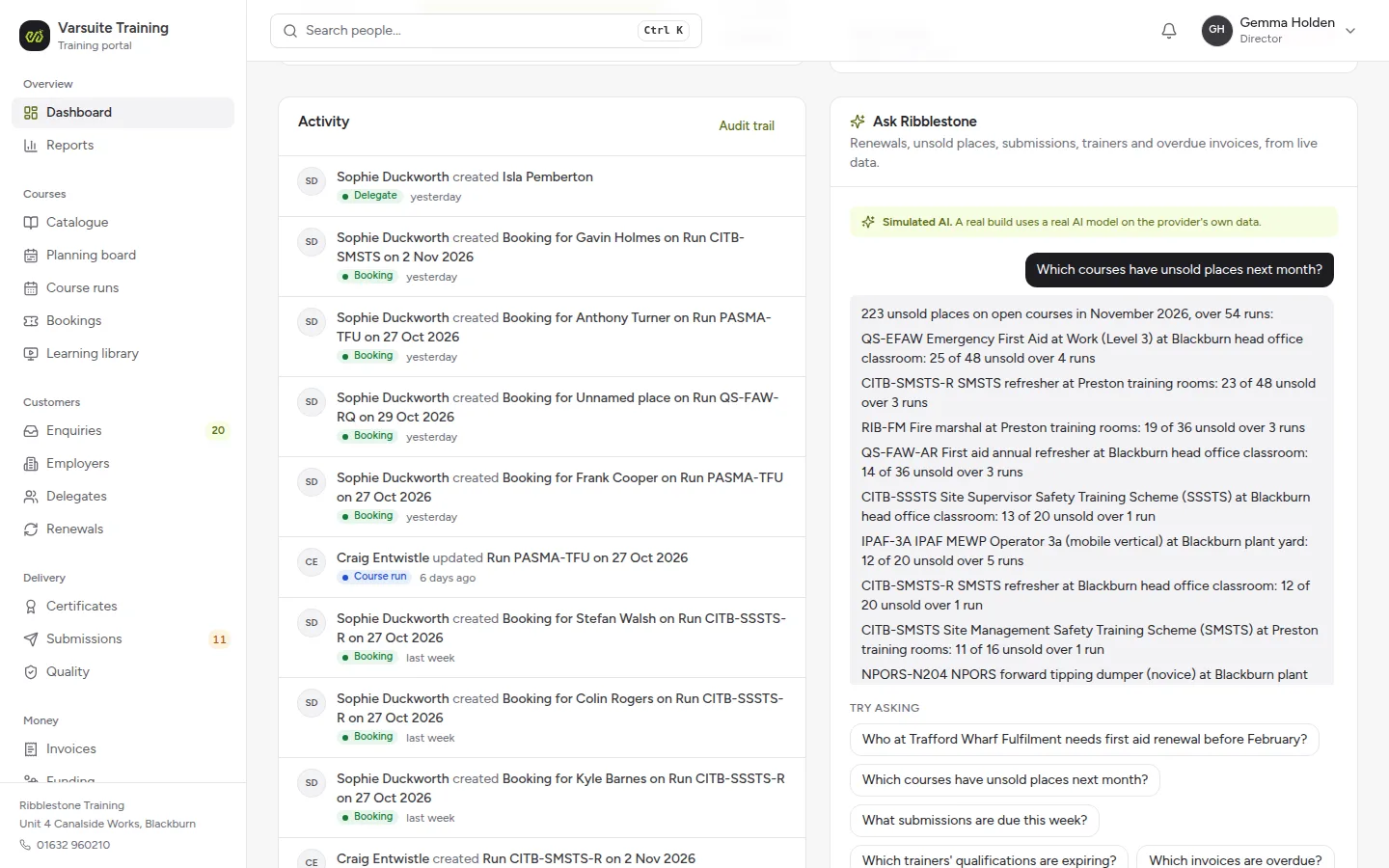
Ask Ribblestone, simulated AI on the dashboard
The director asks which courses have unsold places next month and gets an answer from the live data, run by run. It is labelled Simulated AI: a real build uses a real model on your own data.
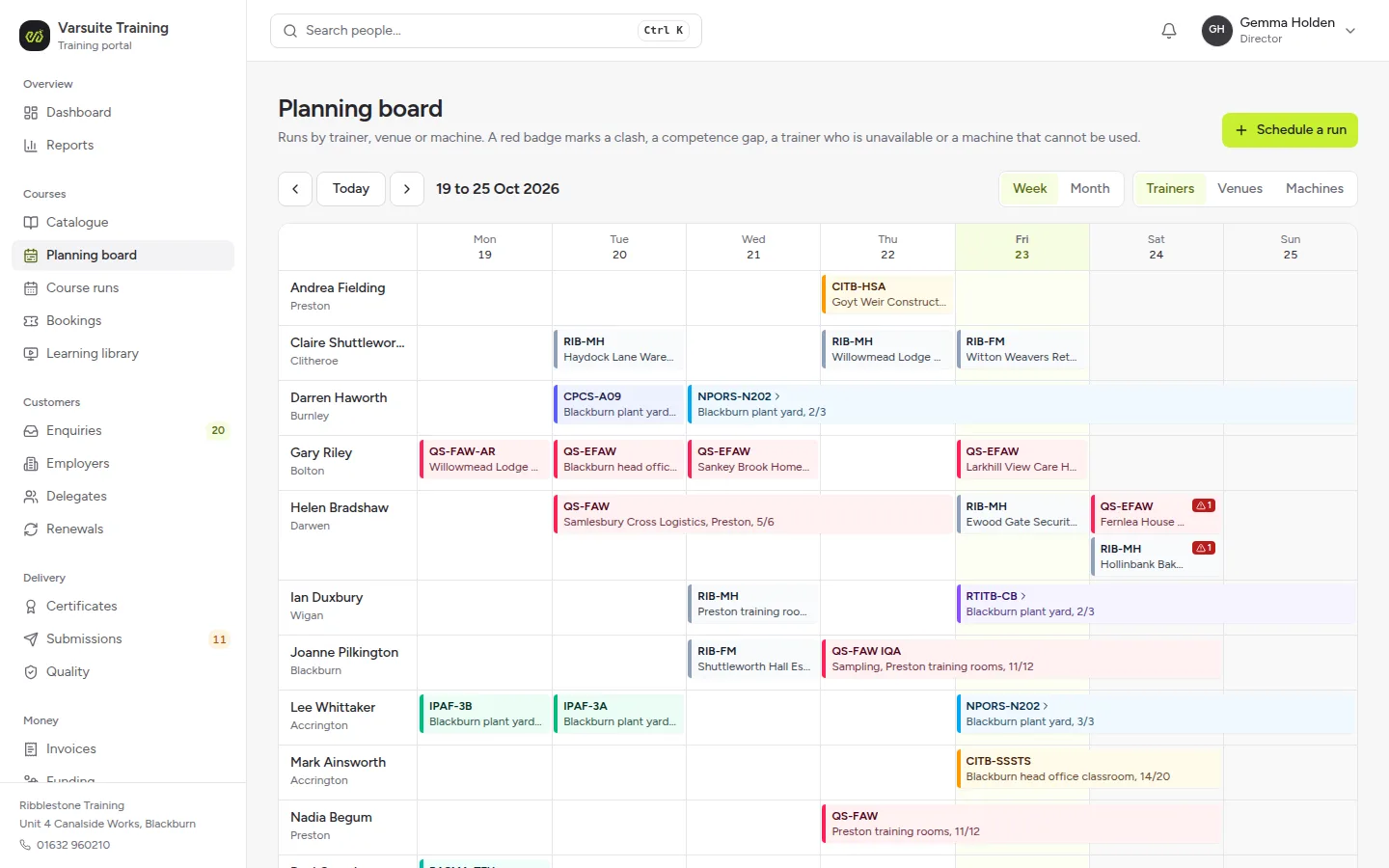
A planning board with clashes flagged
Courses by trainer, venue or machine across the week or the month. A red badge marks a clash, a competence gap, a trainer who is unavailable or a machine that cannot be used.
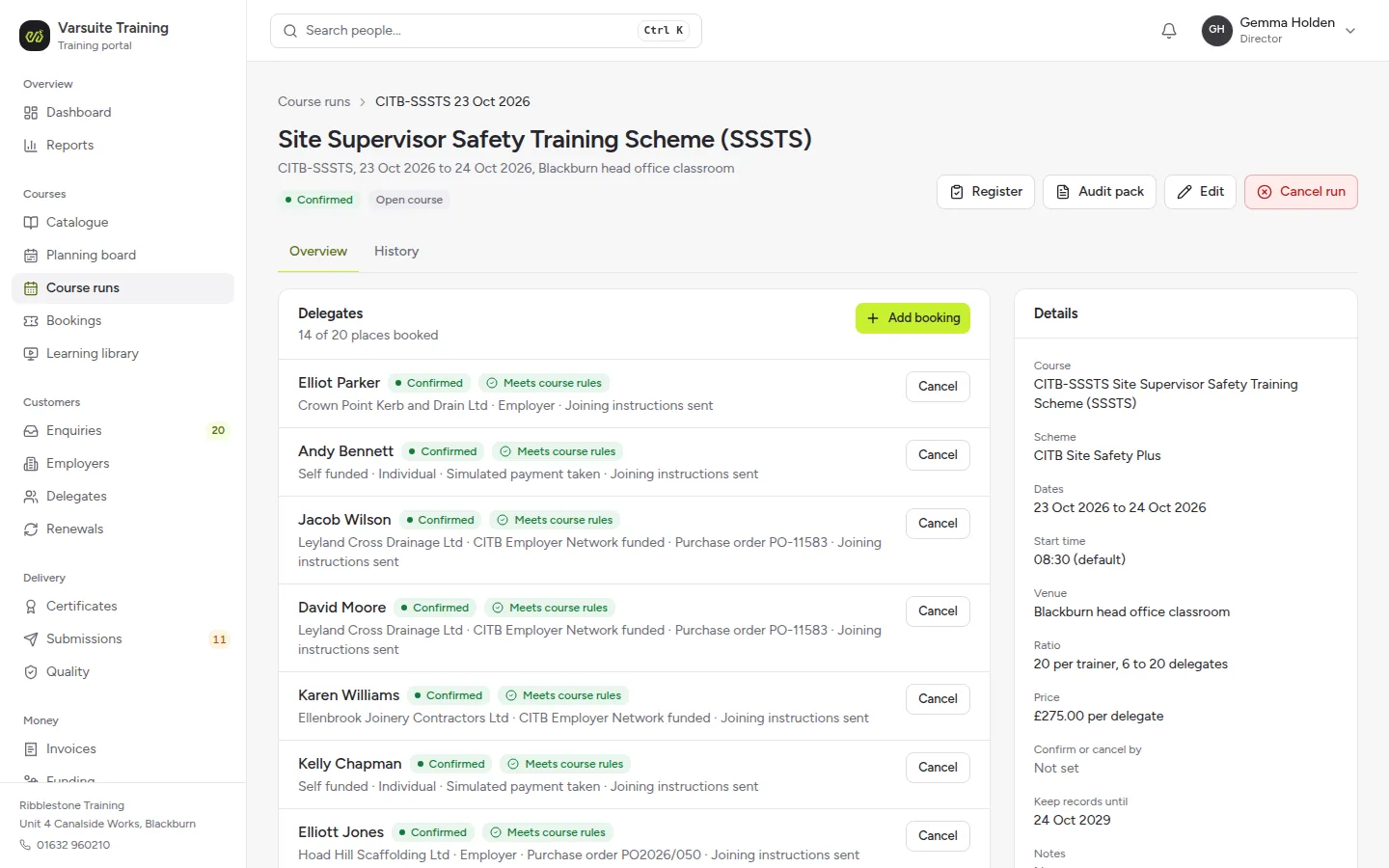
Every booking checked against the course rules
Each delegate on a course shows whether they meet the course rules, who is paying, any purchase order and CITB Employer Network funding, and whether their joining instructions have gone.
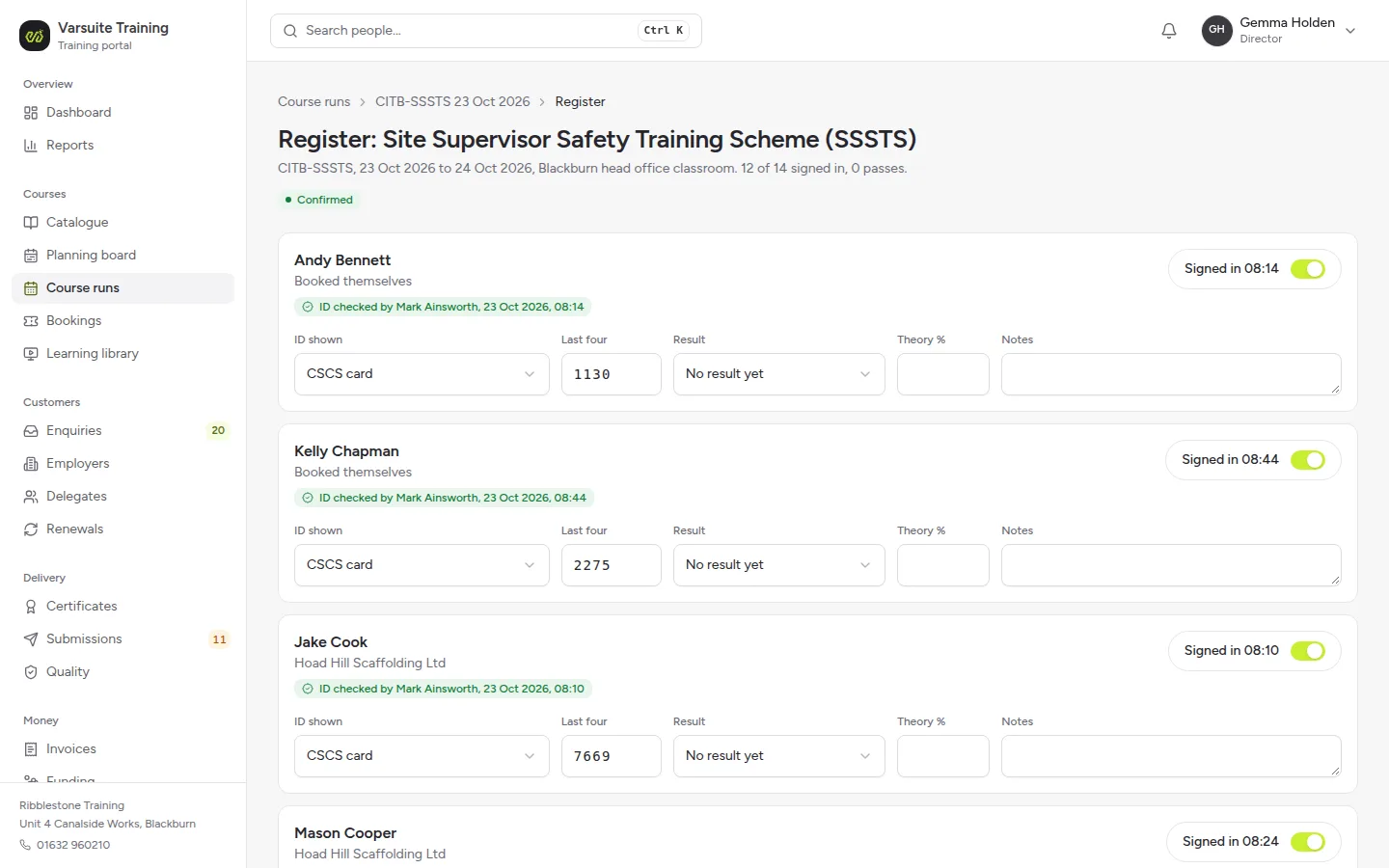
The register with ID checks and results
Sign in times, the ID shown and its last four characters, who checked it and when, then theory scores and results for each delegate. No scan is stored by default.
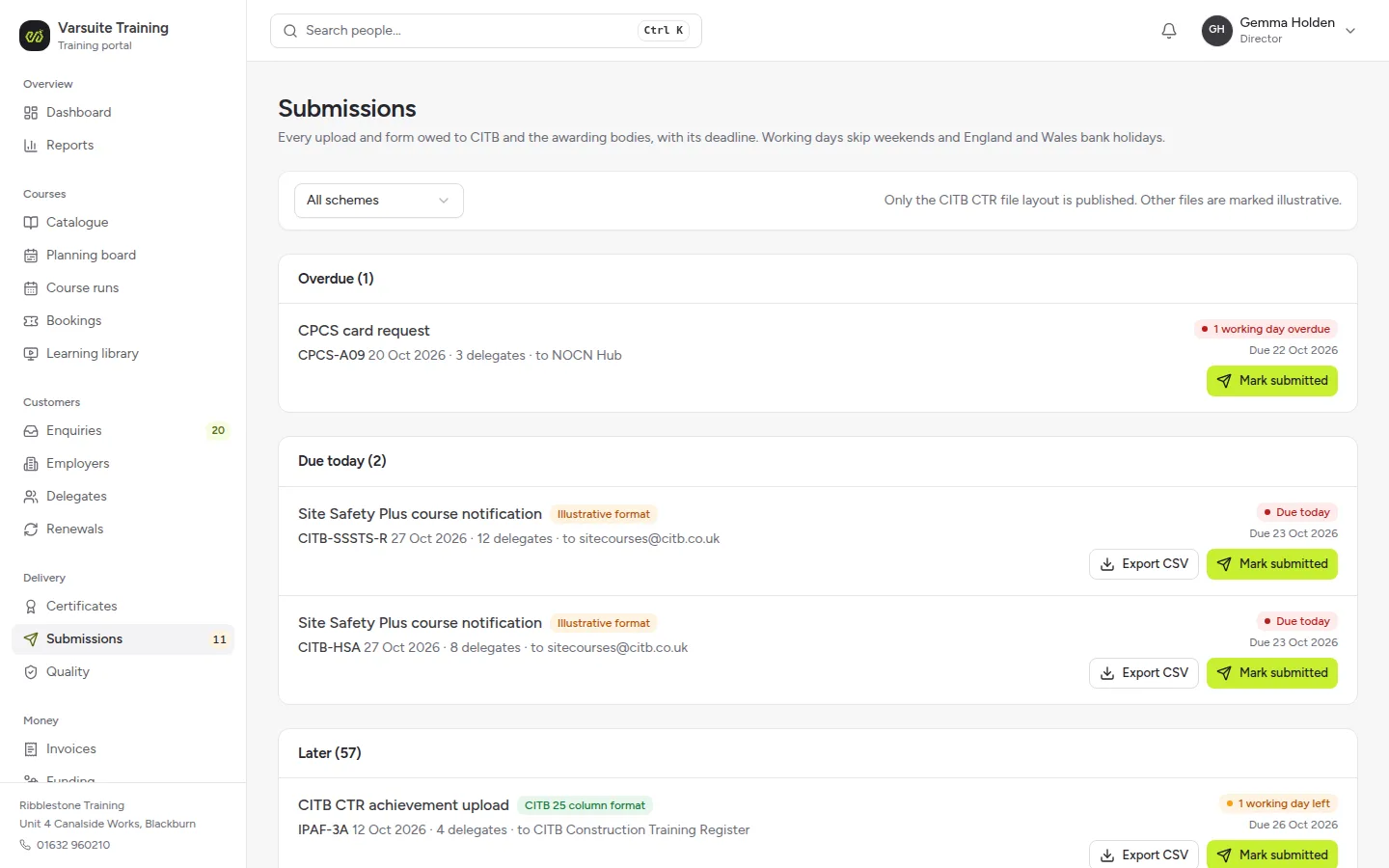
Every upload owed to CITB and the awarding bodies
One queue with a countdown in working days. The CITB achievement file follows CITB's published 25 column layout, and the others are marked as an illustrative format.
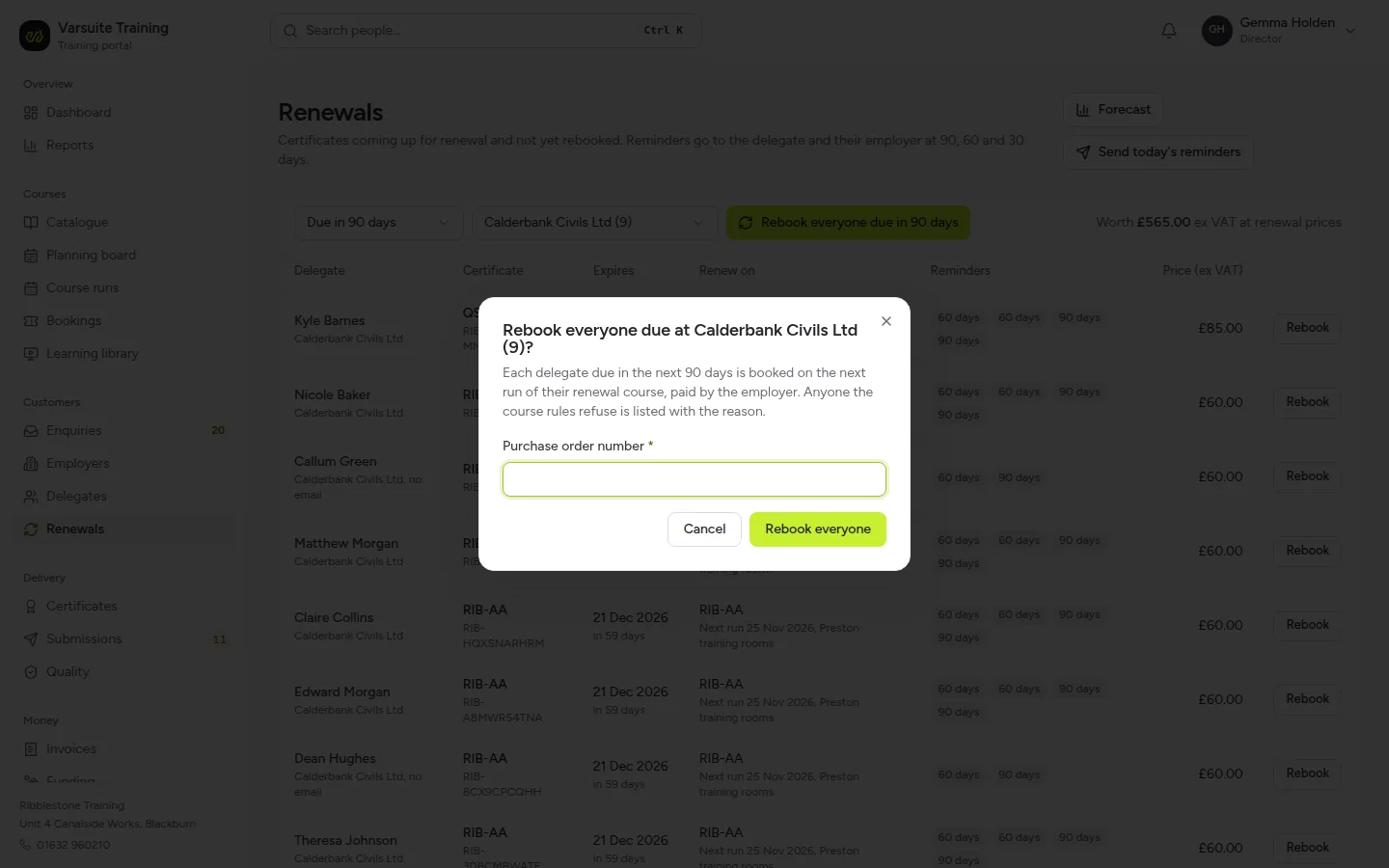
Renewals, and rebook everyone due in one go
Certificates due for renewal with the reminders sent at 90, 60 and 30 days. Choose an employer and every delegate due in the next 90 days goes on the next run of their renewal course, with anyone the course rules refuse named.
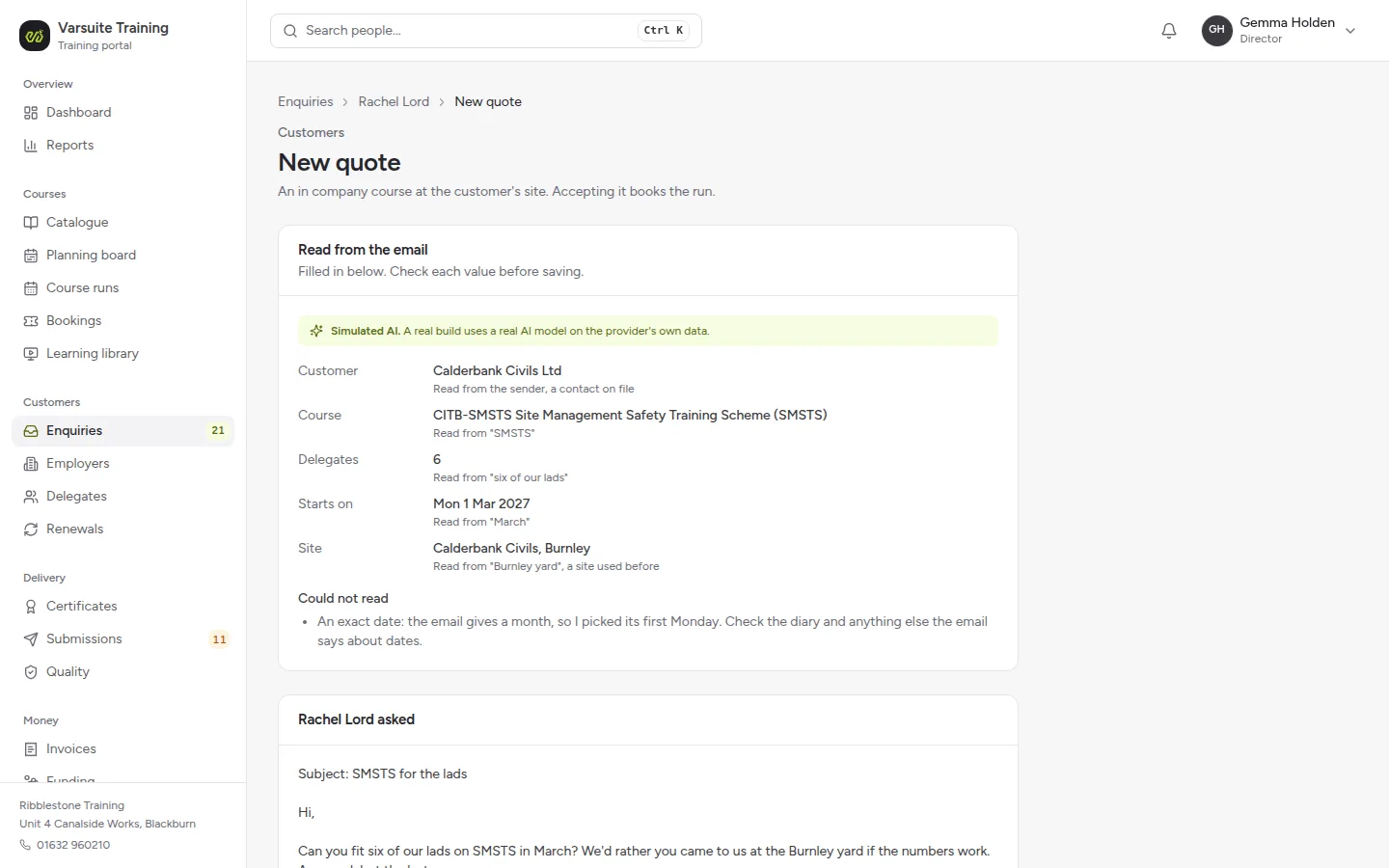
A quote drafted from an enquiry email
Send a test enquiry email and the system reads the customer, course, number of delegates, month and site from it, and says what it could not read. This is simulated AI and labelled as such.
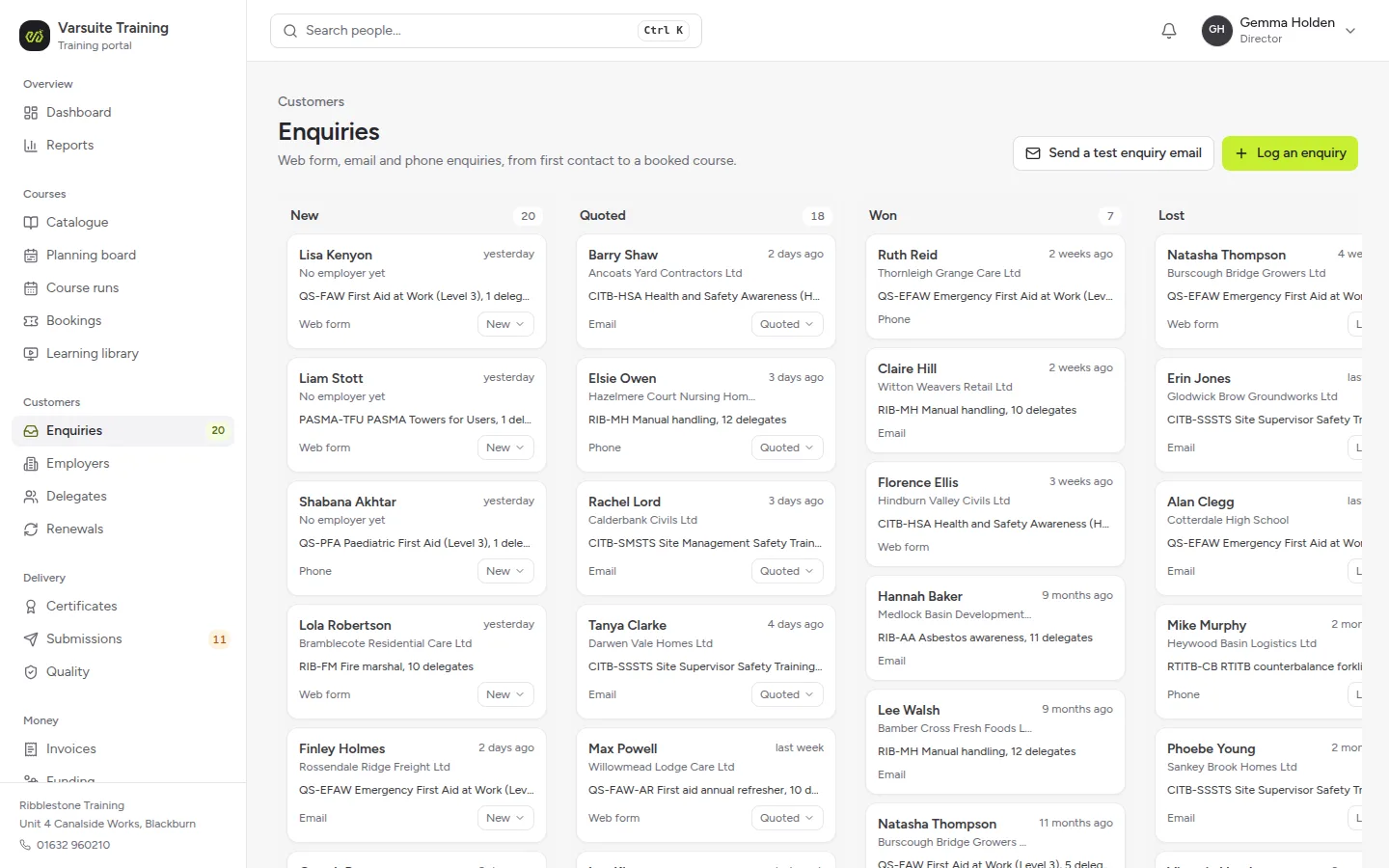
Enquiries from first contact to a booked course
Web form, email and phone enquiries on one board, from new to quoted, won or lost.
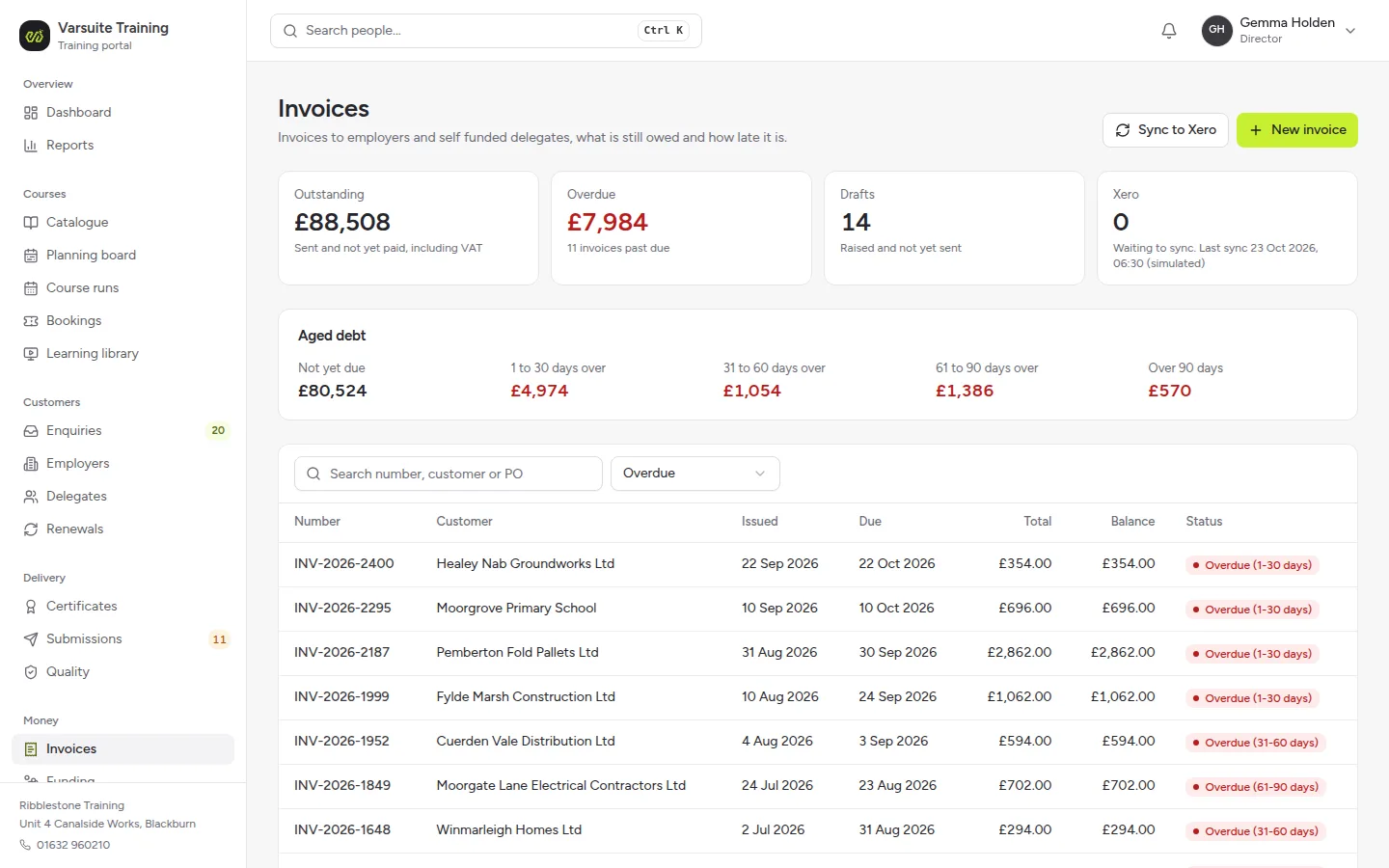
Invoices and credit control
What is outstanding and overdue, aged debt by bucket, drafts not yet sent and a simulated Xero sync, with every overdue invoice and how late it is.
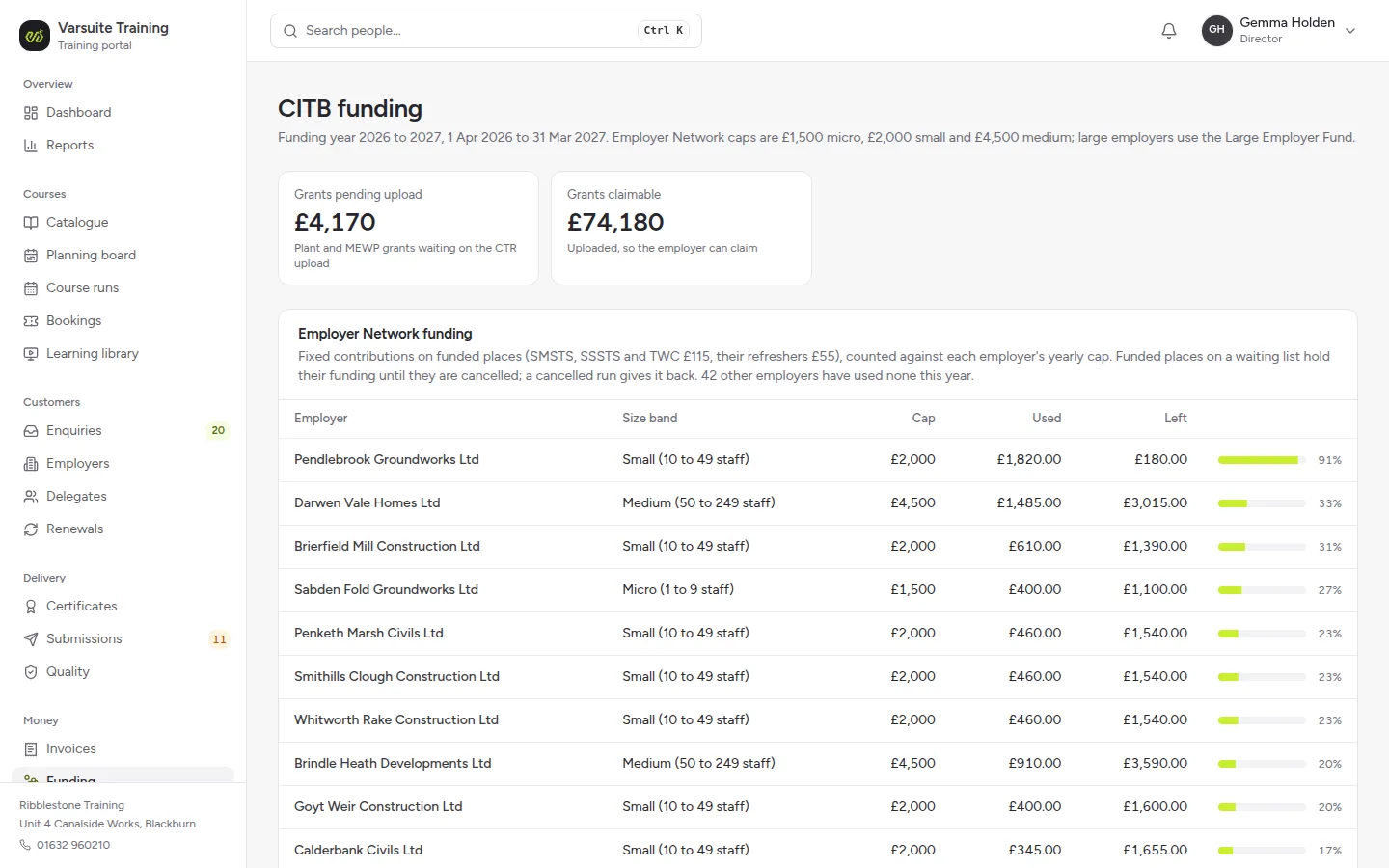
CITB funding for every employer
Each employer's Employer Network cap for the funding year, what it has used and what is left, with plant grants pending upload and grants the employer can claim.
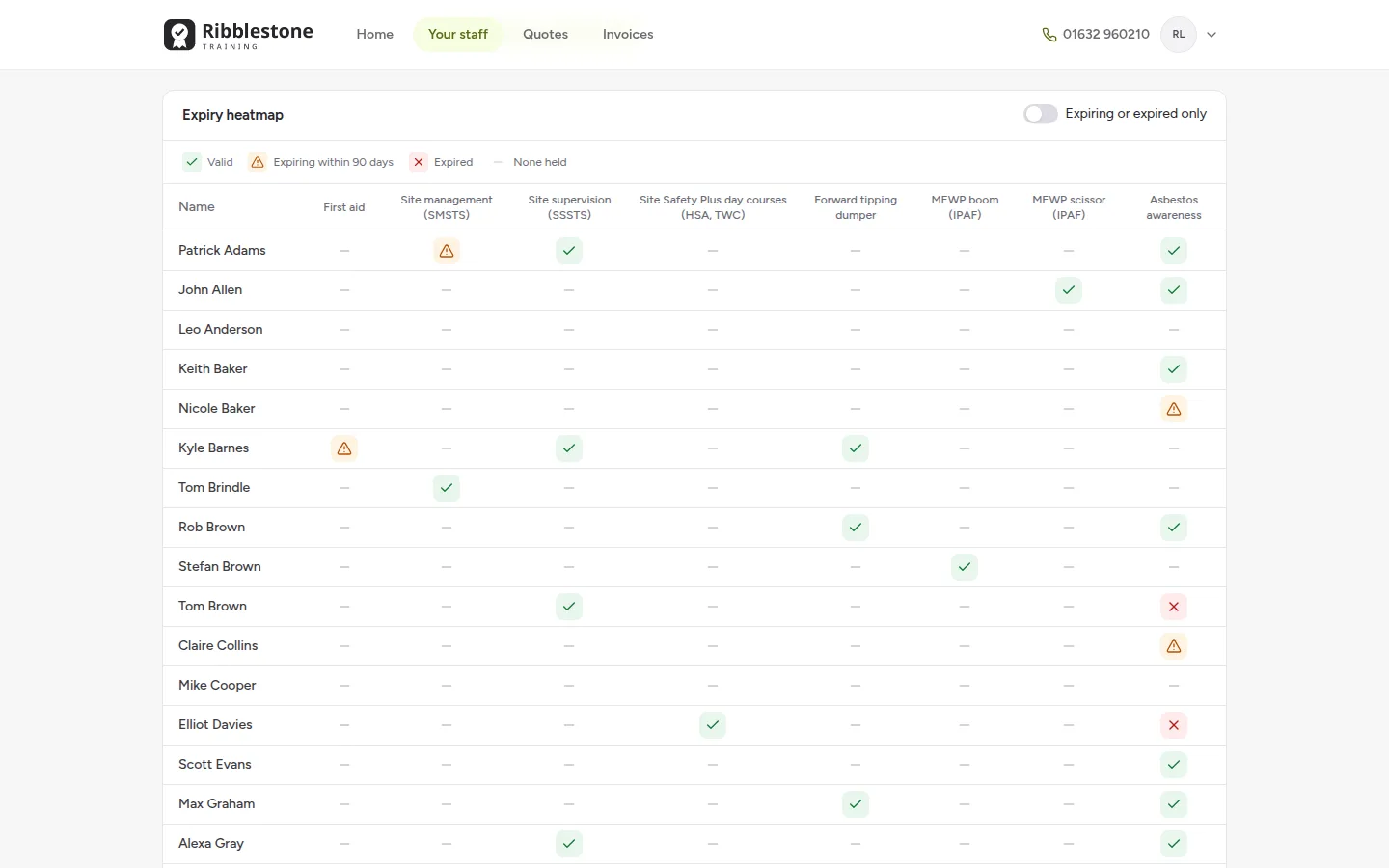
An expiry heatmap for each employer
The employer's HR or safety manager sees every member of staff against every discipline, valid, expiring within 90 days or expired, and can export a training matrix.
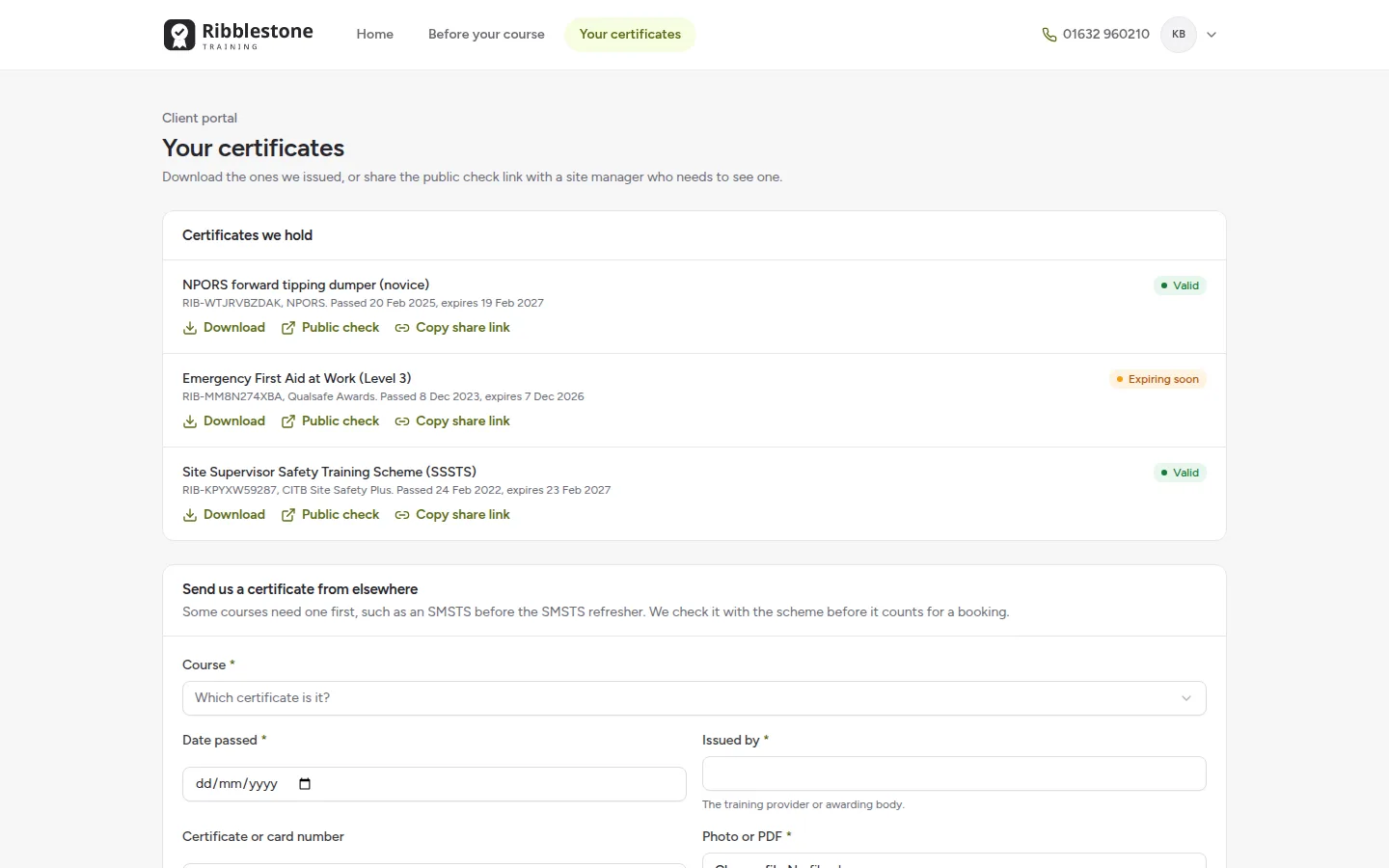
Certificates in the delegate portal
Delegates download the certificates you issued, open the public check or copy a share link for a site manager, and send in a certificate from elsewhere for your team to check.
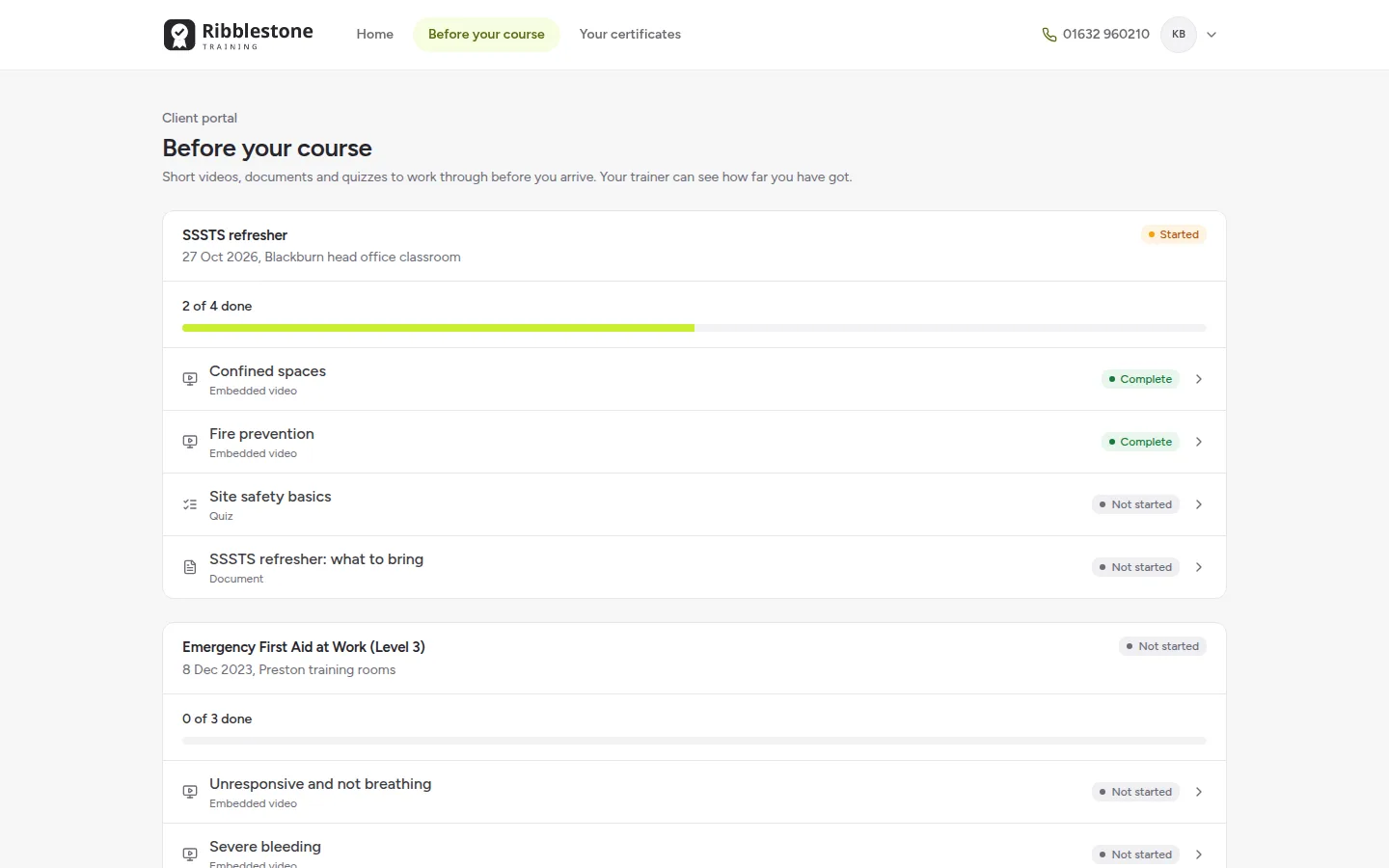
A learning library before the course
Short videos, documents and quizzes to work through before the course, with progress the trainer can see for each booking.
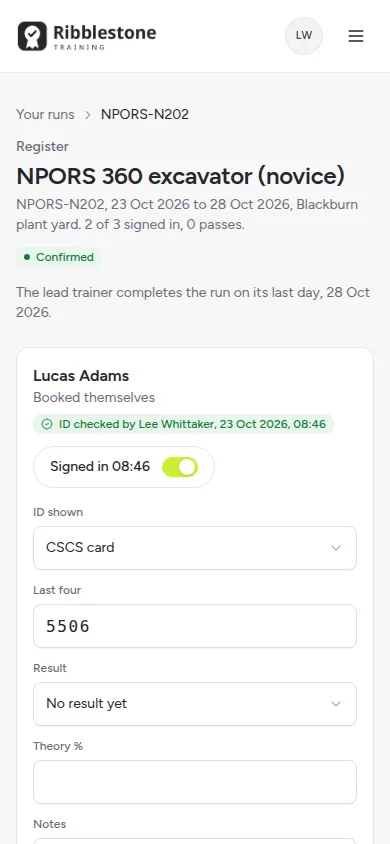
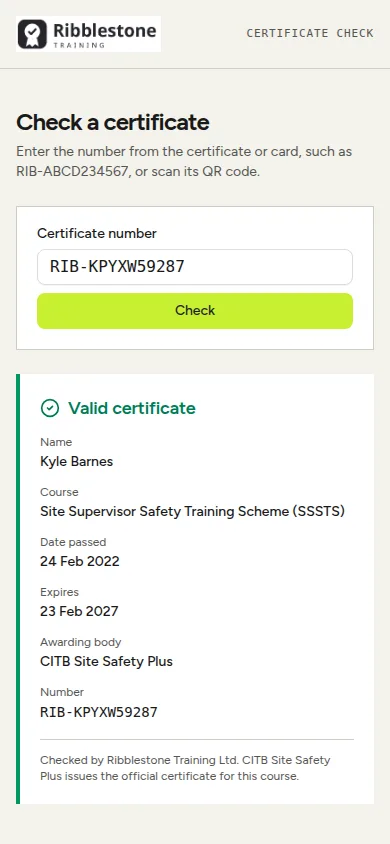
Registers on a tablet, certificates checked from a phone
Trainers take the register, log ID checks and record results on a tablet or phone. A site manager scans the QR code on a certificate and sees straight away whether it is valid, expired or revoked. Everything lands on the same records your office works from.
Questions training providers ask
- Is there a grace period when a first aid certificate expires?
- How long do construction training certificates last?
- CITB funding changes in 2026: what do training providers need to change?
- How do you check a training certificate or card is genuine?
- When do the two year CSCS Labourer cards start to expire?
- How much does training management software cost in the UK in 2026?
What is training provider software?
Training provider software runs a training business from the first enquiry to the renewal three or five years later: the quote, the course date, the trainer and venue, the booking, the register on the day, the results, the certificate, the uploads to CITB and the awarding bodies, the invoice and the reminder when the certificate is due to run out.
Most training management systems are rented. Many charge each month for every admin user, and some add a fee for every booking, so the bill grows with the business. Our answer on how much training management software costs in the UK lists the published prices, each with its source.
We take a different route. We build one system around your courses and your schemes, as a business system. The build is a one off cost of £1,000 to £10,000 depending on the size of your organisation. Hosting with us includes an SLA and unlimited changes within our fair use policy, for as long as you stay hosted. There is no fee per booking and no charge per admin user. The scheme rules that cause the real admin, such as uploads within 10 working days and refreshers that are only allowed while a certificate is in date, are built in rather than kept in someone's head.
How are bookings checked against scheme rules?
Every booking is checked against the course's rules and the delegate's record before it is taken. The rules come from the schemes themselves:
- SMSTS and SSSTS refreshers: CITB says the refresher must be taken before the certificate expires. In the demo, a refresher booked for someone whose SMSTS expired three days ago is refused, and the full course is offered instead
- IPAF PAL card renewals: IPAF says a PAL card must be renewed before it expires, with 60 logbook entries over the five years. A renewal with missing logbook entries is flagged
- First aid requalification: whether a recently expired First Aid at Work certificate can still go on the shorter requalification course depends on the awarding body, so it is a setting for each awarding body, and the default is no grace period. Our answer on first aid certificate grace periods explains why
- Minimum age: a delegate under the course's minimum age is refused
An override needs a reason, and it is written to the audit trail. Each course type in the catalogue holds its scheme, awarding body, duration, ratio, minimum and maximum numbers, validity, prerequisites, the trainer competence it needs and the equipment it uses, so the checks follow your own catalogue.
How does the deadline queue work for CITB and awarding body uploads?
When a course ends, the admin is not over. Results have to reach CITB and the awarding bodies on time, and some grants are only paid once they arrive:
- CITB Construction Training Register: achievements are uploaded within 10 working days, and there are two days to amend an upload before it is processed. For plant courses under the new standards, the employer's grant is only paid once the provider has uploaded the achievement
- Site Safety Plus: under CITB's Site Safety Plus scheme rules, the course notification form must reach CITB at least two working days before day one, or the course is not recognised, and every delegate's result, fails included, goes back within 10 working days of the last day
- Awarding bodies: Qualsafe results, NPORS and IPAF results and card applications each go through their own portal
The submissions queue in the demo holds every upload the provider owes, with a countdown: CTR achievements, Qualsafe results, NPORS and IPAF results and card applications. Each item checks the data, exports a CSV in the shape of that portal, and is ticked off with who uploaded it. A plant course grant shows as pending upload until it is done.
We found no public API for any of these bodies, so the system prepares, checks and exports each submission and tracks the deadline, and your team uploads it to the portal. Where a scheme publishes its file layout, such as CITB's 25 column achievement file, the export follows it. Where it does not, the demo labels the export as an illustrative format that a real build matches to your own portal template.
Certificates with a public QR check
Certificates for the courses you issue yourself, such as fire marshal, manual handling and asbestos awareness, are produced as PDFs with your logo. Awarding body certificates are attached to the delegate's record, so everything a delegate holds is in one place.
Each certificate has a number that cannot be guessed and a QR code. Anyone who scans it, such as a site manager at the gate, sees a page that says whether it is valid, expired or revoked, with the name, the course, the date and the provider and nothing else. Every check is logged, and the check pages are kept out of search engines.
Fake cards are a known problem, and CITB publishes guidance on fraudulent construction scheme cards. Scheme cards have their own checkers, which our answer on how to check a training certificate or card is genuine lists. A provider's own QR check covers the certificates that no scheme checker can see.
Renewals: turning expiry dates into bookings
Every certificate gets an expiry date from its scheme's rule: three years for First Aid at Work according to HSE, five years for SMSTS and SSSTS under the Site Safety Plus rules and five years for an IPAF PAL card. The renewals engine:
- reminds the delegate and their employer 90, 60 and 30 days before expiry
- nudges first aiders about the annual refresher training that HSE strongly recommends
- rebooks a delegate onto a suitable course in one click
- forecasts renewal revenue by month in pounds, with how many reminders became bookings
So the director can see how many certificates expire next quarter and what they are worth if they are rebooked. Our answer on how long construction training certificates last has the full table, each row with its source.
An employer portal for your customers
Employers who book with you get their own portal. The HR or safety manager sees their staff list across every discipline, an expiry heatmap that shows who needs what and when, and every certificate ready to download. They can rebook everyone due in the next 90 days in one go, accept a quote for an in-company course, see their invoices and export a training matrix.
That makes the certificates you already issue a reason for employers to stay with you. Portals like this are something we build for many kinds of business, as our customer portals page explains.
Trainer tablets, competence and LOLER on training machines
Trainers run the day from a tablet or a phone: the register, sign in, the ID check, theory and practical results, no shows and notes. The ID check is logged as the document type, its last four characters, who checked it and when, and no scan is stored by default.
The planning board shows courses by trainer, venue and machine for the week or the month, with clash checks on all three. It also checks competence: the trainer holds the category, their registration is in date, and the IQA is not the trainer, because Qualsafe requires at least one trainer and one IQA for each qualification, who cannot be the same person. Employed trainers and freelance associates sit side by side, with day rates, availability and registrations that warn before they expire.
Training machines and lifting accessories carry their LOLER dates. HSE says lifting equipment needs a thorough examination every 6 months if it lifts people and every 12 months otherwise, so a training forklift or MEWP that is overdue cannot be allocated to a course.
CITB funding tracked for every employer
Since 8 January 2026, CITB has funded SMSTS, SSSTS and the other short health and safety courses on its list through Employer Networks rather than its short course grant (CITB transition workbook). From 1 April 2026 each employer has a cap by size: £1,500 for a micro employer, £2,000 for a small one and £4,500 for a medium one in 2026 to 2027 (CITB funding update). SMSTS and SSSTS attract a fixed contribution of £115, and their refreshers £55 (CITB Employer Networks course list). Plant courses under the new standards attract a grant by tier, from £250 to £880 depending on the tier and whether the operator is a novice or experienced (CITB plant standards and grants).
The funding tracker in the demo shows, for each employer, its size band, the cap used and left, the Employer Network contribution on each course, the plant grant tier and any grant still pending upload.
Course profitability sits alongside it, setting the trainer day rate, the venue, books and the awarding body and scheme fees against the income for each course and each course type. Those fees include Qualsafe's £10 First Aid at Work registration and the £39 Site Safety Plus delegate fee. Our answer on CITB funding changes in 2026 covers what providers need to change.
Try our live training provider software demo
The quickest way to judge training provider software is to use it, so we built a working provider you can try at training-demo.varsuite.co.uk.
The demo is Ribblestone Training Ltd, a fictional provider with its head office and plant yard in Blackburn, a classroom venue in Preston and courses on site across Lancashire, Greater Manchester and Cumbria. It runs first aid, construction site safety and plant and access courses with 14 trainers and around 120 employer accounts, with 13 months of history and 10 weeks of courses ahead. You can sign in as:
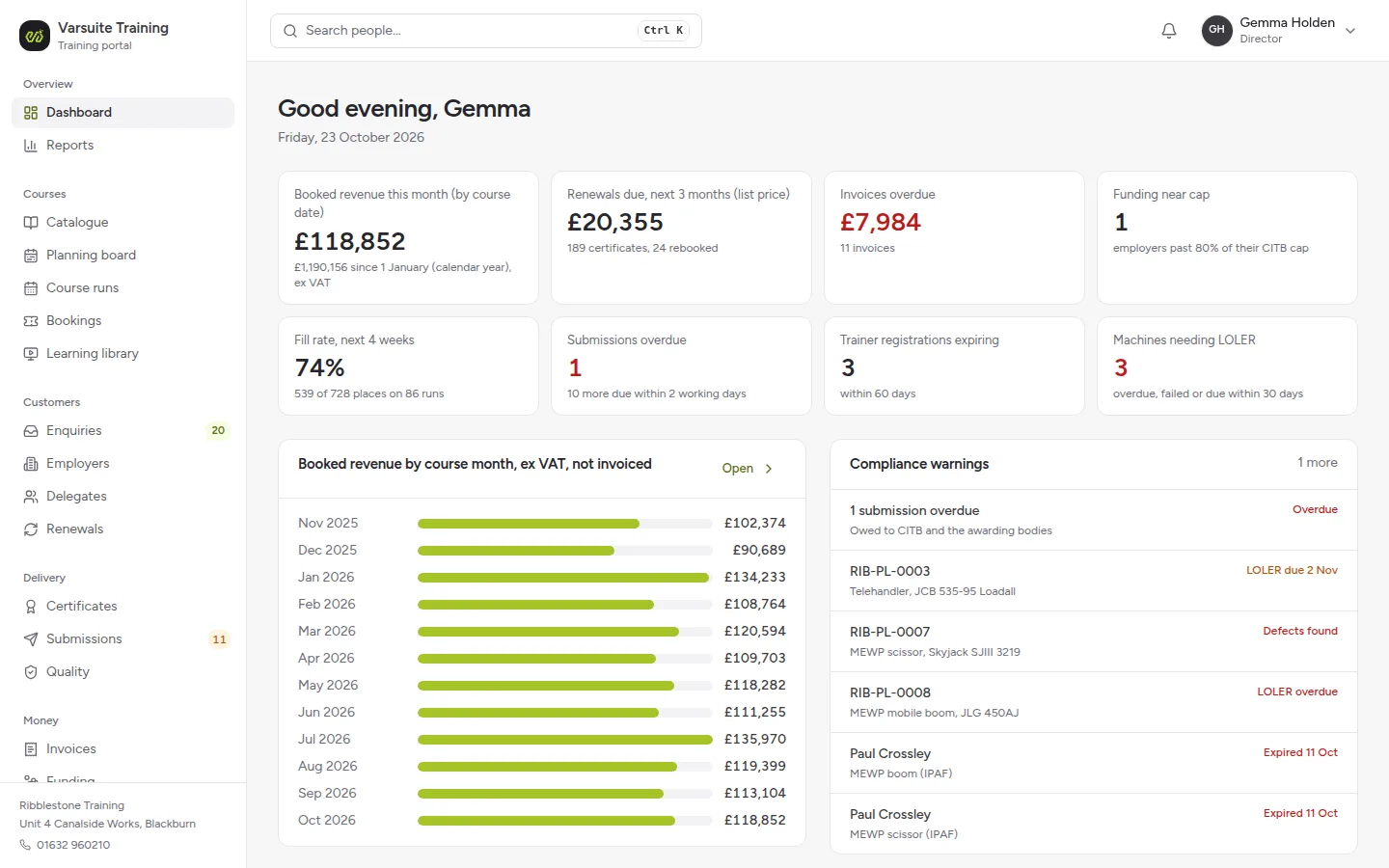
- the director, with revenue, fill rate, the renewals pipeline and compliance warnings on the dashboard
- the training manager, on the planning board with a trainer clash and an under filled course to decide on
- a bookings officer, with the bookings inbox and the submissions queue, and a CTR upload due tomorrow
- accounts and funding, with invoices, credit control and the CITB funding tracker
- a trainer, a freelance plant and IPAF instructor, with his day on a tablet: the register, ID checks and results
- an employer, the HR and safety manager at a groundworks contractor, with 46 staff, an expiry heatmap and nine certificates due
- a delegate, a groundworker booked on an SSSTS refresher, with a pre-course form to finish and his certificates
Every visitor gets their own private copy, with guided tours. Sign in is protected by a second step, with the demo code shown on screen. Card payments, the Xero sync and text messages are simulated and labelled, an enquiry email arrives through a Send a test enquiry email button, and every email the system sends lands in an outbox you can read rather than being sent.
Three features show what AI could do, and each is labelled Simulated AI on screen: drafting a quote from an enquiry email, reading an uploaded certificate for your team to confirm, and Ask Ribblestone, which answers questions such as which courses have unsold places next month from the demo's own data. In the demo they match patterns over the sample data and call no AI model. A real build uses a real model on your own data, within each person's permissions.
What does the training portal include?
The system is built from modules, and each provider switches on what it needs:
- Employer accounts: contacts, CITB levy number and size band, credit terms, purchase order rules, staff, bookings, certificates, invoices and a timeline
- Enquiries and quotes: web, email and phone enquiries on one board, and quotes for in-company courses with the ratio, trainer cost, awarding body fees, travel and margin, accepted from the employer portal
- Catalogue and planning board: scheme rules on every course type, and courses by trainer, venue and machine with clash and competence checks
- Courses: open and in-company, with places, a waiting list, minimum numbers with a date to confirm or cancel, joining instructions, a trainer pack and a kit list
- Bookings: individuals paying by card, employers by purchase order with names added later, and CITB Employer Network funded places
- Delegates: one record across every discipline, with the pre-course form, adjustments, health declarations seen only by the bookings team and the course's trainer, the ID check log and the certificate history
- Quality: IQA sampling plans, standardisation records, complaints and appeals, and an audit pack for each course in one download with its retention date. Qualsafe asks for learner records to be kept for 3 years and City & Guilds for at least 3 years after certification
- Submissions queue, certificates and renewals: as described above
- Invoices and payments: per booking or per course, purchase orders, credit terms, credit control, VAT and a Xero sync log
- Funding and profitability: the CITB funding tracker and profit for each course and course type
- Trainers, venues and training fleet: a competence matrix, availability, day rates and CPD, rooms with capacity, and machines and lifting accessories with LOLER dates and service history
- Learning library: pre-course videos, documents and short quizzes for delegates, with completion tracked for each booking, and trainer packs that only trainers qualified for the course can open
- Kit and books stock: first aid manuals, manikins and consumables by venue, issued to each course, with reorder levels
- Delegate portal: the pre-course form, adjustments, uploading a prerequisite certificate, their own certificates with a share link, and a route to raise a data protection complaint, which organisations have had to offer since 19 June 2026
- Trainer portal: their courses, registers, kit lists, their own registrations, availability and CPD
- Dashboard and reports: fill rate, trainer utilisation, revenue by discipline and customer, the renewals pipeline, submission timeliness, funding used and profitability over 13 months
How we tailor it to your training business
This is not off the shelf software that you bend your business to fit. Everything in the demo is a starting point. We walk through it with your team, note what you would change, then shape the system around the answers:
- your courses, awarding bodies and schemes
- your venues, trainers and training fleet
- your prices, funding, invoicing and accounts package
- your certificates, joining instructions, quotes and emails, in your branding
- your employer, delegate and trainer portals
- your own rules, such as the grace period each awarding body allows
The scheme rules in the demo follow the CITB, awarding body and HSE sources as they stood in October 2026. The demo is a sample provider, so check anything you are unsure of with the scheme or the awarding body.
Training Provider Software, answered.
No. The build is a one off cost of £1,000 to £10,000 depending on the size of your organisation. Hosting with Varsuite includes an SLA and unlimited changes within our fair use policy, for as long as you stay hosted. There is no fee for each booking and no charge for each admin user, so the cost does not rise as you take more bookings or add staff.
On payment in full our terms give you a licence to use it for your own business, and your quote can make that an exclusive licence or a full assignment of the rights. It is built for you rather than rented from a shared platform.
Yes. Open training-demo.varsuite.co.uk, fill in a short form and you get your own private copy of a sample training provider. You can sign in as the director, the training manager, a bookings officer, accounts, a trainer, an employer or a delegate.
Yes. Each booking is checked against the course's rules and the delegate's record. An SMSTS refresher for someone whose SMSTS has expired is refused and the full course is offered instead. An override needs a reason and is recorded in the audit trail.
It prepares and checks each submission, exports a CSV in the shape of the portal and tracks the deadline, and your team uploads it. We found no public API for CITB or the awarding bodies. Where a file layout is published, such as CITB's achievement file, the export follows it.
Yes. Every CTR achievement, Qualsafe result, NPORS or IPAF result and card application sits in a submissions queue with a countdown, and is ticked off with who uploaded it. A plant course grant shows as pending until the upload is done.
Each certificate has a number that cannot be guessed and a QR code. Scanning it shows whether the certificate is valid, expired or revoked, with the name, course, date and provider only, and every check is logged.
Yes. The employer portal shows every member of staff across all disciplines, an expiry heatmap and certificates to download. Employers can rebook everyone due in the next 90 days, accept quotes, see invoices and export a training matrix.
Yes. Delegates and their employers are reminded 90, 60 and 30 days before a certificate expires, first aiders get a nudge about the annual refresher, and a delegate can be rebooked in one click. In the demo the reminders land in an outbox rather than being sent.
Yes. For each employer it shows the size band, the Employer Network cap used and left, the contribution on each course, such as £115 for SMSTS, the plant grant tier and any grant pending upload. The caps for 2026 to 2027 are £1,500, £2,000 and £4,500.
Yes. Machines and lifting accessories carry their LOLER examination dates, 6 months for equipment that lifts people and 12 months otherwise, and a machine that is overdue cannot be allocated to a course. The planning board checks machine clashes as well as trainers and venues.
Yes. Trainers take the register, log ID checks and record theory and practical results from a tablet or a phone. The ID check records the document type, its last four characters, who checked it and when, without storing a scan by default.
Yes, tailoring is the point. We set it up with your courses, awarding bodies, venues, trainers, prices and branding, connect your accounts package and switch off anything you do not need.
No. The demo is a sample training provider that follows the CITB, awarding body and HSE sources as they stood in October 2026. It helps your team apply the rules consistently, but check anything you are unsure of with the scheme or awarding body.
Explore related services
Booking & Scheduling Systems
We build bespoke booking and scheduling systems for appointments, classes, rooms and equipment hire, with depo...
Learn moreCustomer & Member Portals
We build secure customer and member portals where people log in to see their documents, orders, invoices and s...
Learn moreBusiness Systems
We build CRMs, automations and back-office workflows that connect the software you already use, so your team s...
Learn moreLetting Agent Software
We build letting agent software for UK letting agents and portfolio landlords: the lettings pipeline, periodic...
Learn moreSee your training business in it, then make it yours
Try the live training provider software demo, then book a call and we will walk through what we would tailor for your courses and schemes.